Tuesday, February 23, 2010

Attention: SIR, here’s another little Lotus Notes freebie for you!

Sir is a very simple Lotus Notes freeware mini-application for surfacing Notes database property values, such as Replica ID, that are frequently used by Notes developers and administrators.

image

SIR is predicated on the same design principle as my previous freeware contribution Simple Signer (available here or here). That is, SIR is deliberately designed to be “dead simple” to understand “dead easy” and use. (Worth striving for, no?)

Call it “single-minded” or “simplistic” if you like, you won’t ruffle my feathers, and I reckon that SIR will be  useful nevertheless. Sure, you can get this information from other places like the Infobox or Design Synopsis, but I was seeking a somewhat different interface.

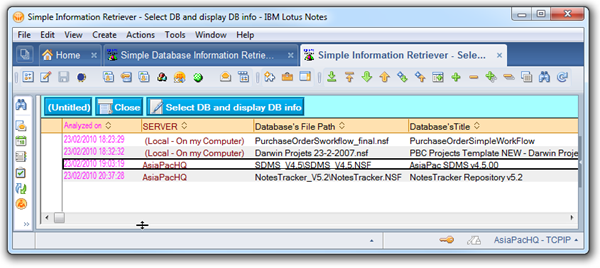
Here’s what SIR looks like once you’ve selected a database and then clicked the long pink “Extract and display” button:

image

Nothing too sophisticated, nothing too complicated. You display the information and then can copy-and-paste it into your LotusScript or other code or use it in Domino Administrator, or whatever else you need to do with such database property values.

If you want to, you can optionally save the information in a series of time-stamped documents for subsequent reference and retrieval:

image

SIR Version 1.0 can be downloaded from here or here 

And note that its design is not hidden/ You’re welcome to add extra code to retrieve additional database properties that you need.  (Only basic LotusScript skills are required for this.)

Once again, it’s FREE, so enjoy! Oh yes, I should add that SIR was cobbled together in a few hours this afternoon, so please be kind and regard it as a beta for the moment. Be sure to send  me prompt feedback about any bugs or usability issues – and let me know whether you think it was worth the effort!

Thursday, February 18, 2010

[UPDATED] Lotus Notes/FX 8.5.1 to Lotus Word Pro field exchange failure -- solved!

Last year I asked for assistance from the Lotus Notes community, on behalf of a client, relating to Notes/FX failure to exchange field data with Lotus Word Pro documents, see: http://notestoneunturned.blogspot.com/2009/08/does-notesfx-work-properly-with-lotus.html

Notes/FX – where “FX” represents “Field Exchange” -- is not something that many Notes users know about. It’s a nifty implementation of Windows OLE and you can read about it by searching for “Notes/FX” in the Domino Designer help database.

My client had been using it since the mid-1990s to send Notes document field data to Lotus Word Pro template documents and then print them for mailing off to their customers.

Notes/FX to Word Pro field exchange worked efficiently and unobtrusively all these years, until the customer decided to upgrade from Notes/Domino 6.5 to the exciting 8.5.1 release. He found during testing that everything except the Notes/FX field exchange worked seamlessly.

The field exchange simply would not operate. The Word Pro templates opened with their “click here” fields blank, instead of receiving data passed via OLE from the corresponding fields in the parent Notes document.

I did fiddle around with Windows registry settings, as suggested by respondents to my blog post, but didn’t seem to get anywhere. In the meantime, I started investigating other possible Notes to word processing document data transfer solutions.

These included Notes to OpenOffice, and after that (once Notes 8.5.1 was officially released towards the end of 2009) Notes to Lotus Symphony via the new LotusScript API. In short, these were fine for field exchange in one or two cases, but required quite a few lines of LotusScript to emulate what notes/FX was doing.

Particularly burdensome and worrying was the need to do hard-coding of field names (lots and lots of them). Of course, hard-coding of field names is quite satisfactory in a simple demonstration application which typically has only five or ten example fields (customer name, address, phone number, etc). But it’s intolerable for a production database like my client’s, which uses more than twenty such document templates, with some of them having dozens of fields to be exchanged.

As I said, I had originally fiddled with Windows registry settings and gotten nowhere back then. But for some reason, this morning I decided to have another quick go at it before giving up entirely on Notes/FX and starting into a very long haul with LotusScript and the Lotus Symphony API.

So I fired up the Windows registry editor (regedit.exe) and made the following change to the hive key (as highlighted in green):

HKEY_LOCAL_MACHINE\SOFTWARE\Classes\Notes.Link\Shell\Open\Command

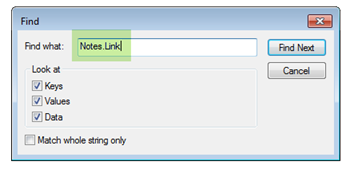
TIP - a quick way to get to the Notes.Link section of the registry is to do a registry search on “Notes.Link” -- and you’ll need to hit F3 (Find Next) several times until you get there:image
And this is where you should finish up (click to view a larger image):

Lotus_NotesFX_word_pro_registry_fix_for_Notes_851

Highlighted in green is the hive key, and in pink is the command setting for Lotus Word Pro in Notes 8.5.1 (and for all I know this might apply right back to Notes 8.0), as highlighted in pink:

"C:\Notes851\notes.exe" -defini "%1"

The fix is very simple, in my case just the removal of all four double-quotes, finishing up (as highlighted in yellow) with:

C:\Notes851\notes.exe -defini %1

Once this simple Windows registry change was accomplished, the Notes/FX OLE data exchange from Notes fields to Word Pro fields worked properly again, what a relief!

HOWEVER… As is often the case, there’s a catch that makes this turn out not to be a universal solution. It will not succeed for most Notes 8 installations, which typically would be something like this:

"C:\Program Files\IBM\Lotus\Notes\notes.exe" -defini "%1"

And now you’re asking why this is so, aren’t you? Purely by empirical testing I discovered that you cannot have blanks in any of the folder names -- as between “Program” and “Files” (curse you again for this, Microsoft).

The presence of spaces is probably the reason for the double quotes being placed in the hive key for the Notes.Link registry entry, but apparently IBM has slipped up somehow in going from Notes 7 to Notes 8. It should be a very simple fix, and I hope they do it soon (Notes 8.5.2 would be nice).

In summary, if you’re one of the few Notes sites still using Notes/FX, you’ll need to install Notes 8 in a folder hierarchy that doesn’t contain any blanks, and also carry out the above simple registry change (which could be automated by scripting, I suppose).

Well, at long last I have a solution for my long-suffering client. Arrived at by chance or my twisted thinking and persistence perhaps, all the same I reckon that it’s a satisfactory workaround and some of you should be able to make use of it too.

Keep an eye on this post in case there are any corrections or updates after I liaise with IBM Support.

UPDATE #1 [19 February 2010]
Initial feedback from IBM Support was as follows:

Cause
----------------------------------------------------------------------
This parameter is used to prevent malicious URLs to launch Notes via  Windows registry by having an "=\\evilhost\notes.ini" on the command line.
----------------------------------------------------------------------
 
/defini %1 is used to provide an alternative Notes.ini file. If you replace this parameter you should not loose functionality.
 
"-defini %1" seems to be the best way to use this parameter. There has been issues using "/defini" as third party software like SmartSuite had troubles parsing this string.
----------------------------------------------------------------------

Aha, it’s the old “blame third party software” caper! Rather amusing, since in this case the third party is the same as the first party, so it’s the right hand smacking the left hand! Anyway, I’m not quite sure what will happen next. Will they (the Lotus SmartSuite team via IBM Support) get back to me with further advice as to what I should do for my client? Will they provide a fix so that this parameter parsing trouble gets resolved and Notes/FX works properly again for Lotus Word Pro? … Time will tell.

UPDATE #2 [22 February 2010]
My client has confirmed that the registry change works. He is able to use all his Notes/FX to Lotus Word Pro links, and is at last able to forge ahead with his delayed Notes Client 8.5.1 installation.

He decided to install Notes 8.5.1 in the C:\Lotus\Notes directory (remember, the golden rule is to avoid any spaces in the path string).

I provided him with a .reg file so that he doesn’t have to manually edit the Windows registry, the contents of which are as follows. In case of word wrap in this post, note that there are four lines, the second line being blank.

REGEDIT4

[HKEY_LOCAL_MACHINE\SOFTWARE\Classes\Notes.link\Shell\open\command]
@="C:\\Lotus\\Notes\\notes.exe -defini %1"

Save these lines with a file name such as NotesLink_command_adjust.reg and just double-click to apply the registry fix. Naturally, if you use some other folder than in this example, amend the fourth line being careful to use double backslashes for each single backslash in the path string. (Read more about such files at http://support.microsoft.com/kb/310516)

Wednesday, February 10, 2010

Spotty line numbering in Lotus Domino Designer 8.5.1

Line numbering is one of the nice features of Domino Designer 8.5.1, but its availability is rather spotty, so here’s a “heads up” (just for the record, as they say).

I’m still settling in to using this Eclipse-based IDE, and really like being able to turn on line numbering, from within the preferences for Domino Designer, thus:

image

Then suppose that you’re editing an agent, as in Figure (1), which is for a LotusScript agent (the same works for Java agents):

DDE_851_line_numbering_2_of_2_Agent

You simply right-click just near the left edge of the programmer’s pane and select “Show line number” in the context menu (as highlighted in green). Happiness and smiles all round!

Then I moved on to updating the code in an Action Bar button, and after four or five fruitless minutes found that (even though it’s LotusScript code) you can’t turn on line numbering in this environment. As shown in Figure (2) below, the context menu is the same as in earlier DDE releases (no line numbering option):

DDE_851_line_numbering_1_of_2_Action

A pity, that’s inconsistency for you! … I hope it appears in a near-term future release of DDE.

Sunday, February 07, 2010

Proof of global warming ... Means exactly what? Your input needed.

If you're reckon that you're good at logical, clear thinking, then go and answer this very basic question over at my Basic Questions blog!

Monday, February 01, 2010

How to open new windows into the world of IBM Lotus Notes 8.5.1

A Lotus Notes Client feature that “went missing” in Release 8.0 and 8.5 was reintroduced in 8.5.1 and, oh boy, am I happy about it!

I’m talking about the “Open In New Window” feature. I have a particular interest in this, not only because it eases life for developers and power users but especially because it enhances the value of my NotesTracker toolkit (see here if that link is down).

The NotesTracker development toolkit enables detailed application-centric activity and compliance monitoring for virtually any Lotus Notes/Domino application (you only need have designer access rights to make a set of simple changes to the database’s design).

NotesTracker will track and report, for both Notes Client and Web Browser environments, on document actions (CRUD: Create/Read/Update/Delete, document pastes and mail-ins, button clicks, etc) -- plus usage of views and a few other things that are of some technical rather than application interest.

Customers use NotesTracker for such things as monitoring Domino Directory changes (person and group documents, server documents, etc), monitoring activities against mail databases for security/privacy intrusions, and the like. … Anything, really.

Anyhow,  with Notes 8.5.1 “Open In New Window” is back at last, built in to the Notes Client itself (as in Notes 7 and prior releases).

It also comes in the form of a new Formula Language command, for use in other places:

@Command( [OpenInNewWindow] )

This new command allows your formula language code to open a document from a view, folder, or calendar in a new window instead
of opening it within a new tab within Lotus Notes.

Further, I’ve also noticed that there’s a new “Open in New Window” system action in some of the IBM templates that you can copy and paste into your own action bars:

Open In New Window action

image

Remember to select the
Include in right mouse button menu
(a.k.a. the context menu):

image

Why would you want to open a Notes Client window externally from the main Notes window, and how might you take advantage of this capability?

Well, here’s just one example: NotesTracker has the capability of generating (inside the Notes Client) what I call “breaking news” Notes views, quite analogous to RSS views on the Internet.

Imagine that you’re logging activities of a range of your Notes/Domino applications into a central NotesTracker Log repository database.

Of all the activities that you’re monitoring this way, usually some actions are more important or critical  than others. Say, if you’re administering your Domino Directory databases (earlier called “Public Address Books” or PABs), and you have a network of hundreds of Domino servers, which people are changing (adding/deleting Person or Group documents, modifying Server Documents, etc).

You’re very concerned about security fields being compromised across each and every one of your servers. Also, specifically for your hub servers, that certain key performance-critical fields (indexing, replication flow control, and so on) might get changed to poorly-chosen values that will cripple your Domino server performance.

Well, you can easily build a separate NotesTracker Log view that’s shows a subset of the log documents focussing on these concerns. Then (as shown in the NotesTracker Guide), make the view become RSS-like and open that view in a new window that move to one side and keep an eye on.

As soon as a violation occurs, the log document will appear in this view and you’ll be alerted pretty much immediately (for remote Domino servers, as soon as replication of each such  log document occurs).

Here’s a video that I whipped up to demonstrate the above points:

You’ll find a detailed explanation of setting up and using such Breaking News RSS-like views in the NotesTracker Guide, a PDF file downloadable from either notestracker.com or asiapac.com.au

Saturday, January 23, 2010

Will Domino 7 corrupt my Notes 8.5.1 databases?

I was asked by Alberto whether he would have a problem installing Notes 8.5.1 client and then using it against Notes databases on his Domino 7.0.3 server. Is there the worrying possibility of database corruption, for example during replication?

See Alberto’s question and my short response both dated 23 January 2010 at the foot of my earlier blog post: Coexistence of Lotus Notes releases 7 and 8 on the same Windows 7 system (using the new Windows XP Mode)

Once you’ve read that, please add your comments and share your experiences about applications (databases) installed on Notes Clients and Domino Servers running on various combinations of Notes/Domino releases (release 8.x and prior).

Was my brief answer to Alberto correct and/or adequate?

Wednesday, January 20, 2010

What is missing in Domino Designer? – Reminder to add your thoughts

Don’t forget to add your opinions about what is missing from Domino Designer (DDE) to the list started off by Jake Ochs’ CMTI blog, at http://www.critical-masses.com/jakeofalltrades/open-thread-what-missing-domino-designer

A couple that I just added are:

#1. Ability to read and write Image Resources directly (in @Formula language at least, LotusScript also would be good, perhaps Java too) -- see more details IdeaJam ......... http://na1.ideajam.net/IdeaJam/P/ij.nsf/0/54257...

#2. A pet hate of mine ...
The LotusScript debugger (and possibly also the Java debugger, I haven't checked) still has the extremely annoying and time-wasting behavior of always rolling the highlighted statement [the statement being executed] to the bottom of the display panel. You always have to SCROLL DOWNWARDS AGAIN AFTER EACH STATEMENT IS EXECUTED to get a view of the statements that are next in line for execution, which is VERY counterproductive. It would be far, far better if the highlighted statement were kept around about the middle of the panel, so that you can see what statements follow it and have a much better idea of where you are in the instruction stream. Fixing this would be a great time saver!

I restrained from mentioning the speeding up by a factor of 5 to 10 for certain actions that were more or less sub-second the the prior DDE and now are taking tens of seconds (opening the Designer, adding/removing databases to/from the design list, etc). I want to see these coming down from around 40 seconds (on my quite fast development system) at least to 10 seconds or under! I’m sure these are already under focus and hope for a BIG improvement in DDE 8.5.2 (has this been mentioned at Lotusphere 2010 by Maureen Leland or anybody else?)

Technorati Tags: ,,

Sunday, January 17, 2010

NotesTracker Version 5.1 Guide – minor update available

The NotesTracker Guide has been updated with a change related to the “Open In New Window” capability being re-implemented in Notes 8.5.1 at last!

This capability is recommended for opening windows on the side (outside the main Notes window),  for keeping a watch on NotesTracker-generated “breaking news” auto-refresh style views. Such Notes views are quite similar to RSS in functionality,  but with regular Notes data (from one or more Notes databases) and viewed via the Notes Client rather than a web browser.

The opportunity was taken also to make a few minor layout changes that should improve its readability. And a correction to the heading level of the Administrator Topics section ensures that this section now appears correctly in the overall table of contents and the PDF bookmarks column.

You can download the NotesTracker Guide PDF file from either notestracker.com or asiapac.com.au and also from docstoc.com

Tuesday, January 12, 2010

Lotus Domino Designer at last gets a well-behaved properties box

What’s wrong with this Lotus Notes properties box?

image 
Well, nothing in particular! But I just wanted to talk about a little-if-ever-mentioned fact that prior to Notes 8.x if you used multiple monitors the box could not be dragged onto secondary monitors.

This was a real pain, especially for Notes developers and administrators who had the Domino Designer or administration windows open on one of their Windows secondary monitors. Below is my own set-up:

ND851_with_ND703_under_Win7_XP_Mode_at_top_thumb%5B1%5D[1]

In the image above you can notice the Properties Box on the right-hand side of the bottom right monitor, just where I wanted it at the time. Thanks, Lotus, for at last eliminating this quirk!

Up to and including Notes 7, the properties could only be moved half-way off the Windows primary monitor, which apart from being bizarre was was of no use whatsoever!

Before ending, it behoves me to point out that --  from bitter experience -- I’m aware of quite a few other software vendors that have let loose on an unsuspecting customers software products in which secondary monitors either are not supported at all or various other types of quirkiness occurs. In most of these few cases it has caused me not to purchase their products, for which they only have themselves to  blame.

Windows 7 “network discovery” may solve your connectivity problem

I’ve been using Windows 7 since July 2009, and generally like it a lot, bypassing Windows Vista and going direct from Windows XP, which I’d been using since it was first released.

Being out of my comfort zone with Windows 7, I didn’t always immediately latch on to some of the new features and way of doing things. One of these is a change in setting up office networking (not referring here to the new “Home Network” feature of Windows 7, just to the old-style regular office networking).

Without going in to the intricacies, I found that it was necessary to configure network discovery before I could connect to my other systems in the domain/workgroup.

That was back in July last year, and I had already forgotten the details when I set up a new Windows 7 system a few weeks ago. So I’ve decided to outline the steps here for my own future benefit, and this will doubtless help a few others too!

You can get there via the Control Panel’s “Network and Sharing Center” pathway, but I’ve found the quickest way to reach the appropriate configuration panel is to type the word “advanced” into the search bar just above the Windows orb, like this:

image

Wait a second or two, and select Manage advanced sharing settings, like so:

image

And here’s the panel that you’re after, notice the “Advanced sharing settings” breadcrumb in the address bar:

imageClick on one or other of the twisties (highlighted in green) to expand the either “Home and Work” or “Public” section of this configuration panel, as you best decide to suit your requirements.

Be careful of the implications for “Public” networking, but there’s deliberately no motherhood about this here, it’s out of scope, so refer to other places for comprehensive security guidance. Here’s a Google search that might start you off on the right track.

In the case of “Public” network sharing, it would look like the following:

image

Select the radio button (from the default of “Turn off network discovery”) to “Turn on network discovery” and after that you should be able to connect to other systems in your workgroup/domain. And, presumably, you’ll also select “Turn on file and printer sharing” -- this being the whole point of the exercise [to share files across your internal network].

Further comments are welcomed from those who understand Windows 7 networking better than I do. I’m not sure what changes Microsoft made between Windows XP and Windows 7, and for all I know this “network discovery” behavior might have been introduced in Windows Vista.