Friday, October 31, 2008

IBM’s ITSO sails on… Long live the ITSO!

For some months now, I’ve been writing a lot of articles for Australia-based iTWire rather than here, and think that it;s about time I linked across to them for you.

Here are two articles about IBM’s International Technical Support Organization, (ITSO), with which I had a close working relationship during my career at IBM Australia.

Big Blue sees Red -- Celebrating 40 years of IBM international technical support
Thursday, 25 September 2008

IBM recently celebrated the 40th anniversary of its international technical support organization, ITSO, and has committed to continue producing its core product, free IBM Redbooks, which these days are downloaded in the tens of millions.

IBM's Jackie Olson explains ITSO mission and services (iTWire podcast)
Tuesday, 07 October 2008

Jackie Olson, program director of IBM's International Technical Support Organization (ITSO) and Authoring Services, tells us in this iTWire podcast with Tony Austin about the ITSO's numerous products and services, plus its benefits to IBM customers, IBM business partners, other parts of IBM, and the general IT community.

See all my articles, including podcasts ...
A Meaningful Look at Desktop and Enterprise Computing

Have some fun with a challenge or two that I've devised!
Go visit the iTWire TechWords Interactive Crosswords section.

Thursday, October 30, 2008

CAPTURE Version 2.2 released (30th October 2008)

CAPTURE version 2.2.00 is now available for download from either http://asiapac.com.au/CAPTURE_Download.htm(or its mirror at http://notestracker.com/CAPTURE_Download.htm ).

From the same page, you also can download the built-in "Help Using This Database" document as a separate PDF, if this is more convenient for you to read outside the Notes environment.

CAPTURE stands for "Customer And Project Tracking with Usage Reporting Extensions" and is a completely free Lotus Notes CRM application -- with Asia/Pacific Computer Services' NotesTrackerTM incorporated so that you can track and audit usage of the documents in a CAPTURE database.

Apart from a few very minor changes, the main functional improvement added is the ability to specify (for each CAPTURE database replica) the three headings that appear at the top of each page.

This is shown in the following illustration. Click on it to open a larger image (on a new page).

CAPTURE_Version_2.2_tailoring_headings

This was requested by a CAPTURE user as a means of applying “branding” to a CAPTURE database.

And the best news is that it is still a FREE application. So download and enjoy!

- - - - - - - - - - - - - - - - - - - - - - -
Having NotesTracker capabilities built in is a unique feature, possibly not found in any other CRM application. For example, you can see who updated the sales forecast figure for your customer Acme Widgets, and when they did it, or who deleted a Contact from the database.

Another option is to keep open the RSS-style "Breaking News" view so as to see database actions appear automatically as soon as they occur (in the case of events on remote Domino servers, as soon as then next replication cycle occurs for the database).

You can purchase the NotesTracker toolkit to add powerful features activity tracking and compliance management to the design of your own IBM Lotus Notes/Domino database applications.

Tuesday, October 28, 2008

SDMS version 4.4.01 released (28 October 2008)

Version 4.4.01 of SDMS, the Simple Document Management System for IBM Lotus Notes and DOmino, was released today with NotesTrackerB built in, Tuesday 28 October 2008 -- and of course it’s free, as ever.

When v4.4.00 was released, I inadvertently reset its default access level so that it was no longer Manager. This meant that, as delivered, you could not do things such as changing the database’s title, unless you knew that you could bypass this problem by making a local copy and select not to copy the access control list.

In version 4.4.01 the default for the ACL has been reset to Manager.

This should make it easier for you again to start off using SDMS “out of the box” (without suffering the abovementioned access level problem).

Monday, August 11, 2008

TechWords Interactive Wikipedia Word Search Puzzle (and Crossword)

iTWire Puzzler number 004 was just released over the weekend, and the technology theme this time is Wikipedia, in the sense that without using Wikipedia you probably won't have much hope in solving the puzzle!

You have a double challenge with this one: firstly, using the clue you have to find the correct answer via Wikipedia research. And then you have to locate where the answer word(s) are located in the puzzle, which is complicated by the fact that some of them are diagonally positioned and this makes it a lot harder to do.

As you'll see from the above image it's in the form of a word search rather than a crossword (although a day or so after releasing this puzzle I relented and also made available a crossword version in case the word search format is a bit too hard).

Tuesday, August 05, 2008

TechWords Interactive IBM Lotus Notes Crossword

Hey now, here's something crafted especially for Lotus Notes enthusiasts and just posted to my iTWire blog section, A Meaningful Look

It's the third in my new series of interactive technology crosswords for iTWire, and you'll find it at the following link:

iTWire TechWords Interactive IBM Lotus Notes Crossword (No. 003)

I really hope that you Lotus followers all like it -- or at least appreciate it -- and if you do please help me by "Digging" it on the above iTWire page.

I'm looking forward to coming back to the theme of IBM and Lotus Software in a while, after creating some puzzlers for other technologies.

I'm aiming to create a new technology crossword (or searchword) puzzle every week or two, but they take quite some fiddling to prepare and upload to iTWire. And keep in mind that's not even making allowance for the creative juices that have to flow in order to devise the clues and answers for each theme. Over the last few weeks I've developed a healthy respect for crossword puzzle authors!

Sunday, July 27, 2008

TechWords Technology Crossword No. 002 -- theme: Apple products

I've just published iTWire technology crossword (TechWords) number 2 and its theme is products from Apple Inc.

Future crosswords will often have a theme too, including: Microsoft, Sun Microsystems, IBM/Lotus, various computer languages (such as Java, Visual Basic, C#, LotusScript, who knows what else) and all sorts of other technology-related subjects, whatever appeals to me at the time.

Enjoy!

Lost your speech? ... How to fix Dragon speech.dll incorrect version error

Recently I decided to take another look at speech recognition for Windows, after immersing myself in it during the mid-1990s and finding that (a) the software left a lot to be desired in terms of coping with the the oddities and quirks of the English language, and (b) the PC hardware at that time was very inadequate in terms of the processing power required to analyze speech on the fly, thereby leading to unnatural forced pauses during the dictation phase.

It seems that in 2008 the only player left on the field is Nuance Communications Inc's Dragon NaturallySpeaking (version 9.5 being the latest edition, being essential a Vista-compatible update of Version 9.0).

I'm a little over a week into the process of familiarizing myself with NaturallySpeaking (DNS) and am rather impressed by it. I'll have more to say on this in the future, but right now thought that I would log a little issue that I came across, in the spirit that such blog postings help other people who encounter the same variety of issues, for example:
After running NaturallySpeaking for a day or two, I thought that I'd also install another favorite of mine, Universal Translator 2000 (UT2000), a nice multi-language translation tool (which unfortunately seems no longer available for sale) that helps me build phrases and sentences in foreign languages.

After installing UT2000 I discovered that DNS refused to start up, with an error dialog stating that it would not continue because an old version 4.0.4.2128 of the speech.dll file was installed (in the WINDOWS\speech folder) and it needed the latest version 4.0.4.2512 to operate with good stability and performance.

I spent quite a few hours after that diagnosing and trying to solve this problem. It turned out that when installing UT2000 I had also installed a companion product that could be used to pronounce the typed words, and it was this which had overwritten the latest speech.dll with the older version (a perfect example of so-called "DLL hell").

I tried uninstalling UT2000 and reinstalling it without the speech option, to no effect. I even tried Windows XP restore points and even a full repair but these too were help whatsoever.

It was as a last resort that I uninstalled NaturallySpeaking, fearing that I would lose the hours that I had spent training it to recognize my voice (my "user" files). However the team at Nuance had obviously considered this in their design, and the uninstaller offered the option to retain the user files.

Then I reinstalled NaturallySpeaking and after pointing it to my user files it was back to business. That's all there was to it, what a relief!

Why didn't I try this approach right at the start? I dunno, that's the way thing turn out sometimes I guess. But the moral of this story is to be careful in deciding to install several speech products simultaneously, and maybe making a manual Windows system restore point or a manual copy of the WINDOWS\speech folder before each install would be a way of being able to recover. Your comments welcomed...

Saturday, July 26, 2008

New TechWords Technology Crossword at iTWire

Do you like playing with words and spoken languages? I do, and even have a resources links page on my web site here (or mirror image backup site here).

Last year, I started blogging for Australian technology site iTWire -- see my list of articles at A Meaningful Look at Desktop & Enterprise Computing.

My latest contribution, possibly a world-first (but probably not, even if close to it) is TechWords Interactive Technology Crossword - No. 001 which looks like this:

(Click to view a larger image)
What's a bit different about these crosswords is that their subject matter is largely technology (mostly IT-related subjects). And instead of having to print them to be solved offline, you can interact with the crossword, with the ability to request letter hints and word hints as well as being able to check your entries.

This is the first of a planned series of crosswords. Future editions, at least some of them, will be based around themes such a "Linux" or "Lotus Notes" or "Microsoft" and the like.

As an aside, I now have a very healthy respect for the makers of crosswords! It's much harder to devise meaningful clues than you would think. The cross-matching and interlinking of clues is a very painful process. I wouldn't have even attempted it without purchasing Crossword Forge from Sol Robots (thanks, Cortis Clark).

Why not skip over there right now and try your hand at iTWire TechWords Number 001?

Saturday, June 21, 2008

How to fix Eudora when the spell checker doesn't want to remember added words

I started using Eudora as my mail client way back in 1993 or thereabouts. I still use Eudora to this day; it's not perfect, but has many redeeming features, so why not?

Anyhow, I've just had to rebuild my system and after re-installing Eudora suffered from a somewhat obscure and irksome little problem that I've encountered previously, so thankfully I knew how to overcome it.

For those Eudora users still out there -- I'm sure there are a few -- here's my description of the problem and how to fix it if you ever encounter it. (Since Qualcomm has decommitted Eudora, you mightn't find this solution described anywhere else.) I know that several other "How To" tips that I've blogged about previously have saved the day for other people, so here goes.

The two examples show Eudora's automatic and manual spell checker at work. Nothing unusual here, you just ignore the word, or add it to the dictionary and it should be recognized as a valid word from then on. (Click on any of the images for a larger view.)

Example of Eudora's automatic spell checking:
Example of Eudora's manually-initiated spell checking (via pressing the Ctrl+6 key combination):

The problem is that next time you come across the supposedly-added word, you find that it's still underlined in red, meaning that for some reason Eudora hasn't remembered it (stored it in the spelling dictionary).

This behavior just about drove me crazy when I first suffered from it some years ago. Eventually, I gave in and had to call Qualcomm technical support, and obviously it was a common occurrence, so the support person was able to tell me the solution without hesitation.

STEP 1 -- Exit from Eudora.

STEP 2 -- Go to the Eudora program folder, and locate the added words dictionary file named uignore.tlx

STEP 3 -- You should find that this file has the Read-only attribute, preventing the spell checker from adding new words. (It beats me why you don't get an error message as soon as you attempt to add a word, but that's how it is folks.)

STEP 4 -- Remove the Read-only attribute for this file (by changing the file attribute from "ra" to "a"). The following diagram shows the desired result:


STEP 5 -- Launch Eudora again, and added words should be successfully "remembered" (stored in this file) from now on.

In the absence of Qualcomm support for this excellent but decommitted product, I hope that the above helps a few of you out of a predicament!

Monday, April 14, 2008

Some basic usability features missing from Adobe Reader

I really like Adobe Reader and use it very frequently. It's probably one of the most popular pieces of software available, and it works across multiple environments due to the clever Portable Document Format (PDF) architecture.

For something that has been around for so long, I'm quite surprised that it lacks a couple of basic productivity features. I had a quick look at Adobe's web site, and couldn't locate any reference to these or how to formally request them, so here's my unofficial request list ...


Recently Used List is Limited to only 10 Documents

Over a period of several days, I might open many more than ten PDF documents, and often I want to re-open some of them from a few days ago. However, you can only set up a maximum of ten documents in the Recently used List (and the default is a miserly five documents):
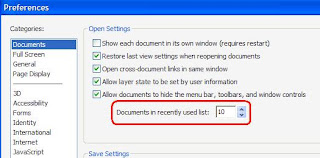

(Click to view a larger image)
This is my main usability complaint against Adobe Reader (as at Release 8.1). The list size needs to be increased to store far more than the current maximum of 10 file names. I reckon that it should cater for at least 40 or 50 recently viewed documents, so that I can quickly and effectively re-open just about any document that I've viewed during the last week or two.


Tabbed Browsing of PDF Documents

I find it very clumsy to move backwards and forwards between open PDF documents, via the Windows menu item. I regard it as essential that the various open documents should be navigated to via tabs, like all of the current browsers do. Further, it should support tabs in multiple rows, which is the only workable method to manage navigation when you have 20 or 30 documents open at once (which I would do fairly often if I could).
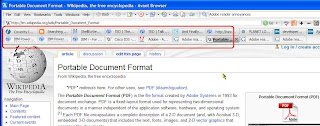
Showing (circled in red) multi-row tabs in Avant Browser, here located at the top of the viewing window. Click for a larger image. And for the icing on the cake, as with my favorite Avant Browser (and Firefox, and others, but unlike Internet Explorer 7, which is pitiable in this regard) it would be nice if the tabs can be optionally positioned at the bottom of the viewing window so as to remove clutter from the top.


Facility to Bookmark PDF Documents, and in Groups

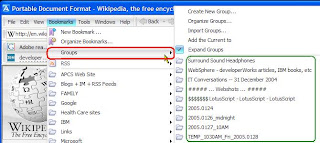
Using Avant Browser (and there's a feature like this in other browsers too), you can not only save 'bookmarks' or 'favorites' so that previously-viewed items can be quickly retrieved, but also you can bookmark PDF documents, and groups of PDF documents (thereby, in the latter case, enabling you to retrieve a whole set or subset of documents in one fell swoop). The following images give a snapshot of how Avant Browser does it:
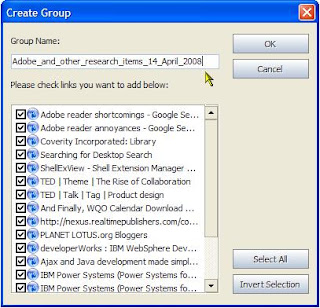
Storing a group of web page URL links in Avant Browser. (Click for a larger image)
Restoring a group of web pages in Avant Browser. (Click for a larger image)

BTW, it so happens that Avant Browser is developed by a single person, so surely Adobe could devote a little development resource to match this! Features like the above would be a tremendous boon to Adobe Reader users in general -- even more so to heavy users and researchers like myself.

Enough said! What do you think? Would you find all or some of the above useful too?