(Last updated 08 April, 2008)
PREAMBLE:So, you're perhaps a developer or a tester or administrator, and are wondering how you go about installing more than one Lotus Notes Client release on your computer.
In October last year (2006) I briefly discussed some
tips for installing multiple Notes client releases on a single system with some links to other peoples' posts on this topic.
There was also a related post about the possibility of
using Junction Points or SoftGrid for Installing multiple Lotus Notes releases on a single system? but, in retrospect, I don't think that this is a useful path to follow. Indeed, it could be an extremely difficult and messy way to go about installing multiple Notes/Domino releases!
The most "generic" solution is to run multiple virtual machines on the one system, each VM having a different Notes/Domino release. This is, of course, nearest to running them on separate systems, but it doesn't work too well if your system lacks processing power, especially RAM. It's the cleanest solution, in the sense that each Notes/Domino release has its own separate Windows registry to play with (no chance of OLE/ActiveX conflicts).
Since mid-2003 I've been using two different notebook PCs as my main development platforms, but they were not expandable enough in terms of processor power, RAM and hard disk to cope with what I was trying to throw at them. For example, they both happened to be limited to 1GB of RAM. By limiting the separate VMs to no more than about 128 Mb of RAM each, and with the aid of some external USB-attached hard disks, I was able to run three or four virtual machines per notebook. However the performance was a little on the sluggish side, okay for testing purposes but certainly not for continued use.
With the above in mind, over the Christmas/New Year break I've taken delivery of a brand spanking new desktop system: an AMD Athlon X Dual Core 5200+ processor, with 4 GB of RAM and around 1 TB of mirrored hard disk. I pressured hardware specialist Gordon Newell (friend and fellow ex-IBMer) of
Chalcot Micro Systems (here in Melbourne, Australia) to build me an ultra-fast yet ultra-quiet desktop machine (it's turned out to be quieter than my latest notebook PC, so I can enjoy listening to quiet music without annoying fan and disk drive noise). Altogether, it should keep me happy for a couple of months, before I notice that it's not fast enough! I'll certainly be running several virtual machines, but it's a pity that the 32-bit Windows XP version cannot make full use of the 4GB of RAM for applications, reporting only about 3.GB as being available. (I would have used the 64-bit version to overcome this issue, however lack of sufficient drivers prevented me from doing so. And this is not to mention the sad and sorry story about having to purchase 64-bit versions of all my applications, but don't get me started on that!)
THE STEP-BY-STEP PROCEDURE:Here now is a more explicit description than last time about installing multiple releases of Notes/Domino on a single system. Note that this enables you to run each release, but not necessarily concurrently. This is adequate for my purposes but might not be for yours, in which case either follow the VM path or see if Bill Buchan's tips work for you (these are referenced in my earlier post).
The scenario is that I install everything on the Windows G: drive -- which for historical notebook-PC-related reasons happens to be a logical rather than physical drive, though this does not in any way affect the outcome. Change the drive letters to suit your own situation (and, of course, they don't all have to be installed on the same drive).
I'm assuming here that, for development and support purposes, your intent is to install not the simple Notes Client but rather the Domino Designer/Administrator product.
The releases should be installed in the following sequence, meaning that when you're finished the Windows registry should have that latest Notes/Domino settings in effect (in this example, Notes 7.0.2):
- Notes plus Domino R4.6.4 were both installed into the G:\Notes4 folder (it could have been separate folders, but this works for me, and anyhow I hope that there aren't any of my customers still using R4.6.4).
- Notes R5.0.11 was installed into the G:\Notes5 folder, and Domino R5.0.11 was installed into the G:\Domino5 folder.
- Notes R6.5.5 was installed into the G:\Notes6 folder, and Domino R6.5.5 was installed into the G:\Domino6 folder.
- Notes R7.0.2 was installed into the G:\Notes7 folder, and Domino R7.0.2 was installed into the G:\Domino7 folder.
(Stating the obvious, when you're doing this for yourself you would use your own directory names.)
The release installations go on pretty much uneventfully until you get to the final stage, installing R7 after you have installed R6. The first consideration arises because IBM enhanced R6 to support roaming Notes Client users, see IBM Technote 1106932:
Is a Multi-user Installation of Notes/Domino 6.x Needed in Order for Users to Roam?As a consequence of having taken the multi-user path in an earlier installation, you may need to use the registry tweak described in IBM Technote 1176213:
Error: 'You are attempting to upgrade a multi-user installation' when upgrading to a single-user install -- and might find helpful information in Technote 1113003:
Unable to upgrade Single-user install to a 6.x Multi-user install plus Technote 1114371:
Where is the option for a Multi-user Install of the Notes Client? and perhaps also Technote 1219467:
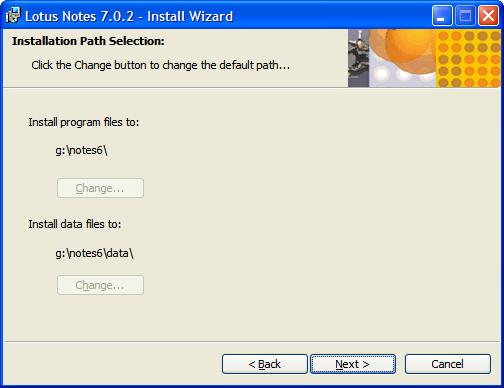
Users are prompted to complete the Client Setup Wizard after upgrading a Notes multi-user installation to 7.0In my case, I wanted to install Domino Designer/Administrator R7 into the Notes7 folder, but instead was presented with the following installer panel (click on any of the following the images to see an enlargement):

The problem here is that you don't want to install R7 into your R6 folders, but the installer has the
Change... buttons grayed out so you are stymied by being prevented from selecting different folders for R7. So what do you do next?
Well, my workaround was to cancel the above R7 installation, start the Windows registry editor (regedit.exe) and locate the hive key
HKEY_LOCAL_MACHINE\SOFTWARE\Lotus\Notes whereupon I could see entries for R5 and R6 (but not for R4, which is possibly why you can get away with putting both R4 Domino and R4 Designer into the same folder). I renamed them by adding the string
_OLD to their names, like this:
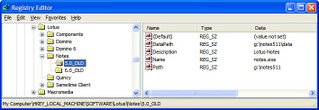
Then, I renamed the Notes6 folder to Notes6_OLD.
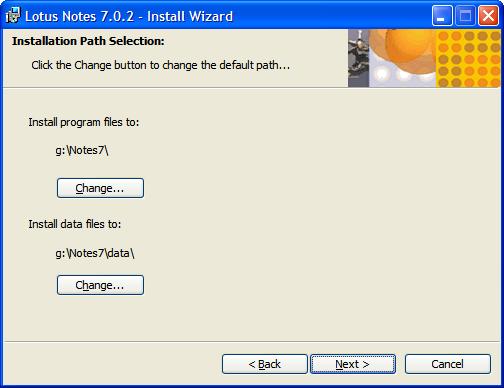
Having done that, I relaunched the R7 Domino Designer/Administrator installer and this time was allowed to select the desired new R7 target folders, thus:

When the R7 install was complete, I refreshed the registry editor window and got:
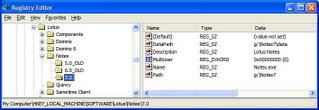
The final step is to rename the R5 and R6 hive key entries back to their proper values (by removing the string
_OLD from their names), thus:
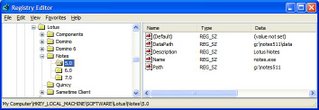
And of course, I renamed the Notes6_OLD folder back to Notes6.
After that, all four Notes/Domino releases more or less operated normally.
I run one server and one designer client at a time, and they don't necessarily have to be at the same release level. For example, I might leave the Domino 7.0.2 server running continuously and launch the various Notes Client releases one at a time to perform function compatibility tests.
It's likely that certain Windows registry-based functions such as OLE will only work for the last-installed version, but you can't have everything! (If this is an issue for you, then try the Virtual Machine approach, where you have the older releases each running in its own VM with its own dedicated Windows registry settings.)
--------------------------------------UPDATE - 05 May 2007: I just came across IBM Technote 1233184 (modified 2007-01-02) which more or less confirms that my suggested procedure works. The body of this Technote is as follows:
Coexistence of Notes 6.x and 7.x on a single workstation
Problem
IBM Lotus recommends that you do not install more than one version of Notes on the same computer. Notes is not designed to function in this manner. Rather than install, for instance, Notes 6.x and Notes 5.x on the same machine, upgrade your Notes 5.x client to Notes 6.x. If you install both versions on the same machine, be aware that this installation could have adverse effects on the operation of the version of the client (or server) that was originally installed. For example, OLE/COM settings will point to the Notes 7.x directory, default email client settings, etc.
Solution
With that understanding, follow the steps below to install Notes 7.x on a machine that also has 6.x installed:Note: You must have local administrator privileges to complete this procedure. These instructions apply to single user installs only: they do not apply to multi-user client installs.
Shut down the Notes client and all Notes-related tools, utilities and add-ins running on your computer.
Rename the Notes 6.x directory. Notes 6.x is typically installed to \Program Files\Lotus\Notes on Windows. For example, you could rename the directory "Notes6."
Rename the entire Notes registry key HKEY_LOCAL_MACHINE\Software\Lotus\Notes. For
example, you can rename it HKEY_LOCAL_MACHINE\Software\Lotus\Notes6
Rename the entire Installer registry key KEY_CURRENT_USER\Software\Lotus\Notes\Installer.
For example, you can rename it
HKEY_CURRENT_USER\Software\Lotus\Notes\Installer6
Run the Notes 7.x install program (SETUP.EXE). Select new locations for the program and data
directories. For example, you can select \Program Files\Lotus\Notes7 and \Program Files\Lotus\Notes7\Data
During the install you may see an error message
"Error 1905.Module c:\program files\lotus\notes\nelsons.Dall failed to unregister. RESULT". Click OK and installation will proceed.
When the install program has finished, rename the 6.x directory back to the original directory name, for example, \Program Files\Lotus\Notes)Note: The information provided above is taken from the Notes 7.0 Release Notes.
Related information
Caveats that occur when more than one version of Notes is installed on the same computer
UPDATE - 30 July 2007:Das Notes Forum has another perspective on this, by Jens b. Augustin:
Parallelinstallation Von Clients, merer DetentionsHere's a translation from German to English (performed by Google Translate):
http://translate.google.com/translate?u=http%3A%2F%2Fatnotes.de%2Findex.php?topic=15318.0&langpair=de%7Cen&hl=en&ie=UTF-8&oe=UTF-8UPDATE - 22 January 2008:My website and blog tracking services show that Notes/Domino developers all around the world are very interested in this topic, so here's another promising tip.
I've recently come across another product that appears to have the potential for supporting multiple Lotus Notes Client releases -- or for that matter most other Windows software -- concurrently and robustly. It's called Altiris Software Virtualization Solution (SVS), now a Symantec product. There's a full-fledged professional commercial version and a
free personal version (
the same as the regular commercial product except for the server-side components for centralized management).The personal version should be good enough for the solo Notes/Domino developer. You can read about SVS at
http://www.altiris.com/Products/SoftwareVirtualizationSolution.aspxWhen I get enough time I will read the rather hefty documentation and give SVS a try, then report the results in this blog.
UPDATE - 12 March 2008:
Over at his
BizzyBee's Thoughts blog, Martin Vereecken has an article
Notes 8 and Notes 7 coexistence that gives another take on the Windows registry settings that I discussed earlier on in this post.
But the most precise recipe so far is this one by Thomas Bahn:
Installing and running Notes R5, 6, 7 and 8 concurrently ... Nice work, Thomas!