Visit...
New formula language functions: @SetImageResource and @GetImageResource
New formula language functions: @SetImageResource and @GetImageResource
Thanks to the great meeting place that PLANET LOTUS has now become, I came across the following post by Glenn Irvine: What I’d Love to See in Notes 9.0 (go take a look at it)
Let it be clear from the outset I have nothing whatsoever against the feature changes that Glenn is requesting. It’s just that when he talked about “Notes 9.0” I expected it it the be about, well, Notes 9 as a whole – but it only happened to be about several usability shortcomings in the mail application in Notes.
So I made the following comment (maybe because it’s around 10 AM and already warming up. The Bureau of Meteorology predicts a real scorcher here in Victoria today. They reckon it will reach 44 degrees Celsius or more, which would make it the hottest February day on record down here, and very ominous for bushfires. (UPDATE: see what actually happened here.)
We had a couple of similarly hot days near the end of January. People, animals and plants are under considerable weather stress in our corner of the continent. The last rain of any significance was in December last. The weather was quite cool then, but it has warmed up with a vengeance recently.
A day or two ago, ex-Collingwood footballer Peter Daicos, when putting out his wheelie bin in North Balwyn (just a few kilometres away in the heart of suburban Melbourne) was bitten on the toe by a venomous red-bellied black snake. (Talking about snake, scientists have found in Colombia a fossil 13-metre giant snake, as long as a school bus, which used to devour giant turtles and primitive crocodiles. Scary.)
Another sign of the unusually warm stretch we’ve had here in south-eastern Australia is the fact that many of the less hardy deciduous trees have been dropping their leaves, months before the stat of our southern autumn.
Maybe this has put me a bit on edge, but I just commented on Glenn’s story as follows. Let me know if you agree, or otherwise:
- - - - - - - - - - - - -
What disturbs me a bit about the content (but sometimes only the title) of posts like this is that all too often they’re restricted to talking about desired enhancements in apps bundled up with Notes. Often the comments are restricted to Notes Mail (as in your case above, Glenn) — or to iNotes or Sametime or one of the other IBM apps.Understandably, IBM people (like our famous and most gentlemanly leader Ed Brill) often talk about specific enhancements in their own apps. Hey, I worked for IBM for a long time, and know that it’s hard enough to keep up with what IBM is announcing much less what happens outside IBM.
Many of the vast community of IBM business partners and independent ISVs, not to mention all those thousands of Notes customers big and small alike who roll their own apps (and some of whom have a vast inventory of such apps), do like what they see being added to or fixed in in Notes Mail.
But in many cases they also want major new generic enhancements in Notes. A perfect example of this would be the grouse new Xpages capability that’s just been released in Notes 8.5 for us all to savor.
Notes remains a fantastic application platform [for certain classes of apps] as we all know. While there have been many outstanding mainly server-related enhancements in the past few years (major compression improvements, DAOS, etc) it’s not quite as common for a startling application-building enhancement like Xpages to appear.
So what would I myself talk about when I say I’d like to see something new in Notes 9 or Notes 10?
How about a few REALLY big hitters, for generic app design and development? For one, the ability to design an application once and have it behave exactly the same in the Notes client and a web browser? (Not asking for much, am I?)
IBM in an earlier release used to make available what I’ll term “some trusty old Lotus Notes applications” which you’ll find listed here on my website: http://asiapac.com.au/Links/NotesDomino.htm#TRUSTY_OLD_LOTUS_NOTES_APPLICATIONS
They’re quite old and rusty pre-Domino apps (so are not web enabled), but my point here is that one thing they did at that point in time was to let people see that Notes is note just about mail (as important as mail still is), but that Notes is really very good for building a vast range of other application types.
The old hands at Notes (customers and others) were very worried that IBM had lost its way in the early part of this decade, but needn’t worry now since it’s apparent that IBM is solidly behind Lotus Software including Notes.
A recent extremely promising move from IBM is the decision to get behind OpenNTF.org and help push out the message that Notes is a great application platform, and that there are lots of free apps available from OpenNTF (and from a range other sources too, for that matter)
In summary, what I would have called this post is “What I’d Love to See in Notes 9.0 Mail” because there are LOTS of other bigger things I’d like to see in Notes 9 (and 10 and 11 and ad infinitum) as a whole!
- - - - - - - - - - - - -
Don’t get me wrong, I reckon that OpenNTF.org is an absolutely fantastic boon to the Lotus Notes/Domino community. There are lots of excellent tools, frameworks, utilities and applications available for download at the best possible price [free, as in beer].
But right now
So I request a new password, which it tells me will arrive shortly, but I have to wait maybe fifteen minutes for it (didn’t take an exact measurement of the elapsed time). Having to wait so long was another frustration, such things should happen within seconds, a minute or two at the very outside.
I signed in using the new password, but it still showed me as being “not logged in” (highlighted in yellow in Figure 1) so I couldn’t download anything. Therefore I repeat the sign-on process a number of times more, sometimes deliberately entering the wrong password and having it knocked back. … Swearwords flowed liberally!
After a few more minutes of puzzlement and messing around, I decide to try the same with Firefox browser, and everything worked fine this time. Then tried to work out what configuration setting (or cookie or whatever) was causing my IE-based Avant Browser session to spit the dummy and prevent downloading [even while accepting the new password].
I decided to give up on that quest and, not liking the cryptic new password, wanted to reset it to its old easily-remembered value.
I hoped to find a conventional “Manage your profile” or “Reset Password” function just underneath the “Register” and “Forgot Password” links in the right-hand column (where the green highlighted area is in Figure 1) but it wasn’t there.
Maybe I was just just having a bad morning or am going blind, but having signed in (under Avant Browser) couldn’t see a “reset password” facility anywhere, so it appears that I’m stuck with the cryptic password.
[UPDATE STARTS HERE] But then I look at the Firefox window again and, as shown in Figure 2, see that indeed there is an “Update Profile” option (thought there would be all along, actually).
Now I’m an old-timer in the IT industry – still think that punched cards and print-outs are the most reliable form of input/output devices devised so far! One of the reasons I have misgivings about new fads like AJAX and cloud computing is that they’re so reliant on HTML and browsers in all their variations, and problems like I experienced this morning with cookies (or whatever it was) are really awful to experience and nightmarish for the web application designer/developer to handle elegantly.
I write regular articles for iTWire which uses Joomla and so I have to use a browser-based editor which I find quite awkward to use. And the built-in browser-based editor for Blogger.com that I originally used for writing posts in this very blog was also quite clumsy and restrictive. even compared with the nice Writely editor they acquired for Google Docs (which they should adapt for use in Blogger.com, I’d recommend). But now I use Microsoft’s excellent free Windows Live Writer and find it far, far nicer to use for blog content management. It’s a cinch to create everything offline in a familiar GUI (very similar to using Microsoft Word, or Expression Web / FrontPage) and when you’ve finished composing your article you just click on the Publish button and everything (text, images, more) is updated on you blog with no hassles whatsoever. It’s a very nice piece of work, congrats Microsoft.
Browsers do some things nicely, but I find them not at all good – sometimes quite horrible -- for really serious transactional activities of various types. Conceived as a means of displaying web contents, they are now being force-fitted into all sorts of environments where they perform less than ideally.
Footnote:
I find the OpenNTF site (kindly hosted by Prominic) to be a little on the slow side. My impression is that the average response time is around ten seconds or so, just on the borderline of acceptability. It would be nice if it were snappier (and a better advertisement for Prominic’s Lotus Domino hosting offering -- hint, hint).
UPDATE #2:
I implied above that I might possibly be going blind. Being a thorough type, I did further research on the causes of blindness, and just by chance came across the following little gem concerning a form of blindness (in dating)…
UPDATE #3:
Strangely enough, next day the sign on problems that I had experienced under Avant Browser (a front end to IE) went away. I have no idea why.
I don’t give many presentations these days, but expect to do so tomorrow afternoon at the Melbourne (Australia) Lotus User Group meeting.
So I took out my unique little “Presenter for Lotus Notes” application and brushed up a few cobwebs on it. No new functionality, mainly some color changes to alternate view rows and little things like that.
Its now ready for download at either http://asiapac.com.au/NotesPresenter_Download.htm or http://notestracker.com/NotesPresenter_Download.htm. Naturally, it’s still completely free.
But you are probably asking: “What on earth is Presenter for Notes?”

Well, the story behind Presenter goes like this…
I once did industrial chemistry and high school chemistry/mathematics teaching, then spent a long time at IBM (from 1970 to the mid-1990s, now retired), and find myself as a consultant still in IT 39 years after starting at IBM. My fortieth year in IT begins next January, is that good or bad I keep asking myself.
During all that time, I’ve seen a vast number of lessons, lectures, business presentations and the like. In the early days, they were done on blackboards and paper. Later overhead projectors were in vogue, with their transparent plastic “foils.” These foils, in any quantity, weighed a ton and weren’t much fun to prepare, distribute and lug around (as I can attest from giving lots of IBM presentations across Australia, and Asia while supporting the IBM System/38 and AS/400 and other systems).
Then in the 1980s and 1990s, along came Lotus Freelance and Microsoft PowerPoint and suchlike. A better thing? On the whole, probably so.
But overdone to the nth degree. Now we have PowerPoint presentations in plague proportions! See here or here (especially look at the articles about “Unplug that projector” and “Drag and drop” and “warts” and “disaster”).
When I was to give a presentation several years ago, I asked myself if there was a different and/or better way.
Being active in the Lotus Notes community, I decided that “If you promote and sell it, you should use it!.” So I developed a “presenter” platform to be used in the Lotus Notes Client environment itself.

The rationale for having a tool like Notes Presenter is briefly outlined in an earlier blog post of mine, see Notes Presenter -- Let's eat our own dog food with more details on the download page given above. There’s a user guide built in to the database, in the “Help Using This Database” document.
You can use Presenter not just for preparing and giving presentations via a Lotus Notes Client, but also for packaging and delivering virtually any Notes applications (databases) together with any sort of related supporting files: executables, documents, data files (even other Notes databases, including design templates), and much more.
You could, as just one example, hold different versions/releases of a Notes application suite – or a presentation, or anything else -- either inside [separate documents held in] a single Presenter database or in multiple Presenter databases each one dedicated to s single version/release.
In fact, whatever can be attached to a Notes rich text field can be delivered via a Presenter database as one tidy self-contained package.
With the various Presenter views (such as the view by Category/Concept shown just above), and via full-text search, you can quickly and easily locate a particular slide or group of slides related to a given topic.
For example, in the question time at the end of a pitch, somebody asks you about a particular term you used that’s buried deep within one of many slides. Use a full-text search to rapidly locate that slide instead of fumbling around (as I’ve seen happen a number of times) and perhaps not even be able to find that slide again.
There’s a lot more I could say, but let me just say that if you’re a Lotus Notes Client user you should “eat your own dog food” and avoid using PowerPoint wherever possible. Download Presenter for Lotus Notes and go try it out!




 And of course, I renamed the Notes6_OLD folder back to Notes6.
Coexistence of Notes 6.x and 7.x on a single workstation
Problem
IBM Lotus recommends that you do not install more than one version of Notes on the same computer. Notes is not designed to function in this manner. Rather than install, for instance, Notes 6.x and Notes 5.x on the same machine, upgrade your Notes 5.x client to Notes 6.x. If you install both versions on the same machine, be aware that this installation could have adverse effects on the operation of the version of the client (or server) that was originally installed. For example, OLE/COM settings will point to the Notes 7.x directory, default email client settings, etc.
Solution
With that understanding, follow the steps below to install Notes 7.x on a machine that also has 6.x installed:Note: You must have local administrator privileges to complete this procedure. These instructions apply to single user installs only: they do not apply to multi-user client installs.
Shut down the Notes client and all Notes-related tools, utilities and add-ins running on your computer.
Rename the Notes 6.x directory. Notes 6.x is typically installed to \Program Files\Lotus\Notes on Windows. For example, you could rename the directory "Notes6."
Rename the entire Notes registry key HKEY_LOCAL_MACHINE\Software\Lotus\Notes. For
example, you can rename it HKEY_LOCAL_MACHINE\Software\Lotus\Notes6
Rename the entire Installer registry key KEY_CURRENT_USER\Software\Lotus\Notes\Installer.
For example, you can rename it
HKEY_CURRENT_USER\Software\Lotus\Notes\Installer6
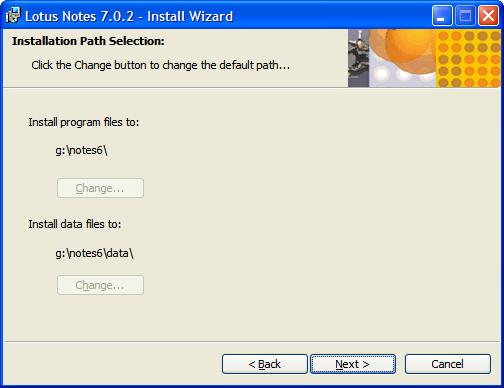
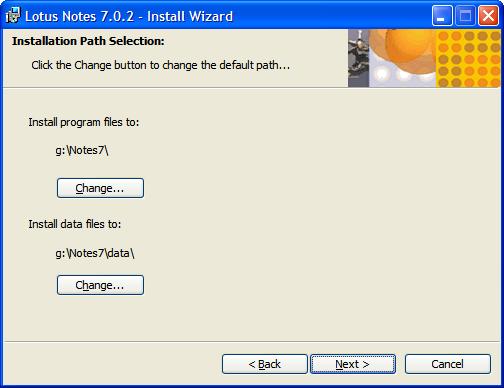
Run the Notes 7.x install program (SETUP.EXE). Select new locations for the program and data
directories. For example, you can select \Program Files\Lotus\Notes7 and \Program Files\Lotus\Notes7\Data
During the install you may see an error message
"Error 1905.Module c:\program files\lotus\notes\nelsons.Dall failed to unregister. RESULT". Click OK and installation will proceed.
When the install program has finished, rename the 6.x directory back to the original directory name, for example, \Program Files\Lotus\Notes)Note: The information provided above is taken from the Notes 7.0 Release Notes.
Related information
Caveats that occur when more than one version of Notes is installed on the same computer


