Monday, January 08, 2007

Steps for installing multiple Lotus Notes Client releases on a single system

(Last updated 08 April, 2008)

PREAMBLE:
So, you're perhaps a developer or a tester or administrator, and are wondering how you go about installing more than one Lotus Notes Client release on your computer.

In October last year (2006) I briefly discussed some tips for installing multiple Notes client releases on a single system with some links to other peoples' posts on this topic.

There was also a related post about the possibility of using Junction Points or SoftGrid for Installing multiple Lotus Notes releases on a single system? but, in retrospect, I don't think that this is a useful path to follow. Indeed, it could be an extremely difficult and messy way to go about installing multiple Notes/Domino releases!

The most "generic" solution is to run multiple virtual machines on the one system, each VM having a different Notes/Domino release. This is, of course, nearest to running them on separate systems, but it doesn't work too well if your system lacks processing power, especially RAM. It's the cleanest solution, in the sense that each Notes/Domino release has its own separate Windows registry to play with (no chance of OLE/ActiveX conflicts).

Since mid-2003 I've been using two different notebook PCs as my main development platforms, but they were not expandable enough in terms of processor power, RAM and hard disk to cope with what I was trying to throw at them. For example, they both happened to be limited to 1GB of RAM. By limiting the separate VMs to no more than about 128 Mb of RAM each, and with the aid of some external USB-attached hard disks, I was able to run three or four virtual machines per notebook. However the performance was a little on the sluggish side, okay for testing purposes but certainly not for continued use.

With the above in mind, over the Christmas/New Year break I've taken delivery of a brand spanking new desktop system: an AMD Athlon X Dual Core 5200+ processor, with 4 GB of RAM and around 1 TB of mirrored hard disk. I pressured hardware specialist Gordon Newell (friend and fellow ex-IBMer) of Chalcot Micro Systems (here in Melbourne, Australia) to build me an ultra-fast yet ultra-quiet desktop machine (it's turned out to be quieter than my latest notebook PC, so I can enjoy listening to quiet music without annoying fan and disk drive noise). Altogether, it should keep me happy for a couple of months, before I notice that it's not fast enough! I'll certainly be running several virtual machines, but it's a pity that the 32-bit Windows XP version cannot make full use of the 4GB of RAM for applications, reporting only about 3.GB as being available. (I would have used the 64-bit version to overcome this issue, however lack of sufficient drivers prevented me from doing so. And this is not to mention the sad and sorry story about having to purchase 64-bit versions of all my applications, but don't get me started on that!)


THE STEP-BY-STEP PROCEDURE:
Here now is a more explicit description than last time about installing multiple releases of Notes/Domino on a single system. Note that this enables you to run each release, but not necessarily concurrently. This is adequate for my purposes but might not be for yours, in which case either follow the VM path or see if Bill Buchan's tips work for you (these are referenced in my earlier post).

The scenario is that I install everything on the Windows G: drive -- which for historical notebook-PC-related reasons happens to be a logical rather than physical drive, though this does not in any way affect the outcome. Change the drive letters to suit your own situation (and, of course, they don't all have to be installed on the same drive).

I'm assuming here that, for development and support purposes, your intent is to install not the simple Notes Client but rather the Domino Designer/Administrator product.

The releases should be installed in the following sequence, meaning that when you're finished the Windows registry should have that latest Notes/Domino settings in effect (in this example, Notes 7.0.2):
  1. Notes plus Domino R4.6.4 were both installed into the G:\Notes4 folder (it could have been separate folders, but this works for me, and anyhow I hope that there aren't any of my customers still using R4.6.4).
  2. Notes R5.0.11 was installed into the G:\Notes5 folder, and Domino R5.0.11 was installed into the G:\Domino5 folder.
  3. Notes R6.5.5 was installed into the G:\Notes6 folder, and Domino R6.5.5 was installed into the G:\Domino6 folder.
  4. Notes R7.0.2 was installed into the G:\Notes7 folder, and Domino R7.0.2 was installed into the G:\Domino7 folder.
(Stating the obvious, when you're doing this for yourself you would use your own directory names.)

The release installations go on pretty much uneventfully until you get to the final stage, installing R7 after you have installed R6. The first consideration arises because IBM enhanced R6 to support roaming Notes Client users, see IBM Technote 1106932: Is a Multi-user Installation of Notes/Domino 6.x Needed in Order for Users to Roam?

As a consequence of having taken the multi-user path in an earlier installation, you may need to use the registry tweak described in IBM Technote 1176213: Error: 'You are attempting to upgrade a multi-user installation' when upgrading to a single-user install -- and might find helpful information in Technote 1113003: Unable to upgrade Single-user install to a 6.x Multi-user install plus Technote 1114371: Where is the option for a Multi-user Install of the Notes Client? and perhaps also Technote 1219467: Users are prompted to complete the Client Setup Wizard after upgrading a Notes multi-user installation to 7.0

In my case, I wanted to install Domino Designer/Administrator R7 into the Notes7 folder, but instead was presented with the following installer panel (click on any of the following the images to see an enlargement):
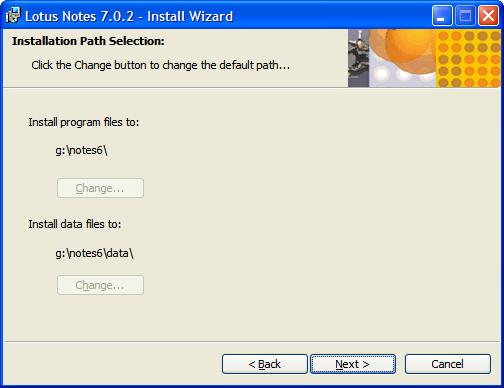


The problem here is that you don't want to install R7 into your R6 folders, but the installer has the Change... buttons grayed out so you are stymied by being prevented from selecting different folders for R7. So what do you do next?

Well, my workaround was to cancel the above R7 installation, start the Windows registry editor (regedit.exe) and locate the hive key HKEY_LOCAL_MACHINE\SOFTWARE\Lotus\Notes whereupon I could see entries for R5 and R6 (but not for R4, which is possibly why you can get away with putting both R4 Domino and R4 Designer into the same folder). I renamed them by adding the string _OLD to their names, like this:


Then, I renamed the Notes6 folder to Notes6_OLD.

Having done that, I relaunched the R7 Domino Designer/Administrator installer and this time was allowed to select the desired new R7 target folders, thus:
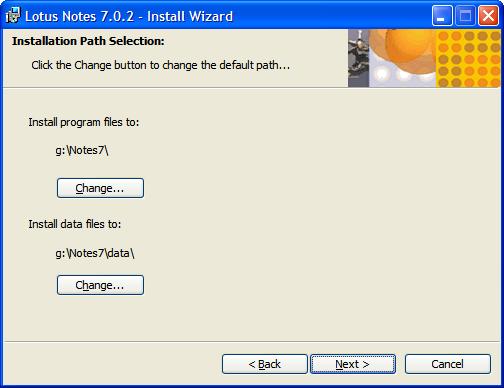

When the R7 install was complete, I refreshed the registry editor window and got:


The final step is to rename the R5 and R6 hive key entries back to their proper values (by removing the string _OLD from their names), thus:

And of course, I renamed the Notes6_OLD folder back to Notes6.

After that, all four Notes/Domino releases more or less operated normally.

I run one server and one designer client at a time, and they don't necessarily have to be at the same release level. For example, I might leave the Domino 7.0.2 server running continuously and launch the various Notes Client releases one at a time to perform function compatibility tests.

It's likely that certain Windows registry-based functions such as OLE will only work for the last-installed version, but you can't have everything! (If this is an issue for you, then try the Virtual Machine approach, where you have the older releases each running in its own VM with its own dedicated Windows registry settings.)
--------------------------------------

UPDATE - 05 May 2007:
I just came across IBM Technote 1233184 (modified 2007-01-02) which more or less confirms that my suggested procedure works. The body of this Technote is as follows:

Coexistence of Notes 6.x and 7.x on a single workstation

Problem
IBM Lotus recommends that you do not install more than one version of Notes on the same computer. Notes is not designed to function in this manner. Rather than install, for instance, Notes 6.x and Notes 5.x on the same machine, upgrade your Notes 5.x client to Notes 6.x. If you install both versions on the same machine, be aware that this installation could have adverse effects on the operation of the version of the client (or server) that was originally installed. For example, OLE/COM settings will point to the Notes 7.x directory, default email client settings, etc.

Solution
With that understanding, follow the steps below to install Notes 7.x on a machine that also has 6.x installed:Note: You must have local administrator privileges to complete this procedure. These instructions apply to single user installs only: they do not apply to multi-user client installs.

Shut down the Notes client and all Notes-related tools, utilities and add-ins running on your computer.

Rename the Notes 6.x directory. Notes 6.x is typically installed to \Program Files\Lotus\Notes on Windows. For example, you could rename the directory "Notes6."

Rename the entire Notes registry key HKEY_LOCAL_MACHINE\Software\Lotus\Notes. For
example, you can rename it HKEY_LOCAL_MACHINE\Software\Lotus\Notes6

Rename the entire Installer registry key KEY_CURRENT_USER\Software\Lotus\Notes\Installer.

For example, you can rename it
HKEY_CURRENT_USER\Software\Lotus\Notes\Installer6

Run the Notes 7.x install program (SETUP.EXE). Select new locations for the program and data
directories. For example, you can select \Program Files\Lotus\Notes7 and \Program Files\Lotus\Notes7\Data

During the install you may see an error message

"Error 1905.Module c:\program files\lotus\notes\nelsons.Dall failed to unregister. RESULT". Click OK and installation will proceed.

When the install program has finished, rename the 6.x directory back to the original directory name, for example, \Program Files\Lotus\Notes)Note: The information provided above is taken from the Notes 7.0 Release Notes.

Related information
Caveats that occur when more than one version of Notes is installed on the same computer


UPDATE - 30 July 2007:
Das Notes Forum has another perspective on this, by Jens b. Augustin:
Parallelinstallation Von Clients, merer Detentions

Here's a translation from German to English (performed by Google Translate):
http://translate.google.com/translate?u=http%3A%2F%2Fatnotes.de%2Findex.php?topic=15318.0&langpair=de%7Cen&hl=en&ie=UTF-8&oe=UTF-8


UPDATE - 22 January 2008:
My website and blog tracking services show that Notes/Domino developers all around the world are very interested in this topic, so here's another promising tip.

I've recently come across another product that appears to have the potential for supporting multiple Lotus Notes Client releases -- or for that matter most other Windows software -- concurrently and robustly. It's called Altiris Software Virtualization Solution (SVS), now a Symantec product. There's a full-fledged professional commercial version and a free personal version (the same as the regular commercial product except for the server-side components for centralized management).The personal version should be good enough for the solo Notes/Domino developer. You can read about SVS at http://www.altiris.com/Products/SoftwareVirtualizationSolution.aspxWhen I get enough time I will read the rather hefty documentation and give SVS a try, then report the results in this blog.


UPDATE - 12 March 2008:
Over at his BizzyBee's Thoughts blog, Martin Vereecken has an article Notes 8 and Notes 7 coexistence that gives another take on the Windows registry settings that I discussed earlier on in this post.

But the most precise recipe so far is this one by Thomas Bahn: Installing and running Notes R5, 6, 7 and 8 concurrently ... Nice work, Thomas!

Wednesday, December 20, 2006

Activity-based Collaboration (a new issue of the IBM Systems Journal)

I used to spend many happy hours soaking up the fascinating contents of the IBM Systems Journal during my decades as a Systems Engineer at IBM. I sometimes even read selected articles (those I could comprehend) the more formidable IBM Journal of Research and Development. They were print-only publications in those days and it was a little hard for me to get my hands on some issues. How much easier it is these days, getting access to them via the Web!

The excellent trend continues ...


The December 2006 issue (Volume 45 no 4) is focused on Business Collaboration, which is the focus of the Workplace Portal and Collaborative (WPLC) software division. WPLC is responsible for all Lotus branded products as well as WebSphere Portal. A common theme in several papers in this issue is activity-based collaboration, which is an important research focus for continued development. You can learn more about activity-based collaboration in this exciting issue of the IBM Systems Journal:

http://www.research.ibm.com/journal/sj45-4.html

Nine papers of this issue deal with business collaboration, and they cover activity-centered collaboration with customers, the use of patterns for capturing best practices, tools for supporting activity-based collaboration, user studies, and collaboration-related analytics and visualization. A tenth, non-topical paper deals with the use of ontology in the development of software architectures.


It's a sobering thought that the Systems Journal goes back to 1957. Hey, that was well before Microsoft appeared on the scene, and my final high school year!

Since I went on to major in Chemistry at university, perhaps (if I had known about the Journal in those days) I'd have found the very first article of some interest: Domain Orientation in Barium Titanate Single Crystals ("An acid etching technique makes visible the domain structure of barium titanate crystals as reported by Hooton and Merz. Earlier observations by Merz of the mechanism of switching are confirmed by experiments using this technique. A discussion of domain wall formation in the orthorhombic state leads to the explanation of observed domain patterns. Photomicrographs are shown and discussed.") -- then again, perhaps not.

ASIDE:
Everyone regards Microsoft to be the "biggest software maker", which might be true in terms of licenses and revenue, but by no means so in terms of software/hardware/research/consulting history and variety. IBM has been developing systems software since 1964 at the very least, that being the year of that the System/360 architecture was announced. And its successor, the System/370 was announced in 1970 (the year that I joined IBM), the first widely-adopted virtual system. But such tales and the argument about "who's biggest" is better left for another time.

A fog-shrouded Vista?

The question going through many peoples' minds at the moment is when to upgrade from Windows 2000 or XP to Windows Vista. There's much opportunity for Sturm und Drang here!

Certainly there are lots of goodies in Vista. But my own approach will be to keep using Windows XP Professional as my production system long enough (which could be quite a few some months) for all those third-party software developers out there to update their products to operate under Vista. Meanwhile, I'll be happy enough to run Vista as a secondary non-production system underneath Microsoft Virtual PC (or similar) and go through the painful learning stages without threatening my income-generating production work.

I suspect that some of the lesser players will take a long time to master some of the more esoteric differences in Vista, and some of them will not be up to the task (so I suspect that that some of my favorite tools may never become available in Vista-compatible versions).

You only have to look at Java Software on Vista - Yes, it works to see all the sorts of things that Sun Microsystems had to do to get Java functioning properly under Vista:
People have been wondering lately: How does Java software work on Windows Vista? The short answer is: Java software works great on Vista. In fact, the entire Sun engineering team working on Java Platform Standard Edition has been tuned into Vista and making Java software work on it since it was named after a breed of cattle. ...

Windows Vista is not just XP++; there are fundamentally new things about the system that makes older software break. Is all software broken? Probably not. But the more of the system an application uses, the more likely it is to run into issues in which the system has changed. In our case, Java software is not just a simple Win32 GUI application; it's a runtime platform with deep-rooted needs in the operating system, the networking stack, the security model, the graphics system, etc. If any of these subsystems change significantly, we need to adjust our software accordingly. In the case of Vista, it has been an ongoing process of learning, testing, debugging, filing bugs with Microsoft, fixing our bugs, and repeating the whole process. Since Vista has been a moving platform during the Java Platform Standard Edition 6 (Java SE 6) development process, we have been in an ongoing cycle with every new drop of Vista.
When a major player like Sun has had to do so much intricate software engineering work, I shudder to think what some of the minor players will come up with!

Web Services, Specifications, and Interoperability

Keeping up with the goings-on in the IT industry is a big challenge. Here's a short but informative article that might help you:

Web Services, WS-* Specifications, and Interoperability

"Interoperability is an important factor in the success of solutions that are based on Web Services and Service Oriented Architecture (SOA), along with other key factors such as contracts, loose coupling, and reuse.

Interoperability is generally accomplished by developing your Web Services using the well-established guidelines for implementing Web services and by following industry standards such as XML, WSDL, SOAP, and UDDI. However, just following Web Services standards and guidelines during the development phase of a project isn't sufficient to achieve interoperability.

As the Web Services industry evolves, it embraces new specifications like WS-Security, WS-ReliableMessaging (WS-RM), and WS-AtomicTransactions (WS-AT) to provide advanced functionalities such as security, reliability, and transactions that are not provided by the basic specifications. These specifications are generally referred to as the WS-* (pronounced WS-Star) specifications. As they are relatively new and have not been so widely agreed on by the industry, achieving interoperability between Web Services that use WS-* specifications is much more difficult and the WS-* specifications may not even be supported in many products."

This SYS-CON SOA Web Services Journal article by Sanjay Narang "provides a set of guidelines and best practices that you can follow to accomplish interoperability when developing web services that make use of the WS-* specifications across products provided by different vendors. It also provides insight into the Web Services specifications situation that contains a large number of WS-* specifications that are being developed by different groups."

Microsoft to get the VAPORs in 2007?

Read this JDJ article to find out:
Where's i-Technology Headed in 2007?

Saturday, December 16, 2006

SOA means Business!

One of the major trends in IT these days is, as you would probably be aware, that of SOA ... Service-Oriented Architecture

I'm certainly no expert in this field, just an interested observer. Keeping my eyes open, yesterday I came across two interesting insights into the business aspects of SOA.
- - - - - - - - -

Firstly, in a recent survey by GCR Custom Research (sponsored by BEA Systems) over 150 SOA decision-makers and influencers across North America and Europe were asked to give their input on SOA costs, and benefits. Below are some of the key findings:


  • The CIO is the main SOA sponsor and business-case approver
  • IT cost savings are the main driver of SOA adoption in Europe, while North America’s focus is on business agility
  • 22 percent of SOA funding comes from SOA money, while 59 percent?comes from business-solution money
  • Almost 40 percent of SOA projects are impeded due to difficulty with financial justification
  • The most significant cost in the business case is for software infrastructure
Secondly, at the CBDI Service Oriented Practice Portal there's an article by David Sprott titled Explaining SOA to the Business Audience where he makes the point (amongst other things) that:
Much has been said about the way SOA can deliver agility and I continue to observe comments that suggest everything can change constantly in an SOA. Frankly this is dangerous nonsense. In a large enterprise change needs to be controlled both from a technical and business perspective in order to manage quality and regulatory compliance. But what SOA does give us is an enhanced ability to cleanly separate the things that do need to change from the things that don’t.

As an outside observer, it seems to me that far too many discussions of SOA focus on the technical side, but business considerations such as those covered in the above two references need always to be kept foremost.

Wednesday, December 06, 2006

Choosing the right server virtualization solution

I'm interested in too many things for my own good -- ah, what a dissipated person I am!

One of those things is system virtualization, and here I merely wish to point you towards a short and to=the-point four-part series of articles by Andrew Kutz, over at Techtarget's SearchServerVirtualization.com (you may have to carry out a free registration to view these and other Techtarget articles).
Just keep in mind that these articles were published early 2006, and new virtualization product versions and pricing are sure to have been announced since then. But the methodology used by Andrew to compare and contrast the various offerings is nice., and there's always new stiff being added to SearchServerVirtualization.com.

Tuesday, December 05, 2006

"Workplace" software -- from IBM, and from O3Spaces too!

I participated a week or two ago in an online survey being conducted on IBM's behalf. I remember that one of the questions was something like "What is your impression of the 'IBM Workplace' product name?"

I commented that the name was quite acceptable, except possibly down here in Australia where there's some contentious federal legislation about "Workplace relations" -- in general, the workers and particularly the trade unions don't like it at all. If you're interested, try a Google search such as http://www.google.com.au/search?hl=en&q=workplace+legislation&meta=cr%3DcountryAU and browse some of the items, such as Catholic Bishops call for changes to workplace legislation to get one point of view.

It surprised me a little to find that the name "Workplace" is used for another software product, and wonder what IBM thinks of it: take a look at O3Spaces - "The way to extend OpenOffice.org" which has as its opening paragraph:

O3Spaces technology enhances OpenOffice.org and StarOffice with an integrated solution for Collaboration, Document Management and Document Retention within teams and small businesses. O3Spaces provides the OpenOffice 2.0 and StarOffice user community with a professional out-of-the-box extension for team and project collaboration, O3Spaces means an affordable and integrated alternative for MS Office Sharepoint.
Pricing options are given at http://o3spaces.org/Page/sp6/nctrue/ where it states: "The O3Spaces Workplace software is licensed on a 'per user' basis in 5 user bundles for accounts from 5-100 users. From 100 users up, a per (virtual) cpu licensing model applies which is available on request. Base prices include a one year subscription for product updates, five direct support calls (3 day response), forum and wiki support."


It seems that the folks behind O3Spaces are going after Microsoft's Sharepoint marketplace ... that is, document-centric collaboration. Now, isn't this the playing field of IBM Lotus Notes/Domino and IBM Workplace? I wonder why I couldn't find any reference to either of them on the site. (The site search was in "coming soon" mode so I could have missed any such references.)

Would anyone care to comment or offer enlightenment?

A presentation on Architecture and Design

I just came across a nice presentation ... Architecture and Design by John Klein, guest lecture for COMP 180: Software Engineering, at Tufts University, Fall 2006.

It's only 24 pages, and well worth a look. A couple of cautionary quotations from it that tickled my fancy:
  • "Software architecture is the set of decisions which, if made incorrectly, may cause your project to be cancelled.” – Eoin Woods

  • (Under the heading "Reality Check") ... Conway’s Law – The structure of the system reflects the structure of the organization that builds it - “…[an] organization had eight people who were to produce a COBOL and an ALGOL compiler…five people were assigned to the COBOL job and three to the ALGOL job. The resulting COBOL compiler ran in five phases, the ALGOL compile ran in three.”

Friday, December 01, 2006

Good form is hard to come by (in America)!

I've been using the Internet since the early 1990s, and have subscribed for many Web sites and e-mail newsletters over the years.

One thing that really annoys me is poorly designed web forms. There are far too many of them. Why don't form designers put them selves into the mindset of those who will be filling? Is that too much to be asking for?

Apart from the horror of forms that lose all your carefully-entered information if you hit the Back button, which can be rather a programming challenge to handle appropriately (and a fundamental browser architecture shortcoming that needs to be resolved), it continues to disappoint and amaze me that even elementary usability faults still abound.

Simple things like:
  • Fields that are too short for the field contents to be visible with horizontal scrolling
  • Comment fields that are just a few rows in depth
  • Check boxes used where radio buttons should have been [for multiple-choice questions where only a single response is valid]
  • And a particular annoyance of mine -- form fields that handle North American postal and telephone values but do not cope with international values
  • I was reminded of this when today I came across a form that was designed quite well, and I'd like to pass on my compliments to Techtarget.com for the good form design! Having received an newsletter from them inviting me to subscribe to yet another nice service of theirs (SearchServerVirtualization.com).

    I decided to take up their offer, and launched the specified registration page: http://go.techtarget.com/r/786206/57192

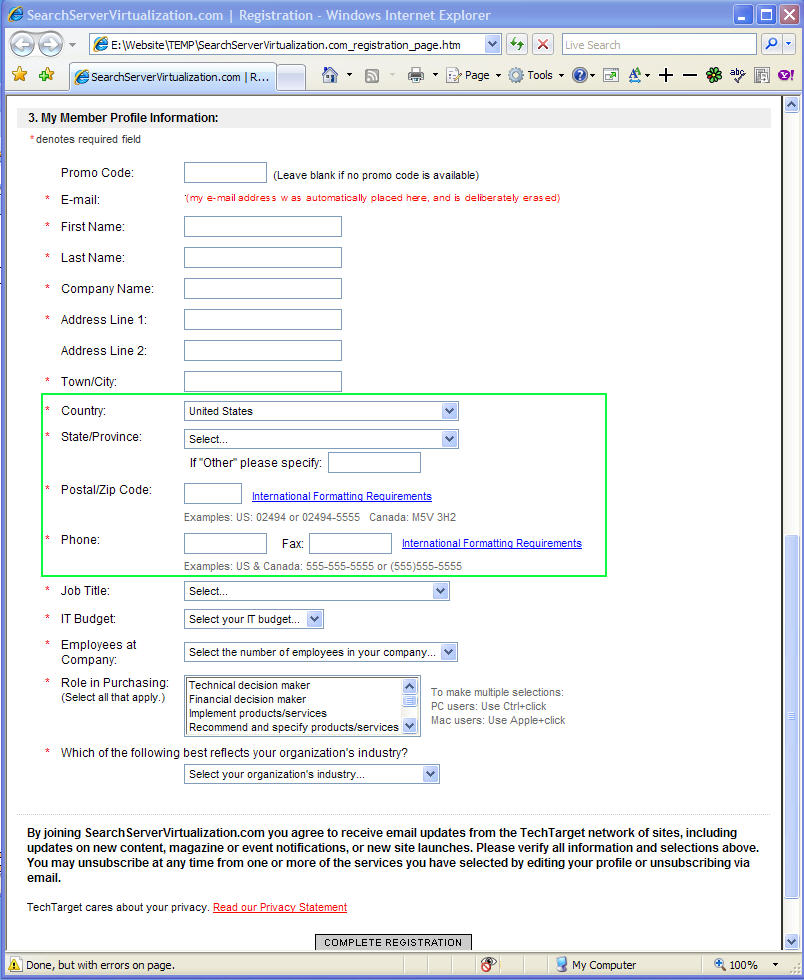
    If you open it yourself, you will be able to view the source code and see what they've coded. In this discussion, I'm interested in the Member Profile section at the bottom of the form, the type of form that you would get for just about any registration, which looks like this:

(click to see a larger image)
My e-mail address was automatically placed into the form and I have deliberately obfuscated it.

I'd like to focus on on that part of the form which is surrounded by the green rectangle. It's here that very many web forms on other USA-centric web sites are deficient, and this is an excellent example of how to do it properly:
  • Selection of states, provinces, regions, zones outside the USA.
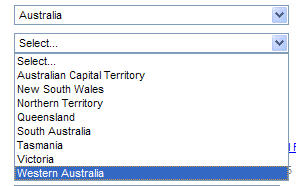
    Most us-designed web forms provide a selection list for US states and dependencies, but just have "Other" or "Non-US' or "Not in USA" for all other parts of the world. If I live in a country like Australia that has states, there's absolutely no excuse for them to be listed in the form, like this:
    (click to view a larger image)(As you can see, Techtarget.com also has the "other" option, anyway.)
  • Postal/zip codes should be catered for. Make sure that the field is long enough. Why not allows, say, twenty characters?(click to view a larger image)
    The Techtarget form also has a link labelled International Formatting Requirements that opens a separate window to provide some background guidance about the proper entry of postal codes and zip codes. On top of this, there are some examples (albeit for the USA and Canada only). In Australia we have four-digit postcodes, but I've used some forms that give an error message insisting on five digits (the minimum for US zip codes) so I've been forced to enter an unnecessary leading zero!

  • Telephone number formats vary quite a bit from country to country, so it's probably best/easiest to just have a single field (say, twenty characters long). But many US-designed forms have three separate fields that allow only for a 3-digit area code followed by the number broken onto a 3-digit field plus a 4-digit field.

    Such a filed layout is not good at all. Firstly, it makes no allowance for country dialling codes, such as +61 for Australia or +44 for the United Kingdom. Here I'm using the "+" convention for country code prefix, of which some people are ignorant and this presumably includes some insular web form designers! (Which is strange, since if you want to call an overseas number on your mobile/cell phone you need to use the "+" button to signify that the country code follows.)

    A further complication is that some countries -- Australia and the United Kingdom being two of them -- use a "0" (zero) prefix for long distance non-international calls. We have the situation where some people signify that this zero must be dropped for calling them internationally by enclosing the zero in parentheses. Therefore they would represent my office number as +61 (0) 3 9888 7772 which might be meaningful to them but can confuse anybody not familiar with this convention. My preference is to always omit the zero and hope that intra-country callers have enough nous to realize that they have to insert the zero if they're calling long distance. So, my recommendation for the entry of telephone numbers is s single text field of twenty characters (enabling me to enter my number simply and unambiguously as: +61 3 9888 7772).

    The Techtarget form has this:

    (click to view a larger image)At least the phone (and fax) field isn't broken into three separate areas, but it's too short to cater for some numbers -- why didn't they allow, say, twenty characters? But at least they give some examples, even if they're USA- and Canada-centric (no "+1" for country code). And they have that link labelled International Formatting Requirements that opens window giving additional guidance for the formatting of telephone numbers.
Enough said!

To sum up, my message to all web form designers is: There's absolutely no excuse to do it poorly. Use some of the above tips (including the sample Techtarget form) to improve your registration forms and bring them up to a standard that caters for international users and isn't that what the Web is all about? I feel that the worst offenders are Web form designers in North America, or that probably should be just the USA (apologies to fellow British Commonwealth members in Canada)!