Tuesday, August 04, 2009

Does Notes/FX work properly with Lotus Notes 8.5? … Help badly needed.

A new client has asked me to help redesign and modernize their key revenue-generating Lotus Notes application. They want to add new function and utilize all the latest Notes/Domino 8.5 capabilities to implement up-to-date look and feel

Generating all sorts of official letters and forms is a crucial part of their operations. In the current application, Lotus Notes/FX is used to automate the transfer data fields between the Notes database and all sorts of Lotus WordPro documents. We’re aiming to replace WordPro with Lotus Symphony and use LotusScript (or whatever) to perform the field updates.

In one of their two offices, yesterday they upgraded Notes/Domino from Release 6.0 to Release 8.5 – and immediately ran into a problem. Notes/FX is not working properly in the Notes 8.5 Client, creating what appears to be a WordPro document with blank fields.

(However, when the WordPro docs are opened later they DO have the expected data in the various fields. It’s just that is is extremely off-putting, to say the least, for the fields not to be visible at the time of generation.)

Is this one of the known UI bugs under Notes 8.5, with Notes/FX and/or OLE and/or WordPro 9.8? I conducted a number of searches, but didn’t come up with any problem reports about it. (Indeed, there are surprisingly few mentions of Notes/FX in general.)

The redesign (to use Symphony, etc) is only in its formative stages, so we’re urgently looking for a fix or workaround that will enable the fields generated by Notes/FX to be visible [as they were under Notes 6.0, which fortunately is still installed in their other office].

Every day counts. Any rapid feedback/assistance from knowledgeable IBMers and the Notes community will be greatly appreciated.

Thursday, June 25, 2009

Browser share mid-2009, a perspective

I’ve been tracking the so-called “browser wars” for quite a few years now, based on recording visits to my web site asiapac.com.au and its mirror notestracker.com (since 2002) and blogs (Notes Tone Unturned and others, since early 2005).

I’ve used SiteMeter and StatCounter and Google Analytics to track site visits. But I’m certainly not in ay way obsessive about SEO like some unfortunates, having too much regard for my mental health to get into that game!

I’m still basically a nuts-and-bolts guy, interested in the technology of IT, but recognize the need for web metrics as part of the marketing of my goods and services -- these days, mainly NotesTracker.

Here are some SiteMeter snapshots. Keep in mind that the number of daily visitors is rather modest, so that the visit percentages can fluctuate a fair bit from day to day. However they still seem to be in general agreement with browser statistics described at  sites like Wikipedia or w3schools or Market Share.

Firstly, from late June 2008, we see that Internet Explorer 8 (IE8) not on the scene, nor Google’s Chrome browser either:

image
(Click image to view an enlargement)

Around September 2008 we find IE8 beginning to show up, in low single-digit percentages:

image

Here’s one from May 2009, during a period where there were lots of visits via links on Planet Lotus (obviously the mix of users being somewhat more technical leading to a higher than usual ratio of Firefox aficionados):

image

A snapshot from 25 June 2009, pretty much the average browser type distribution. Usage of IE8 is gradually creeping up, but not yet reaching ten percent. All flavors of IE total around fifty percent, whereas in mid-2008 the total for IE was something like sixty to sixty five percent. IE8 plus IE7 plus IE6, No IE5 visits showing up though (yes, there still are some IE5 users out there, but not many).

image

I expect that once Windows 7 is released, the proportion of IE8 users will gradually increase (relative to IE7 and IE6). I’ll keep reporting on the browser battles from time to time.

Since my early days in the IT industry forty years ago, I’ve been a keen evaluator of all sorts of products and technologies. Starting with early versions of Netscape browser, over the years I’ve tried just about every browser variant out there.

I believe in using the best tool for the job in hand, switching between tools as needed. My personal favorites, used daily, are Avant Browser and Firefox, or Enigma Browser specifically for Internet banking (because I find that Enigma best keeps under control the pop-up multiple banking windows, showing them as tabs inside the main instance rather than as external windows).

Tuesday, May 19, 2009

How views affect size & performance of Lotus Notes databases (like NotesTracker usage log repositories) — a case study

Some application performance tips, from a somewhat different perspective, for Lotus Notes developers and administrators…

Preamble - Performance still is important
Sooner or later, the performance of any application you’re using becomes important. It may start off performing quite well, and then begin to slow down and grind to a halt over time. In a few cases, it may perform abysmally right from the launch.


I spent more than two decades at IBM (starting in 1970, now long retired) and a fair bit of that was taken up advising, supporting and troubleshooting IBM customers on a broad range of performance-related matters. Forty years on, performance is no less important as we approach the end of the first decade of this 21st century.

We don’t usually notice a system’s performance at all when it is good, but we certainly notice it when it is slow. Think Google search, nearly always sub-second (which now we take for granted, and only notice the extremely rare slowdown), versus some other web applications that run at tortoise-like speeds. Overall, the performance of a system could be summarized as “what the end user sees and accepts as reasonable” for whatever applications they are running.

Once upon a time computing (or “data processing”) was nearly all in the form of batch batch processing on centralized machines, then along came mini-computers (smaller than corporate machines, typically in corporate divisions or departments or smaller businesses), then desktop machines (like the IBM Personal Computer, or PC), nowadays right down to handheld devices (PDAs, mobile phones, netbook PCs, etc).

As a general statement, the overall observed performance is the sum of the individual performance of each in a series or chain of stages involving different hardware/software components: central processing unit (CPU), main storage (RAM), buffers of various types, channels or similar data paths, communication links, the operating system binding it all together, and finally the applications being executed.

Then there’s the speed of movement of data between the stages: to and from non-volatile storage (persistent, long-term storage) on devices such as paper tape or punched cards in the early days, magnetic media (disks, tapes, diskettes), flash memory (getting faster and cheap enough to soon become widespread for bulk storage in the gigabyte range), and who knows what in the future (quantum storage, holographic storage, carbon nanotube storage, or whatever might eventuate).

The overall  performance of a transaction — the time from when a user requests something to be done until the last bit of the result is served back — is the sum of the performance of each and every link or step in the device chain. It depends on the not just the raw speed characteristics of each step, but on the workload being imposed (often in a shared user environment, such as a Web server).

There are nearly always complex interactions between steps and at each stage in the overall process: queuing for service, task execution (at some relative priority and , for some length of time or “time slice”, perhaps getting preempted and dropping back in the queue), recovering from errors (often badly designed and handled), and more. As I said earlier, it’s a very complex picture.

Sometimes you encounter poor performance because of inadequately funded hardware (and perhaps software), poor infrastructure design (low-powered servers, slow communications links, and the like).

But quite frequently it’s a matter of poor application design: bad or even erroneous coding, choosing the wrong algorithm for a sub-task, inadequate or even non-existent error handling, and much more.

Even an otherwise excellent service can be brought to its knees by a bad application, such as one with an extremely inefficient sorting algorithm, one that retrieves a data record in an extremely inefficient manner, one that waits for an error that is never going to be recovered from. One classic example is the deadlock or so-called deadly embrace record update situation, which can bring even the fastest of systems to a dead halt in processing your transaction (and at the very least locks out one other user too, but possibly more).


IBM Lotus Notes and Domino performance considerations
Here I’d like to share my findings on one aspect of performance that I haven’t come across being covered elsewhere, at least in the way that I’m going to explain it: the analysis of Notes/Domino view size as it relates to view indexing performance.

You’ll want to know how much hard disk capacity is needed to store the view indexes (indices, if you prefer) in your Notes applications, and from this get some feel for the effect on view index maintenance processing overheads which can have a major effect on overall Domino server transaction throughput and response times.

There are many resources from IBM and other parties which give excellent advice and guidance about analyzing and managing performance for both the Lotus Notes desktop client and the Lotus Domino server. I’ve no intention of going over this broad field, having already assembled many useful reference links for you at my web site here and its mirror/backup here.

Many of these (and other forums/blogs maintained by the Notes community) discuss the design of Lotus Notes views. Some of them give excellent tips for optimizing the performance of Notes views, either by optimizing view design (many considerations) or setting the properties of the views such as index refresh/discard options:

image  image


What follows is a brief discussion of views as they relate to NotesTracker (see here or here). I gathered this information when a user of NotesTracker asked me how to predict the size of the Usage Log repository database, and to give some guidance on when it should be archived.


NotesTracker concepts
NotesTracker is a set of easy-to-apply routines that you (once a licensed purchaser) can easily apply to the design of any of your own Notes/Domino applications. Read more about it in the NotesTracker Guide, a download link for which is on on either of the web pages mentioned a few paragraphs above.

Think of NotesTracker as a software development kit (SDK). Once you have modified the design of any of your applications, NotesTracker can write out a “usage log record” for each and every user interface transaction against that database: document CRUD events (Create, Read, Update, Delete), document paste-ins, document mail-ins.

You control what NotesTracker does via a NotesTracker Profile that you place in each database (on a replica by replica basis). For example, in the case of document update event you can specify whether or not field changes are tracked, and on top of that whether or not an e-mail alert is sent out (say, to Notes administrators or coordinators of that particular application database).

These events are logged as ordinary Notes documents, the same way for both Notes Client or Web browser interactions (no dichotomy here). For a given database replica, you can specify that the usage log repository be the database itself or en external Notes database. With this very generic logging mechanism, you have tremendous flexibility in the way that usage log repositories may be organized, as the following diagram illustrates:
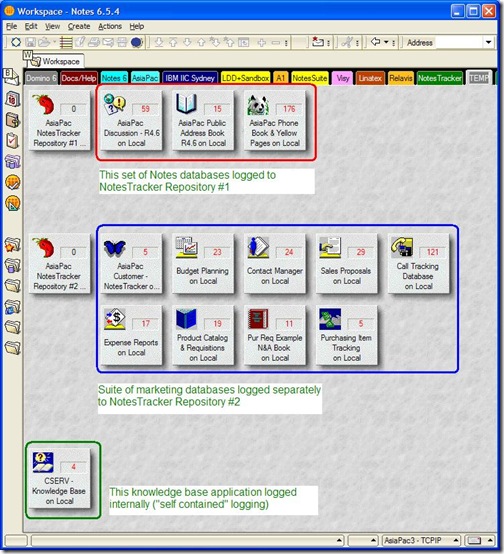
NotesTracker usage log repository configuration flexibility

You might take the simplest approach, and send all build usage log documents to a single central repository. The top two groups of applications (circled in red and blue) indicate how you might instead set up a number of different repositories grouped by application category (Marketing, Finance, HR, Manufacturing, or whatever), and at the bottom (circled in green) have any database store its own usage log documents internally. Undoubtedly you would have many more Notes databases than illustrated above, but the same methodology applies.

NotesTracker uses nothing but regular Notes/Domino capabilities. Usage log records  (documents) are replicated in the normal fashion between servers, giving a composite organizational usage picture covering both Notes Client and Web browser activities.

How is reporting done? Via ordinary Notes views of course, nothing special. A pre-built set of NotesTracker views are distributed with the SDK, and you can extend or modify these views any way you like, no specialist skills being necessary. Indeed, all of NotesTracker was carefully designed so that no more than a medium level of Notes developer and administrator skills are required for installation, programming and administration (including security).

No end-user training is required whatsoever (indeed, they may not even be aware that NotesTracker capabilities have been added to a database, although there may be legal or organizational policies that require you to inform them that their actions are being tracked).


The build-up of NotesTracker Usage Log documents, and view index overheads
Because NotesTracker is creating usage log document (one document per user interaction), the Notes administrator will need to understand the ramifications: disk space consumed and server CPU workload implications.

Presumably this would be particularly important to monitor for databases where the usage log documents are being created internally (in that database itself) and could have a noticeable effect on view opening performance. It’s probably not so critical for central NotesTracker repositories (particularly if they are placed on a dedicated disk drive), because the usage log documents are being appended to what’s already there and the speed of doing so should be quite fast, though the effect (of rapidly adding many such documents) on view indexing might be considerable. But to stress again, this is “business as usual” in terms of Domino server administrative skills needed.

As a good first rough approximation, for NotesTracker the database size increases at 1.5KB to 2KB per usage log document. The growth rate needs to be monitored, and you should devise an appropriate archive-and-purge strategy if disk space is a worry. How frequently you purge log documents should primarily be determined by the length of time — typically a number of months (or even years) — for which you wish to retain usage metrics.

Of course, it’s not only document contents that take up space in a database. Keep in mind that view indexes will have a major impact on database growth, rather than the relatively small amount of data stored in the log documents. To reduce Notes Client view opening overheads (and Domino server workload needed to maintain the view indexes), the number of sorted view columns has been kept reasonably low. However, you may wish to alter the view designs to decrease the number of sorted view columns even further, or to make other changes that balance view opening times against indexing overheads to your satisfaction.

As a guide, one user of NotesTracker found that some 60,000 Usage Log entries occupied close to 1 GB of disk space, equating to an average of 16 to 17 KB per usage log document. I’m not sure if they removed any of the default views from the repository, or altered any of the views’ indexing properties, both of which could have a big influence on this average. (Naturally enough, other Notes applications could and almost certainly would have quite different characteristics. Your mileage may vary, as the saying goes.)


Disk Space management – the NotesTracker archiving agent
In NotesTracker there is an archive agent that can be run as-required or on a scheduled basis, giving you the control you need to remove historic log records for managing repository database size. The archive agent is discussed a little further on.


Monitoring and Managing Usage Log view indexes
The NotesTracker Repository is distributed with around 35 views. Some views will only ever contain a small number of documents, even down to a single document. Most of the views are based on a selection of Usage Log documents (all of them, or a subset), and might contain tens of thousands of documents depending on the level of activity in your applications and the length of time — weeks or months — that Usage Log records have been stored before being archived.

The set of NotesTracker views provided are configured generally to discard their indexes after 14 days of inactivity, and it’s simple for you to alter these settings if you wish.

You should monitor the NotesTracker view index sizes over time. If there is any view that is used rarely, you should consider setting its view the discard period to a smaller number of days or perhaps even consider removing the view from the Repository.

It’s interesting to note that NotesTracker has a unique method for you to make an extremely quick and simple, standardized modification to the designs of the views in a database, after which you can track individual view usage. This gives you a sound basis for knowing which views are heavily used (and should be retained) and which ones are seldom used (thereby being candidates for being removed from the database’s design). Indeed, one company purchased a NotesTracker license just to do this very thing.
To get a look at the innards of a Notes database, you could use a Domino console command of the form:
      show database database_filename

Here’s an example for database notestracker.nsf in subfolder notestracker_v5.1:

image

But let’s do things a much better way: using the Domino Administrator client to look inside the database. Consider a newly-created NotesTracker Repository database, which we select like this:

image

The resulting panel “Manage the views of this database” (next image) show as that a group of Usage Tracking views, circled in red, have indexes that are some three or four times larger than other Usage Tracking views (circled in green). The index size difference essentially reflect the complexity of the individual view designs, nothing else. For this exercise, it will be the views circled in red that we focus on., but this has no effect on the overall argument.

As mentioned above, this example database is quite small. It contains  only about 900 Usage Log documents and its overall size is only about 14 MB.

Firstly, a new “empty” copy of the database was made, containing no Usage Log documents as a base point. Its size with empty view indexes was less than 4 MB. You will notice that the various view index sizes ranged between 1 KB and 4 KB.

image

Then normal database activity was carried out for a short while: creating, reading, updating, deleting documents inn other databases. This generated some 6140 Usage Log documents in this NotesTracker Repository database.

Then each of the twelve commonly-used views circled in red in the following image was displayed, causing their indexes to be created. The repository database size increased from 4 MB to 74 MB, and the index sizes (focus on the twelve circled in red) looked like this:

image 

Note that this was somewhat atypical, having a very high disk space percentage used of 99.3% — because this NotesTracker Repository is essentially a logging database, the main activity being sequential adding of Usage Log documents. It is likely that most “normal” databases would in practice have a significant percentage of “white space” (until they are compacted).

Finally, a new copy of this database was made, and its size was reduced to 9 MB (an somewhat easier way to eliminate the view indexes, compared with manually initiating a compaction).

This indicates that the 6140 documents themselves occupied about 5 MB (that is, 9 MB minus the “empty” database size of 4 MB).

We saw a little earlier that with full view indexes the database size was 74 MB, therefore the 6140 documents had view indexes (for 12 views) totaling about This all indicates that each Usage Log document adds, as a simple approximation, about 1 KB per view!

Extrapolating this to thousands or tens of thousands of Usage Log documents obviously will lead to much larger overall Repository size. Obviously the removal of unused Usage Log views could significantly reduce Repository size.

Summary
This brief insight into view index creation should give you a more definitive basis for managing your NotesTracker usage log repository databases. The same general approach can be applied for managing the views in your own inventory of Lotus Notes/Domino applications.

I first learned about Notes in 1993, just into early retirement from IBM. Compared with the lumbering mainframe office systems architecture that IBM had spent a decade or more trying to get off the ground, I was (and still am) struck with the way that “plain vanilla” Lotus Notes and Domino do smart stuff such as replication with simplicity and elegance.

The basic underpinnings of the Notes/Domino document-oriented database architecture are still without peer, and there’s still a big role for it (compared with other platforms, which shall remain nameless, because Ed Brill and others in the Lotus community say quite enough to go around).

Let the battle rage on, competition is good for us all, keeping us all on our toes and leading to improvements all around. Crikey, it’s my 40th year in the IT industry, and I’m still enjoying it — I must be crazy!

Saturday, May 16, 2009

How to stop Samsung 204B LCD monitor blackouts

Here’s a tip that hopefully will assist those who have Samsung 204B LCD monitors and who are encountering random momentary blackouts. (It might help with some other monitor models too, or at least give you some extra ideas.)

This great white shark has its eyes on you for a snack! (Click to enlarge.) A couple of years ago, tiring of the limitations of notebook PCs, I purchased a fast new dual-processor desktop system with two graphics cards. Each video card came with one DVI (digital) and one VGA (analog) adapter, and after a few months I had attached four very nice 1600 x 1200 Samsung 204B monitors, as shown adjacent, in a handy inverted-T arrangement.

Compared with only some five years ago, when a single 1600 x 1200 resolution CRT monitor could set you back well over a thousand dollars, today purchasing high quality LCD monitors is far less expensive, and it’s a false economy for any serious worker not to have at least two of them. Having three or four is just “icing on the cake” and won’t break the bank. I tend to have windows open all over the place, for monitoring e-mail, programming, web page and image design, blog monitoring an posting, and more.

TIP - The Samsung 204B has one additional advantage: you can rotate the monitor from landscape to portrait mode, the latter of course being extremely useful for intensively editing documents (such as the several weeks I spent carefully rewriting and extending the NotesTracker Version 5 Guide). Look for this feature next time you buy a monitor, and check that the vendor provides accompanying software to support the dual modes.

The only problem that I’ve ever encountered with the Samsung 204B monitors was this curious but also intensely irritating. There would be blackouts, each lasting a second or two, occasionally in rapid succession and with no easily discernable pattern of occurrence.

Apparently -- though Samsung doesn’t seem to have publicly admitted it -- this behavior results from the 204B model, running at native 1600 x 1200 resolution with 32-bit color depth and at 60 Hz refresh rate, not quite being able to cope with the 165 MHz transfer rate of the DVI interface. I only found out about this cause by scouring forums and blogs (see here, for example: http://forums.techpowerup.com/showthread.php?p=721013 ). When I originally encountered this problem in early 2007, it was resolved as suggested by such non-Samsung sources, by opening the NVIDIA Control Panel, selecting the obscurely-named “CVT reduced blank” timing option, and setting the refresh rate to a value slightly below the default 60 Hz.

All went swimmingly until a few days ago, when one of the two video cards failed. Upon checking, it looked as if the other one might be on its last legs, so I obtained two new cards each (preferring to have two identical models for ease of configuration). As before, each card had one DVI plus one VGA adapter.

When I fired up the system again, I soon found out that the blackouts had returned with a vengeance! Remembering the original solution, I blithely went about re-applying the original “CVT reduced blank” solution. However, I found that the NVIDIA Control Panel had been redesigned, and it took a frustrating fifteen or twenty minutes before I could even locate this setting again. (Why do software designers move things around between releases, making them hard to find?)

There no longer was a “Manage custom timings” high-level menu item. It took me a good while to discover that instead you have to select the “Manage custom resolutions” high-level menu item,which opens a panel like this:

image

Simple, I thought, there’s an option if plain view to alter the refresh rate.But when I tried to enter a refresh rate of 59.90 I discovered that it ignore the decimal point and finished up with 5990 Hz instead. Frustration! What to do now?

Next, I clicked the “Advanced” button and the panel expanded out like this:

image

Aha, now I could see a “Timing standard” field. So I expanded the timing standard drop-down list, and was able to select the “CVT reduced blank” option. Problem solved, I said to myself:

image

But when I looked at the bottom of the panel, the “Desired refresh rate” was grayed out(greyed out, if you prefer). Throwing all caution to the wind, I selected the “Manual” timing standard option, and at long last was able to drop the refresh rate to a value slightly below 60.000 Hz, like this:

image

And I can now report, after more than 24 hours of running, that there have been no more screen blackouts. Hurrah! Hooray!

Monday, May 11, 2009

SDMS Version 4.5 for Lotus Notes/Domino now available for Beta testing

SDMS is a very popular free “simple document management system” for IBM Lotus Notes and Domino, see the home page asiapac.com.au or notestracker.com for the download link to the current production version 4.4 of SDMS.

SDMS incorporates our NotesTracker capability for comprehensive tracking of database activities.

Version 4.5 of SDMS has been completed, and is now in beta testing. If you would like to carry out some testing of SDMS v4.5 then please send a request to participate via e-mail to SDMS_beta < at > asiapac <dot> com <dot> au

Tuesday, April 21, 2009

Image served out by Domino not visible in browser – Help needed!

I’ve been working on some enhancement to SDMS (a freeware “simple document management system” with built-in NotesTracker), and have encountered a Domino web design issue that I haven’t been able to nut out.

So I’m now calling for assistance from all you Domino web design wizards out there whom I know do far more IBM Lotus Domino web design than myself and who have in-depth knowledge/experience with how Domino serves out Rich Text images to the web. None of the many blog posts and forum discussions that I’ve scoured seem to be tackling quite the same browser image-handling issue that I’ll describe below.

I’ve done a fair bit of research on the matter, but haven’t quite crack this one. Perhaps I’ve overlooked some basic Domino web design point – which would be far from first time for me -- but I suspect it might be one of those quirks of the Domino web server that irritate us.

My aim was to add four new user-editable fields to the SDMS Profile document so that, in both Notes Client and Web Browser environments. they would appear at the top of each SDMS window alongside the previous three plain text heading lines.

The four fields are labeled A, B, C and D in the following two images (Notes Client on the left, web browser on the right, click an image to enlarge it):

SDMS_V4.5_new_heading_fieldsSDMS_V4.5_new_heading_fields_Browser

Fields B, C and D are plain text fields that display without problem in both environments. Change them in the SDMS Profile document and the changed value displays in the Notes Client or browser.

The problem that I’m having is with Rich Text field A. This is intended to act as a container of a user-selected logo image to better represent or brand a given SDMS database. (In current versions of SDMS, this is a static image of my own Asia/Pacific Computer Services logo, and I want to allow users now to be able to override this with an image of their own choosing.)

I use the following code to retrieve the logo image and display it on the form (inside the top frame of the frameset):

temp_Logo := @GetProfileField( "SDMS_profile"; "Logo" );
@SetDocField( @DocumentUniqueID; "Logo"; temp_Logo )

These formulae work fine for the Notes Client, but fail miserably for the web browser client.

All that appears is the dreaded image download placeholder, which I’ve highlighted in yellow in the above right illustration.

SDMS_V4.5_new_heading_fields_Browser_image_properties

I just cannot get the logo image to display in a browser. I’ve tried several browsers (IE8, Firefox 3, and others) with the same result regardless of which browser.

The image placeholder has properties like in the third illustration.

If I save a different-sized image in the SDMS Profile document, the dimensions property at F changes to match the new image, and the image placeholder correspondingly changes shape.

Thus the Domino server (HTML task?) must be retrieving the image file, but why doesn’t it actually display the image in the browser window? As you can see at point E in the illustration, curiously the image’s URL consists of everything but the image filename.

What’s going on under the covers? Is it some quirk of the Domino HTML task that prevents it in some subtle way from being able to handle/display an image retrieved from a Rich Text field?

I was toying with writing some LotusScript that would store the image file into a database Image Resource object that had a fixed filename, but couldn’t see any script class with a method for doing this. Is there any way to accomplish such a feat? Besides which, why should I have to go to so much extra trouble when the text fields are being displayed without drama (via the simple @GetProfileField and @SetDocField formulae) yet the image stored in the Rich text field isn’t?

So guys and gals… Please HELP, HELP, HELP!

Small businesses bringing economic stress home – Microsoft survey

I’ve just published a podcast interview and associated summary article at iTWire that has just been released by Microsoft Australia.

Inese Kingsmill, director of small and mid-market business, Microsoft Australia. “It appears that many small businesses have clearly been hit by the reality of the global economic downturn as many of Australia’s small businesses are feeling the pinch and experiencing increased stress in this climate of uncertainty,” said Ms. Inese Kingsmill, director of small and mid-market business, Microsoft Australia.

38 percent of Australian small business (SMB or SME) owners and managers report their business is currently struggling or worse, when compared to this time last year. Of those, nine in 10 say the health of their business is having a negative impact on their personal lives.

I’d be extremely interested in hearing back about how you think these research results compare with what’s happening in your neck of the woods: North America, Europe, Asia or wherever.

The Australian federal government has just in the last few days admitted that it’s now inevitable, here Down Under, that we’re going to move into the same recession that they thought/hoped they had fended off by spending billions of dollars in economic stimulus packages.

My personal view is that we should continue to spend on iT, but do so rather more frugally and with explicit, definable targets in mind.

I certainly agree with the study that we should make better use of current IT resources -- such as by taking advantage of products like my very own NotesTracker to gain a better understanding of Lotus Notes usage and use Notes applications more efficiently! (Sorry, but we’ve all gotta make a living, eh?)

So, how’s business over there?

Wednesday, February 11, 2009

Koala Flags Down Cyclists to Quench Thirst in Australian Heat Wave

I don’t know whom to credit for these images, sent to me by a friend in South Australia. I will gladly attribute them properly, it the photographer contacts me.

It has been extremely hot in south-eastern Australia during the past few weeks, especially in Victoria (where the tragic, deadly bushfires raged last Saturday, 7th February) and in South Australia.

Below are some photos showing what koalas are having to do to get a drink. The photos with cyclists were taken on Tuesday night, 3rd February 2009, on the old “Eagle on the Hill" Highway (near Adelaide, South Australia).


UPDATE:
Here’s another koala, a female called Sam, rescued by a fireman the following weekend in Victoria. Sam was so thirsty that she drank three bottles of water:

Tuesday, February 10, 2009

Bushfire catastrophe in Victoria, 07 February 2009

Last Saturday afternoon I reported that down in the south-eastern corner of Australia, in the state of Victoria, we were the hottest day ever on record, and that the expected bushfires were raging all over the state.

The Bunyip State Park blaze has been fanned by gusty winds. (LINK - AAP: Simon Mossman, file photo)

It saddens me to report that as I was writing that blog post, another tragic record was being broken: the most lives ever lost in Australia due to a bushfire inferno (several hundred souls lost, and the count is still increasing as the ashes are combed). It is now classified as Australia’s worst ever peacetime natural disaster.

Many people live in towns and villages an hour or so by road from downtown Melbourne, enjoying the beautiful Australian bush while being quite close to a major metropolis.

But mother nature had this terrible event in store, with hot gale-force northwesterly winds funneled in to the Victorian region after traveling across the hot continent, and on a day of record temperature. Whether caused by lightning strikes, accident or arson, the fires roared through the tinder dry forests at speeds that caught out even the best-prepared citizens.

One eye witness described a fire front first appearing some twenty kilometres away, then reaching his location about two minutes later. TWO MINUTES! Others said that the front approached like a tsunami of flame ten or twenty metres high.

Embers were reported settling down up to ten or fifteen kilometres ahead of the fire fronts. People found themselves suddenly and totally unexpectedly surround by raging fires. A few were lucky to survive where they were, but too many poor souls weren’t.

Some tried to flee by car, but they had no hope of outpacing the fires and were incinerated as they drove.Victoria's killer fires, 07 February 2009, No. 105

There were shocking images of the shells of their cars, showing the alloy wheels having melted and spread across the road. One driver who was lucky to survive said that his timber truck had melted, not burned!

The Australian Broadcasting Corporation (ABC) has coverage of the tragic bushfires here.

Victoria had two earlier bushfire disasters in the summers of 1983 (“Ash Wednesday”) and 1939 (“Black Friday”) but the firestorms of 7th February this year were even worse than those.

Please spare a thought and say a prayer for all of the victims and their families.

You couldn’t stop this inferno with 10,000 fire trucks and 1,000 helicopters:

Is it POSSible (or PROSSible) that the great FOSS debate is missing an important point?

David M. Williams (one of my fellow writers at iTWire) has just posted an opinion piece that got my grey matter going, see Free software isn't freeware: why Linux and FOSS have a higher standard

You’ll find some interesting, on the whole supportive, comments to David’s article here.

I thought that thee was an additional aspect of open source missing from his arguments, and missing also from just about every other thing I’ve read on the FOSS topic, including those by the arch-advocate Richard Stallman, so I added these comments on iTWire

You haven't quite covered all the bases regarding "free" and "gratis" and "non-gratis" and "open source" in my opinion.

Let's have a pseudo-hypothetical example. Apart from other gratis apps that I generously offer, suppose I have a non-gratis product "Fantastic App" -- gotta make a living somehow, so why not charge for at least one of my apps?

I've slaved away developing over many months, and keep coming out with minor enhancements (let's call these "releases') and less frequently major enhancements (let's call these "versions"). If you are willing to agree with the license and usage terms for FantasticApp and pay a license fee for any given version of it, then I let you have it together with all the source code to use however you like throughout your organization. All bug fixes and minor releases incur no extra fee, but there's an upgrade fee if you choose to upgrade to a newer major version.

Since you have all the source then surely FantasticApp is "open source" is it not? If I get run over by the proverbial Bourke Street bus (you probably don't know that we had double-decker buses in Bourke Street, Melbourne, some decades ago), there's no issue since you have all of the code.

But it's proprietary because the license states that you cannot share it with anybody outside your organization. Nobody forced you to purchase the license in the first place. You were free to try to get the same or a similar app elsewhere, presumably agreeing to license my app because it was the only one of its sort or the other were in some way unsuitable for your needs.

I would intend to demand payment from and/or sue any organization that obtained the source for FantasticApp without paying the appropriate license fee, or released to other organizations who hadn't paid up.

So this is a piece of non-gratis "proprietary open source software" (or "POSS") is it not? Or maybe it would be more accurately labeled "proprietary restricted open source software" (or "PROSS"). What's wrong with all that? Surely we aren't expected to develop apps like FantasticApp for no financial return if we want to make a living from them from at least some of our efforts, that seems absurd to me.

Richard Stallman, eat your heart out over this one!

And what are your opinions on my POSS/PROSS concept?