I've just published iTWire technology crossword (TechWords) number 2 and its theme is products from Apple Inc.
Future crosswords will often have a theme too, including: Microsoft, Sun Microsystems, IBM/Lotus, various computer languages (such as Java, Visual Basic, C#, LotusScript, who knows what else) and all sorts of other technology-related subjects, whatever appeals to me at the time.
Enjoy!
Sunday, July 27, 2008


Lost your speech? ... How to fix Dragon speech.dll incorrect version error
Recently I decided to take another look at speech recognition for Windows, after immersing myself in it during the mid-1990s and finding that (a) the software left a lot to be desired in terms of coping with the the oddities and quirks of the English language, and (b) the PC hardware at that time was very inadequate in terms of the processing power required to analyze speech on the fly, thereby leading to unnatural forced pauses during the dictation phase.
It seems that in 2008 the only player left on the field is Nuance Communications Inc's Dragon NaturallySpeaking (version 9.5 being the latest edition, being essential a Vista-compatible update of Version 9.0).
I'm a little over a week into the process of familiarizing myself with NaturallySpeaking (DNS) and am rather impressed by it. I'll have more to say on this in the future, but right now thought that I would log a little issue that I came across, in the spirit that such blog postings help other people who encounter the same variety of issues, for example:
After installing UT2000 I discovered that DNS refused to start up, with an error dialog stating that it would not continue because an old version 4.0.4.2128 of the speech.dll file was installed (in the WINDOWS\speech folder) and it needed the latest version 4.0.4.2512 to operate with good stability and performance.
I spent quite a few hours after that diagnosing and trying to solve this problem. It turned out that when installing UT2000 I had also installed a companion product that could be used to pronounce the typed words, and it was this which had overwritten the latest speech.dll with the older version (a perfect example of so-called "DLL hell").
I tried uninstalling UT2000 and reinstalling it without the speech option, to no effect. I even tried Windows XP restore points and even a full repair but these too were help whatsoever.
It was as a last resort that I uninstalled NaturallySpeaking, fearing that I would lose the hours that I had spent training it to recognize my voice (my "user" files). However the team at Nuance had obviously considered this in their design, and the uninstaller offered the option to retain the user files.
Then I reinstalled NaturallySpeaking and after pointing it to my user files it was back to business. That's all there was to it, what a relief!
Why didn't I try this approach right at the start? I dunno, that's the way thing turn out sometimes I guess. But the moral of this story is to be careful in deciding to install several speech products simultaneously, and maybe making a manual Windows system restore point or a manual copy of the WINDOWS\speech folder before each install would be a way of being able to recover. Your comments welcomed...
It seems that in 2008 the only player left on the field is Nuance Communications Inc's Dragon NaturallySpeaking (version 9.5 being the latest edition, being essential a Vista-compatible update of Version 9.0).
I'm a little over a week into the process of familiarizing myself with NaturallySpeaking (DNS) and am rather impressed by it. I'll have more to say on this in the future, but right now thought that I would log a little issue that I came across, in the spirit that such blog postings help other people who encounter the same variety of issues, for example:
- An error was encountered while opening a window
- Best way to install a Netgear FR114P Print Server (and possibly others) under Windows XP -- very popular
- Tips for installing multiple Lotus Notes Client releases on a single system -- quite popular
After installing UT2000 I discovered that DNS refused to start up, with an error dialog stating that it would not continue because an old version 4.0.4.2128 of the speech.dll file was installed (in the WINDOWS\speech folder) and it needed the latest version 4.0.4.2512 to operate with good stability and performance.
I spent quite a few hours after that diagnosing and trying to solve this problem. It turned out that when installing UT2000 I had also installed a companion product that could be used to pronounce the typed words, and it was this which had overwritten the latest speech.dll with the older version (a perfect example of so-called "DLL hell").
I tried uninstalling UT2000 and reinstalling it without the speech option, to no effect. I even tried Windows XP restore points and even a full repair but these too were help whatsoever.
It was as a last resort that I uninstalled NaturallySpeaking, fearing that I would lose the hours that I had spent training it to recognize my voice (my "user" files). However the team at Nuance had obviously considered this in their design, and the uninstaller offered the option to retain the user files.
Then I reinstalled NaturallySpeaking and after pointing it to my user files it was back to business. That's all there was to it, what a relief!
Why didn't I try this approach right at the start? I dunno, that's the way thing turn out sometimes I guess. But the moral of this story is to be careful in deciding to install several speech products simultaneously, and maybe making a manual Windows system restore point or a manual copy of the WINDOWS\speech folder before each install would be a way of being able to recover. Your comments welcomed...
Saturday, July 26, 2008
New TechWords Technology Crossword at iTWire
Do you like playing with words and spoken languages? I do, and even have a resources links page on my web site here (or mirror image backup site here).
Last year, I started blogging for Australian technology site iTWire -- see my list of articles at A Meaningful Look at Desktop & Enterprise Computing.
My latest contribution, possibly a world-first (but probably not, even if close to it) is TechWords Interactive Technology Crossword - No. 001 which looks like this:

What's a bit different about these crosswords is that their subject matter is largely technology (mostly IT-related subjects). And instead of having to print them to be solved offline, you can interact with the crossword, with the ability to request letter hints and word hints as well as being able to check your entries.
This is the first of a planned series of crosswords. Future editions, at least some of them, will be based around themes such a "Linux" or "Lotus Notes" or "Microsoft" and the like.
As an aside, I now have a very healthy respect for the makers of crosswords! It's much harder to devise meaningful clues than you would think. The cross-matching and interlinking of clues is a very painful process. I wouldn't have even attempted it without purchasing Crossword Forge from Sol Robots (thanks, Cortis Clark).
Why not skip over there right now and try your hand at iTWire TechWords Number 001?
Last year, I started blogging for Australian technology site iTWire -- see my list of articles at A Meaningful Look at Desktop & Enterprise Computing.
My latest contribution, possibly a world-first (but probably not, even if close to it) is TechWords Interactive Technology Crossword - No. 001 which looks like this:

What's a bit different about these crosswords is that their subject matter is largely technology (mostly IT-related subjects). And instead of having to print them to be solved offline, you can interact with the crossword, with the ability to request letter hints and word hints as well as being able to check your entries.
This is the first of a planned series of crosswords. Future editions, at least some of them, will be based around themes such a "Linux" or "Lotus Notes" or "Microsoft" and the like.
As an aside, I now have a very healthy respect for the makers of crosswords! It's much harder to devise meaningful clues than you would think. The cross-matching and interlinking of clues is a very painful process. I wouldn't have even attempted it without purchasing Crossword Forge from Sol Robots (thanks, Cortis Clark).
Why not skip over there right now and try your hand at iTWire TechWords Number 001?
Saturday, June 21, 2008
How to fix Eudora when the spell checker doesn't want to remember added words
I started using Eudora as my mail client way back in 1993 or thereabouts. I still use Eudora to this day; it's not perfect, but has many redeeming features, so why not?
Anyhow, I've just had to rebuild my system and after re-installing Eudora suffered from a somewhat obscure and irksome little problem that I've encountered previously, so thankfully I knew how to overcome it.
For those Eudora users still out there -- I'm sure there are a few -- here's my description of the problem and how to fix it if you ever encounter it. (Since Qualcomm has decommitted Eudora, you mightn't find this solution described anywhere else.) I know that several other "How To" tips that I've blogged about previously have saved the day for other people, so here goes.
The two examples show Eudora's automatic and manual spell checker at work. Nothing unusual here, you just ignore the word, or add it to the dictionary and it should be recognized as a valid word from then on. (Click on any of the images for a larger view.)
Example of Eudora's automatic spell checking:
 Example of Eudora's manually-initiated spell checking (via pressing the Ctrl+6 key combination):
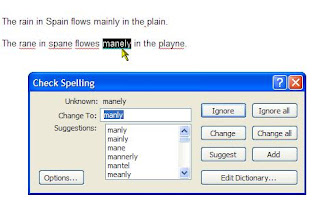
The problem is that next time you come across the supposedly-added word, you find that it's still underlined in red, meaning that for some reason Eudora hasn't remembered it (stored it in the spelling dictionary).
This behavior just about drove me crazy when I first suffered from it some years ago. Eventually, I gave in and had to call Qualcomm technical support, and obviously it was a common occurrence, so the support person was able to tell me the solution without hesitation.
STEP 1 -- Exit from Eudora.
STEP 2 -- Go to the Eudora program folder, and locate the added words dictionary file named uignore.tlx
STEP 3 -- You should find that this file has the Read-only attribute, preventing the spell checker from adding new words. (It beats me why you don't get an error message as soon as you attempt to add a word, but that's how it is folks.)
STEP 4 -- Remove the Read-only attribute for this file (by changing the file attribute from "ra" to "a"). The following diagram shows the desired result:

STEP 5 -- Launch Eudora again, and added words should be successfully "remembered" (stored in this file) from now on.
In the absence of Qualcomm support for this excellent but decommitted product, I hope that the above helps a few of you out of a predicament!
Anyhow, I've just had to rebuild my system and after re-installing Eudora suffered from a somewhat obscure and irksome little problem that I've encountered previously, so thankfully I knew how to overcome it.
For those Eudora users still out there -- I'm sure there are a few -- here's my description of the problem and how to fix it if you ever encounter it. (Since Qualcomm has decommitted Eudora, you mightn't find this solution described anywhere else.) I know that several other "How To" tips that I've blogged about previously have saved the day for other people, so here goes.
The two examples show Eudora's automatic and manual spell checker at work. Nothing unusual here, you just ignore the word, or add it to the dictionary and it should be recognized as a valid word from then on. (Click on any of the images for a larger view.)
Example of Eudora's automatic spell checking:
 Example of Eudora's manually-initiated spell checking (via pressing the Ctrl+6 key combination):
The problem is that next time you come across the supposedly-added word, you find that it's still underlined in red, meaning that for some reason Eudora hasn't remembered it (stored it in the spelling dictionary).
This behavior just about drove me crazy when I first suffered from it some years ago. Eventually, I gave in and had to call Qualcomm technical support, and obviously it was a common occurrence, so the support person was able to tell me the solution without hesitation.
STEP 1 -- Exit from Eudora.
STEP 2 -- Go to the Eudora program folder, and locate the added words dictionary file named uignore.tlx
STEP 3 -- You should find that this file has the Read-only attribute, preventing the spell checker from adding new words. (It beats me why you don't get an error message as soon as you attempt to add a word, but that's how it is folks.)
STEP 4 -- Remove the Read-only attribute for this file (by changing the file attribute from "ra" to "a"). The following diagram shows the desired result:

STEP 5 -- Launch Eudora again, and added words should be successfully "remembered" (stored in this file) from now on.
In the absence of Qualcomm support for this excellent but decommitted product, I hope that the above helps a few of you out of a predicament!
Monday, April 14, 2008
Some basic usability features missing from Adobe Reader
I really like Adobe Reader and use it very frequently. It's probably one of the most popular pieces of software available, and it works across multiple environments due to the clever Portable Document Format (PDF) architecture.
For something that has been around for so long, I'm quite surprised that it lacks a couple of basic productivity features. I had a quick look at Adobe's web site, and couldn't locate any reference to these or how to formally request them, so here's my unofficial request list ...
Recently Used List is Limited to only 10 Documents
Over a period of several days, I might open many more than ten PDF documents, and often I want to re-open some of them from a few days ago. However, you can only set up a maximum of ten documents in the Recently used List (and the default is a miserly five documents):
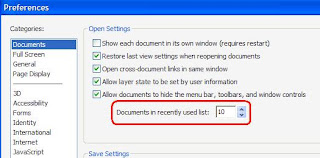
This is my main usability complaint against Adobe Reader (as at Release 8.1). The list size needs to be increased to store far more than the current maximum of 10 file names. I reckon that it should cater for at least 40 or 50 recently viewed documents, so that I can quickly and effectively re-open just about any document that I've viewed during the last week or two.
Tabbed Browsing of PDF Documents
I find it very clumsy to move backwards and forwards between open PDF documents, via the Windows menu item. I regard it as essential that the various open documents should be navigated to via tabs, like all of the current browsers do. Further, it should support tabs in multiple rows, which is the only workable method to manage navigation when you have 20 or 30 documents open at once (which I would do fairly often if I could).
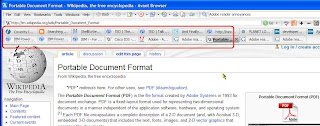 And for the icing on the cake, as with my favorite Avant Browser (and Firefox, and others, but unlike Internet Explorer 7, which is pitiable in this regard) it would be nice if the tabs can be optionally positioned at the bottom of the viewing window so as to remove clutter from the top.
Facility to Bookmark PDF Documents, and in Groups
Using Avant Browser (and there's a feature like this in other browsers too), you can not only save 'bookmarks' or 'favorites' so that previously-viewed items can be quickly retrieved, but also you can bookmark PDF documents, and groups of PDF documents (thereby, in the latter case, enabling you to retrieve a whole set or subset of documents in one fell swoop). The following images give a snapshot of how Avant Browser does it:
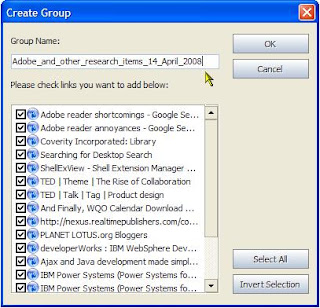
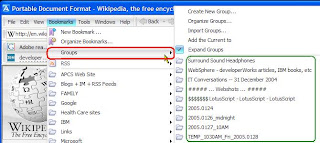
BTW, it so happens that Avant Browser is developed by a single person, so surely Adobe could devote a little development resource to match this! Features like the above would be a tremendous boon to Adobe Reader users in general -- even more so to heavy users and researchers like myself.
Enough said! What do you think? Would you find all or some of the above useful too?
For something that has been around for so long, I'm quite surprised that it lacks a couple of basic productivity features. I had a quick look at Adobe's web site, and couldn't locate any reference to these or how to formally request them, so here's my unofficial request list ...
Recently Used List is Limited to only 10 Documents
Over a period of several days, I might open many more than ten PDF documents, and often I want to re-open some of them from a few days ago. However, you can only set up a maximum of ten documents in the Recently used List (and the default is a miserly five documents):

This is my main usability complaint against Adobe Reader (as at Release 8.1). The list size needs to be increased to store far more than the current maximum of 10 file names. I reckon that it should cater for at least 40 or 50 recently viewed documents, so that I can quickly and effectively re-open just about any document that I've viewed during the last week or two.
Tabbed Browsing of PDF Documents
I find it very clumsy to move backwards and forwards between open PDF documents, via the Windows menu item. I regard it as essential that the various open documents should be navigated to via tabs, like all of the current browsers do. Further, it should support tabs in multiple rows, which is the only workable method to manage navigation when you have 20 or 30 documents open at once (which I would do fairly often if I could).
 And for the icing on the cake, as with my favorite Avant Browser (and Firefox, and others, but unlike Internet Explorer 7, which is pitiable in this regard) it would be nice if the tabs can be optionally positioned at the bottom of the viewing window so as to remove clutter from the top.
Facility to Bookmark PDF Documents, and in Groups
Using Avant Browser (and there's a feature like this in other browsers too), you can not only save 'bookmarks' or 'favorites' so that previously-viewed items can be quickly retrieved, but also you can bookmark PDF documents, and groups of PDF documents (thereby, in the latter case, enabling you to retrieve a whole set or subset of documents in one fell swoop). The following images give a snapshot of how Avant Browser does it:


BTW, it so happens that Avant Browser is developed by a single person, so surely Adobe could devote a little development resource to match this! Features like the above would be a tremendous boon to Adobe Reader users in general -- even more so to heavy users and researchers like myself.
Enough said! What do you think? Would you find all or some of the above useful too?
Saturday, February 16, 2008
Guidelines for developing Lotus Notes/Domino Internet applications
An Aussie mate of mine, Ethann Castell, has recently published a very nice article that everyone who's involved with Lotus Notes/Domino applications for the Internet should read and heed. You'll find his article here:
Top 10 issues when developing Lotus Notes Domino Internet applications
Ethann's article for some reason triggered a bout of recalling memories about computing hardware and software that I've been involved with.
This is my 39th year in the IT industry (I've been programming for over forty years though). I started with IBM Australia in January 1970, and took an early -- very early -- retirement package offer at the end of February 1992. However, under that early retirement plan it transpired that I didn't need to formally retire from IBM until I reached the 25-year mark in mid 1995, so I managed to qualify as a member of the IBM Quarter Century Club, which is a nice thing (although, along with some other such vintage things at IBM, the QC Club is now a "pale image of its former self").
During my 22+ years active career at IBM, I worked on three or four generations of IBM systems and software platforms. This included the IBM mainframes (System/360, System/370, and later), System/7 (sensor-based, real-time computing, where I spent many months coding low-level assembler language to modify an application suite called PIMS, for the monitoring and control of plastic injection molding machines), IBM mainframe communications (SNA, VTAM, NCP, APPC, the 3741 Communications Controller,etc). Starting in the mid 1970s I got to work with System/3 (from the Rochester Development Lab in Minnesota) and its descendants: System/32, System/34, System/36 ("stick them in a corner and forget about them, they run and run, with minimal IT support") and the RPG programming language (a little weird but extremely effective for running the commercial apps back then, and still so as an enormously-improved language to this day).
In August 1978 I made my first ever Qantas flight across the wide Pacific Ocean to the USA, heading for IBM's Rochester Lab, for an intense two-week briefing on the the system code-named "Pacific" which was released as the IBM System/38. This was one of a two "epiphanies" that I experienced in the commercial IT world (more about the second one a little later). The S/38 was conceived and architected in the earlier 1970s by some brilliant IBMers at Rochester, some of whom had moved there when another leading-edge system architecture project (the FS, or "Future System") was canceled. These architects joined the Rochester L:ab and helped come up with the amazing architecture of the S/38, which later morphed (together with the best features of the highly-popular S/36) into the
Application System/400. In typical IBM product naming fashion, as the AS/400 was improved it was rebranded as "i Series" and currently goes under the moniker "System i". The original outstanding architectural foundations live on in today's models: single-level storage, technology-independent machine interface, object-based architecture, machine-level security implementation, and much more. Oh, if only some of this brilliance could make its way into the stunted PC architecture!
I had a second epiphany when I came across Lotus Notes in early 1993, soon after Release 3 had been announced. I attended a Lotus roadshow event that really opened my eyes: document-oriented architecture, seamless replication of documents across Notes network, and more. Lotus had succeeded in getting working at the PC cost level things that IBM had spent well over a decade in developing for its mainframes and (to a lesser extent) midrange systems, but still hadn't managed to make them all that popular even with its enterprise customers much less the broader constituency. A year or two later IBM took the excellent step of acquiring Lotus, and with IBM's deeper pockets the ongoing development of Notes was assured. Many new features were added in subsequent releases.
For Release 4.1 an experimental Internet capability, called Internotes, was added to the "Lotus Notes Server" and this was seen as such a big deal that, for Release 4.5, the server component was rebranded the "Lotus Domino Server." From then on, when you talk about "Domino" you're essentially referring to the Web-serving capabilities. that is, the terms "Domino apps" and "Web apps" are synonymous.
The term "Notes apps" usually signifies the original rich style of "fat client" applications, which in my opinion to this day are to be preferred since they're usually more functional than Web apps. Yes, of course I can see the side of the argument that talks about the ubiquity of the Web. but any Web application architect/designer will be well aware of the lack of standardization of browsers, the limitations of the architecture for handling applications (issues with handling the browser's "Back" key being just one example), the issues with Web pages that are served out dynamically (via DHTML, or AJAX, or whatever) not being search engine friendly, and a host of other things. Even though it is proprietary, at least the Lotus Notes Client is a single, controlled development target compared with the zoo that is the Web application world!
Well, I've certainly rambled on a bit too far today, eh. I fully understand that Web applications are essential. IBM has been putting much effort into enhancing Lotus Notes and Domino, witness the snazzy Eclipse-based Lotus Notes 8.0 client.
Domino-based Web apps will continue to be developed and deployed for the foreseeable future, therefore again I exhort you to go read Ethann's article for a very nice summary of important considerations.
Top 10 issues when developing Lotus Notes Domino Internet applications
Ethann's article for some reason triggered a bout of recalling memories about computing hardware and software that I've been involved with.
This is my 39th year in the IT industry (I've been programming for over forty years though). I started with IBM Australia in January 1970, and took an early -- very early -- retirement package offer at the end of February 1992. However, under that early retirement plan it transpired that I didn't need to formally retire from IBM until I reached the 25-year mark in mid 1995, so I managed to qualify as a member of the IBM Quarter Century Club, which is a nice thing (although, along with some other such vintage things at IBM, the QC Club is now a "pale image of its former self").
During my 22+ years active career at IBM, I worked on three or four generations of IBM systems and software platforms. This included the IBM mainframes (System/360, System/370, and later), System/7 (sensor-based, real-time computing, where I spent many months coding low-level assembler language to modify an application suite called PIMS, for the monitoring and control of plastic injection molding machines), IBM mainframe communications (SNA, VTAM, NCP, APPC, the 3741 Communications Controller,etc). Starting in the mid 1970s I got to work with System/3 (from the Rochester Development Lab in Minnesota) and its descendants: System/32, System/34, System/36 ("stick them in a corner and forget about them, they run and run, with minimal IT support") and the RPG programming language (a little weird but extremely effective for running the commercial apps back then, and still so as an enormously-improved language to this day).
In August 1978 I made my first ever Qantas flight across the wide Pacific Ocean to the USA, heading for IBM's Rochester Lab, for an intense two-week briefing on the the system code-named "Pacific" which was released as the IBM System/38. This was one of a two "epiphanies" that I experienced in the commercial IT world (more about the second one a little later). The S/38 was conceived and architected in the earlier 1970s by some brilliant IBMers at Rochester, some of whom had moved there when another leading-edge system architecture project (the FS, or "Future System") was canceled. These architects joined the Rochester L:ab and helped come up with the amazing architecture of the S/38, which later morphed (together with the best features of the highly-popular S/36) into the
Application System/400. In typical IBM product naming fashion, as the AS/400 was improved it was rebranded as "i Series" and currently goes under the moniker "System i". The original outstanding architectural foundations live on in today's models: single-level storage, technology-independent machine interface, object-based architecture, machine-level security implementation, and much more. Oh, if only some of this brilliance could make its way into the stunted PC architecture!
I had a second epiphany when I came across Lotus Notes in early 1993, soon after Release 3 had been announced. I attended a Lotus roadshow event that really opened my eyes: document-oriented architecture, seamless replication of documents across Notes network, and more. Lotus had succeeded in getting working at the PC cost level things that IBM had spent well over a decade in developing for its mainframes and (to a lesser extent) midrange systems, but still hadn't managed to make them all that popular even with its enterprise customers much less the broader constituency. A year or two later IBM took the excellent step of acquiring Lotus, and with IBM's deeper pockets the ongoing development of Notes was assured. Many new features were added in subsequent releases.
For Release 4.1 an experimental Internet capability, called Internotes, was added to the "Lotus Notes Server" and this was seen as such a big deal that, for Release 4.5, the server component was rebranded the "Lotus Domino Server." From then on, when you talk about "Domino" you're essentially referring to the Web-serving capabilities. that is, the terms "Domino apps" and "Web apps" are synonymous.
The term "Notes apps" usually signifies the original rich style of "fat client" applications, which in my opinion to this day are to be preferred since they're usually more functional than Web apps. Yes, of course I can see the side of the argument that talks about the ubiquity of the Web. but any Web application architect/designer will be well aware of the lack of standardization of browsers, the limitations of the architecture for handling applications (issues with handling the browser's "Back" key being just one example), the issues with Web pages that are served out dynamically (via DHTML, or AJAX, or whatever) not being search engine friendly, and a host of other things. Even though it is proprietary, at least the Lotus Notes Client is a single, controlled development target compared with the zoo that is the Web application world!
Well, I've certainly rambled on a bit too far today, eh. I fully understand that Web applications are essential. IBM has been putting much effort into enhancing Lotus Notes and Domino, witness the snazzy Eclipse-based Lotus Notes 8.0 client.
Domino-based Web apps will continue to be developed and deployed for the foreseeable future, therefore again I exhort you to go read Ethann's article for a very nice summary of important considerations.
Friday, February 01, 2008
SOA in a Nutshell
I'm still struggling to get my head around Service Oriented Architecture and all that it implies. So far, it has only been very peripheral to what I do, so I'm ever on the outlook for pearls of wisdom about SOA.
Neil Ward-Dutton of Macehiter-Ward-Dutton has come up with a very nice visual summary diagram of the key benefits of an SOA approach at SOA's five benefits in one picture (click on the image there to see a legible enlargement, below is merely a thumbnail).

Neil Ward-Dutton of Macehiter-Ward-Dutton has come up with a very nice visual summary diagram of the key benefits of an SOA approach at SOA's five benefits in one picture (click on the image there to see a legible enlargement, below is merely a thumbnail).

Wednesday, January 30, 2008
asiapac.com.au Browser Share, late January 2008

This is the latest installment in a series of informal browser share snapshots that I've been publishing on this blog for several years now.
Today's snapshot matches pretty well the browser share statistics coming from European countries as measured via XiTiMonitor, published 24 January 2008: Relance de la part de visites de Mozilla Firefox dans Les pays européens fin 2007 (Google translation from French to English here).
I noticed Firefox share fluctuating, with a drop-off starting roughly in the middle of 2007, building up to a regular 25% to 30% towards the end of 2007. Also that a quite large proportion of Internet Explorer visits are still via the rather long-in-the-tooth IE6 rather than IE7.
Sunday, October 21, 2007
Firefox 2.0.0.8 can cause add-ons (extensions) to stop working

Here's another one of my occasional posts aiming to hopefully reduce other peoples' angst ...
I was happily working away with Firefox version 2.0.0.7 the other day (October 20th), when out of the blue a dialog box popped up informing me that version 2.0.0.8 had been installed and would come into effect next time that I started the browser.
That seemed innocuous enough. I'd seen the update message a number of times before and had no issues with the newly-installed version. But this time, things were different!
When I restarted under version 2.0.0.8 I went looking for tabs at the bottom of the screen -- put there as an option of the nice Tab Mix Plus add-on (extension) -- and was surprised not to find any tabs down there. Then I looked to the top, and this is where the tabs now were to be found (without any directive from me).
Thinking this must have been a minor perturbation, I tried to open the Tab Mix Plus control panel but it was nowhere to be found, nor were any of the controls for various other add-ons that I use. So I opened the add-on manager window, and found that all the add-ons were there but in a strange state, as shown in the first image.
I've started a discussion about it at this posting on ITWire and looking at this page you'll see that some people have no problems with the upgrade while others have the same problem that I encountered. Who knows why, it seems random!
Strangely, the following suggested fix that worked for me doesn't help everybody. You'll find it at mozillaZine under the topic "Corrupt extension files" on the page Unable to install themes or extensions - Firefox
- Quit Firefox
- Remove the files extensions.cache, extensions.rdf and extensions.ini from your Firefox profile folder. (Go to the Firefox profile folder and look inside the "extensions" folder. You will probably have to unhide the latter folder in order to locate the three files in question.)
- Restart Firefox
After I restarted Firefox, there immediately appeared a dialog box stating that three add-ons were incompatible with this version, so I followed the advice and disabled/deleted them, after which the add-ons all appeared as with version 2.0.0.7, thank goodness. (It also prompted me to do some housekeeping by uninstalling various add-ons that I've experimented with but rarely if ever use.)
It beats me why the Firefox v2.0.0.8 installer couldn't identify those problematic add-ons and save me all the pain -- but that's life!
Now I've decided to turn off automatic installation, via Tools > Options > Advanced as follows:


Monday, September 17, 2007
Out of Africa ... and into Iraq, or was that Mauritius?
For sheer inventiveness, you have to hand it to some of the "darker elements" who use the Internet.
Reportedly, the designers of XXX-rated sex and porn sites are amongst the earliest adopters of new web design techniques, putting some more conventional sites to shame.
This also seems to apply to the scamsters behind "419 fraud" -- named after the relevant section in Nigeria's criminal code , this country being the original centre of such activity.
I've kept copies of typical 419 messages going back to 2003, when such frauds really started getting popular. These messages came thick and fast until about 2005, at which point they seemed to die down and other more obtrusive forms of malware took over (spambots, key loggers, and all the rest of it).
Well, it's a case of "down, but not out" it would seem. Some scammers must still be profiting from this old-hat approach, and a message that arrived overnight tickled my fancy enough for me to want to post a copy of it in its entirety, if only as an appreciation of the scammer's black art.
My apologies to the "Mr John England" sending from an anonymous Hotmail address. Strangely, your client IP address 41.210.24.19 tells me that you're probably in Mauritius rather than Iraq. Anyhow, I felt that others might want to know about your kind offer, so here it is verbatim:
I'm not sure about your reference to the "very lager box" (presumably it contained some beer), and I don't think that the "Shittes" would be very impressed with your message. Your use of the English language certainly belies your surname, Mr English!
By the way, what's your telephone number and street address in Iraq, or even Mauritius, so that I can contact you by regular mail? And may I have your bank account details too, just your credit card logon and password will be okay? Your 14% offer looks a bit low to me, how high are you prepared to go? You can post all of your replies as comments to this Blogger article.
Reportedly, the designers of XXX-rated sex and porn sites are amongst the earliest adopters of new web design techniques, putting some more conventional sites to shame.
This also seems to apply to the scamsters behind "419 fraud" -- named after the relevant section in Nigeria's criminal code , this country being the original centre of such activity.
I've kept copies of typical 419 messages going back to 2003, when such frauds really started getting popular. These messages came thick and fast until about 2005, at which point they seemed to die down and other more obtrusive forms of malware took over (spambots, key loggers, and all the rest of it).
Well, it's a case of "down, but not out" it would seem. Some scammers must still be profiting from this old-hat approach, and a message that arrived overnight tickled my fancy enough for me to want to post a copy of it in its entirety, if only as an appreciation of the scammer's black art.
My apologies to the "Mr John England" sending from an anonymous Hotmail address. Strangely, your client IP address 41.210.24.19 tells me that you're probably in Mauritius rather than Iraq. Anyhow, I felt that others might want to know about your kind offer, so here it is verbatim:
Subject: A massage From John. To You.
Date: Sun, 16 Sep 2007 15:06:21 -0200
Dear Friend,
With due apologies for interference in your privacy ,my name is John England, an Army contractor attached to the US Army corps of engineers in Iraq. The reason why I am explaining my findings to you are to seek for your assistance to enable you contributes immensely to the actualization of my dream.
on the 30th day of August 2007, I and my group of men under my supervision were alerted on the need of some urgent reconstruction works in Haifa Street, a long thoroughfare of high-rise buildings built and occupied by Saddam Hussein when he was alive here in Baghdad. Immediately we proceeded to the site and as we commence work to our utmost surprise we discovered a huge underground bunker in one of the buildings. Upon investigation of the bunker to our surprise we discovered one very lager box safely hidden and sealed together with numerous other boxes filled with different item, However I was attracted to the large box which was the only sealed box of them all, I told my men to open the box in order to find out the contents and when they were opened to our amazement the boxes contained US Dollars which amounted to $46M after time was taken to count them in bundles and rolls.
I however instructed them to keep this in high secrecy so that we can have the money to our selves, they all agreed to the plan, I wisely took the decision for us to share the money between our selves right there in the room to avoid suspicion in moving the very large box and that led me to having US$10.2 Million (US$10,200,000) as my own share of the money after which I concealed it in one box and decided to get the money out of the country but first I hid the money in a safe and untraceable location.
I am now in desperate need of a Reliable and Trustworthy person like you who would receive, secure and protect these boxes containing the US Dollars for me up on till my assignment elapses here. I cannot leave the boxes here in Iraq like most of my men have foolishly done due to many reasons one of which is because Iraq is getting unsafe and dangerous everyday and a full blown civil war among Shittes and Sunni Iraqis may start any moment. I assure and promise to give you 14% of this fund, however feel free to negotiate what you wish to have as your percentage in this deal.
Please assure me of your keeping this topmost secret within you so that my job would not be jeopardized.
My Sincere regards,
John England.
I'm not sure about your reference to the "very lager box" (presumably it contained some beer), and I don't think that the "Shittes" would be very impressed with your message. Your use of the English language certainly belies your surname, Mr English!
By the way, what's your telephone number and street address in Iraq, or even Mauritius, so that I can contact you by regular mail? And may I have your bank account details too, just your credit card logon and password will be okay? Your 14% offer looks a bit low to me, how high are you prepared to go? You can post all of your replies as comments to this Blogger article.
Subscribe to:
Posts (Atom)