Monday, October 15, 2012

How to fix Eudora spell checker when it locks up (hangs, freezes) when the Send button is clicked


The Eudora mail client is still treasured by some people, myself included, even though it was decommitted by Qualcomm some years ago. It still does a very good job, and I don’t want to move on to some other mail client and lose functionality that I’ve come to depend on (not to forget nearly 20 years’ worth of mail logs).

I’ve just upgraded to a new desktop PC, and had to re-install Eudora. Back came a familiar problem: it kept freezing when I clicked the send button on some messages.

Luckily I’ve been through it all before, and knew the solution, no sweat. Here it is for you other Eudora users who might still encounter this problem – I know that I’m not the only one, we dinosaurs are not yet extinct!

SYMPTOM:
Eudora locks up (hangs, freezes) when the Send button is clicked.

CAUSES AND SOLUTION:
Most likely due to one or more of the three spell-checking files have read-only attribute set, meaning that they cannot be updated when any spelling is corrected, even a single word and even if the only spelling error is in the Subject line.

The files are uchange.tlx, uignore.tlx and usuggest.tlx

     image

Selecting the option Warn me when sending/queuing message with misspellings
is what triggers the lock-ups (hangs, freezes):

image

Be sure to switch off this outgoing messages option.

Saturday, September 22, 2012

Fellow procrastinators… DO NOT put off doing this!


Time flies – tempus fugit. Should I do it? When should I do it? Why not put it off until tomorrow?

Yes, that will be fine. Mañana Is Soon Enough for Me …


It was after a fierce struggle with myself that I wrote this blog post today -- or at all.

What I actually meant to eventually get around to recommending is that you do not delay in reading the following New Yorker book review:

What does procrastination tell us about ourselves?

“The essence of procrastination lies in not doing what you think you should be doing, a mental contortion that surely accounts for the great psychic toll the habit takes on people. This is the perplexing thing about procrastination: although it seems to involve avoiding unpleasant tasks, indulging in it generally doesn’t make people happy.”

Go on, learn more about yourself, read this New Yorker article NOW.

Wednesday, September 19, 2012

ESLUG evento: 20 de septiembre en Madrid, NotesTracker presentación


I am extremely happy to announce that leading Spanish IBM partner Domino Plus has been appointed European value-added reseller and regional support point for NotesTracker. See the blog of Alejandro Ahumada here.

For the last few months I’ve been working with Dominique Perarnaud from Domino Plus who is implementing NotesTracker for a client in Spain.

He is delighted to have been given the opportunity to give a lunchtime presentation this Friday for ESLUG, the Spanish Lotus User Group.

Dominique plans to introduce NotesTracker and then share his leading-edge experiences using NotesTracker with XPages.  Below are the meeting details…


Evento de ESLUG 2012
que celebraremos el dia 20 de Septiembre

12:00 - 13:00

“Seguridad de aplicaciones con Notestracker”

IBM Forum,
calle Corazón de María, 44 esquina con Santa Hortensia,
Madrid

Saturday, September 15, 2012

We Drive NOTES Further


Ah, nostalgia. The following page has been on my website for years, and nobody has ever commented, I wonder why!

I’m still driving that trusty and comfortable Mitsubishi, got it when I first started working with Notes Release 3 way back in 1993. … Have no real desire to change, it still does a great job, and newer models don’t offer all that much more (the 80/20 rule at work again).

Here at
Asia/Pacific Computer Services
We Drive NOTES Further!

We_Drive_Notes_Further2

Beat that!

Friday, August 24, 2012

MailWasher Pro 2012 for PC–100% OFF daily deal coming soon

Here’s a rare chance for you to get a MOST EXCELLENT anti-spam/malware tool for nix (normally about $30).

I rely heavily on it and use it day in, day out.

MailWasher gives you ultimate monitoring and control over your incoming mail while it’s still on your mail server, before you allow the auto- or manually-selected good messages into your PC.

Made by some very friendly and competent people in Christchurch, New Zealand.

I recommend it unreservedly -- even if it were at full retail price, much less as a giveaway. It looks good and performs extremely well.

If for some reason you happen to miss the deal, buy MailWasher anyway and help some people in Christchurch recover from the recent earthquakes.
-- Cheers, Tony.


MailWasher Pro 2012 for PC - Coming Soon


100% Off … See the Deal
                      Download Trial

MailWasher Pro is able to stop unwanted spam and virus-laden email messages before they're downloaded to your computer, on an unlimited number of email accounts.

Read more…

Wednesday, July 25, 2012

How I overcome the Windows 7 mouse properties dialog hanging and permanently showing “Not Responding”

Here’s a tip reminding myself how to do this (months later when I’ve forgotten all about how I solved it last time), and hopefully to assist all you other sufferers who will be equally perplexed by this baffling behavior…

The situation is that this evening I wanted to make a minor adjustment to my mouse wheel’s scrolling speed. So I opened the Windows Control Panel and selected the “Mouse” option.

Unexpectedly, the Mouse Properties panel went into a permanent “hang” state. Notice how the dialog is greyed out and the “busy” indicator does not disappear after a second or two (this is a spinning circle in Windows 7, an hourglass in earlier Windows versions):

image

These days I use the built-in Windows 7 Firewall, and Microsoft Security Essentials (once called Windows Defender) antimalware service. I find them pretty much as good as any of the third party offerings (Norton, Kaspersky, etc.) and I’ve always been warned of any potential “nasties”.

Some time ago, I happened to notice that the Windows antimalware service executable “MsMpEng.exe” was running flat out, using a continuous 24 to 25 percent of the CPU. This really shouldn’t happen: it’s errant behavior, but I’ve learned to live with it, there are more important things for me to be concerned with.

Please note that this 24-25 percent in my case represents a runaway task. On your system a higher percentage may occur, but I use the excellent and very highly recommended Process Lasso to keep this service throttled back so that it doesn’t swamp my CPU. In fact, I specify that this service can use only one core of my quad-core processor (the so-called processor Affinity setting) and that it should run at a low priority.

Process Lasso enables you to do all sorts of smart things like this to control your applications as well as Windows tasks and thus keep the performance of your system equitably balanced across all the applications that you run.

So, looking at the Windows Task Manager I notice how the MsMpEng.exe task is more active than it should be:

image


Based on experience, fearlessly I now cancel the MsMpEng.exe task:

image

A warning now pops up:

image

I either click the “Start now” button or simply ignore it, knowing that Windows will automatically restart this important antimalware service within a few seconds (for the first two failures, at least).

image

Going back to the Mouse Properties dialog, I see that it is now responding (no longer in a hung state), and contentedly make the intended change to mouse properties.

Easy when you know how, huh?

Thursday, June 28, 2012

Informed consent, software-wise (or software-dumb?)

You must learn something new each and every day of your life, so I keep reminding my young grandsons. It’s a maxim that I still follow myself, in a desperate bid to keep my brain alert and defer that day when my grey matter finally degenerates into a useless pile of wobbly jelly.

As an example, this morning for the first time I came across the legal term “informed consent” which is explained thus at Wikipedia:

“An informed consent can be said to have been given based upon a clear appreciation and understanding of the facts, implications, and future consequences of an action. In order to give informed consent, the individual concerned must have adequate reasoning faculties and be in possession of all relevant facts at the time consent is given.”

I was led to this learning opportunity by David Platt’s MSDN Magazine Blog post The Myth of Informed Consent (go read it yourself before continuing here). He finishes with:

“We developers are the experts, and users depend on us. We cannot abdicate our responsibility by asking for guidance from someone who cannot possibly know. Informed consent in computing is a myth, and companies that claim it as an excuse for their malpractice are weasels. Stop it. Now.”

“Low Risk”? Who knows?

David was commenting on the a dialog box generated by Norton Internet Security which leaves the hapless computer user to work out and decide on the significance of the meaning of an obscure message. Actually, I’d go even further and call the message is obscurantist (rather than just obscure), leaving the user most likely to have to guess what to do, rather than coming to a reasoned conclusion.

Software tends to be rather difficult to design, develop and test, and in my experience the people involved typically focus on the the technical architecture/design/coding accuracy rather than the textual precision and accuracy.

Usability testers should always be involved, and if worth their salt they should pick up on wordings and meanings that are obscure, incomplete, misleading, indeterminate, and so on. I wonder how much software gets released without any significant degree of usability testing.

Sensible and accurate wordsmithing takes time and effort, hence adds cost (which is doubtless the reason why it’s often not done). Further, not all people are good at writing clearly and concisely – not to mention spelling properly, as well as using accurate terms and terminology.

As an aside, my pet peeve at the moment is the schoolboy howler error of referring to a single building as a “premise” when discussing broadband (such as Australia’s National Broadband Network), using terms such as cabling is laid right up to the premise and  in-premise terminating equipment. However it wasn’t my intention here to focus on poor writing, spelling mistakes, bad grammar, and the like, bad practice as they are.

David Platt’s security warning dialog box is just one example of the sort of rubbish that software designers and developers keep forcing upon us.

You’ve surely got your own examples. Below, without further commentary, are a few others: inane, puzzling and meaningless gibberish from software vendors big and small,  that I’ve collected over the years …

image
Mr. Software Vendor, I do happen to run more than one application at a time,
not just the one YOU developed, whichever it is of all that are currently active!
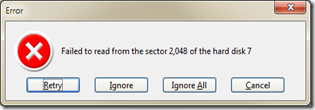
And I have multiple hard drives.
image
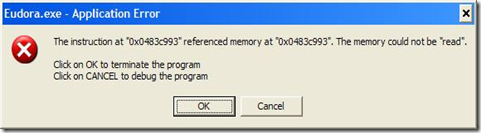
At least I know that the problem’s occurring with Eudora,
but that’s about all I know.

image
Thanks for telling me, so what?

image
I knew this was associated with Acronis True Image. but what should I reply?
[It took some time to discover which of the drives was “hard disk 7’ and
I wonder why they don’t make it easy by quoting the drive letter instead]

image  image
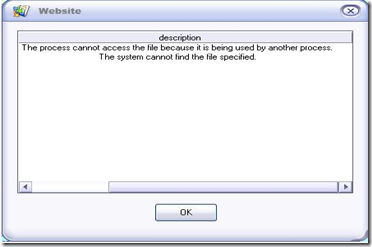
You don’t say!

  image image
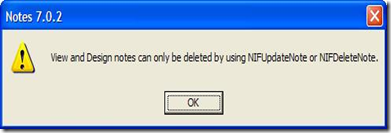
I do really like Lotus Notes, but all the same …
image
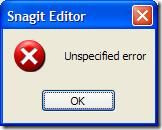
Techsmith does it too (not just IBM Lotus Software) …

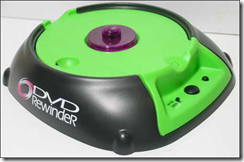
… about as useful as the following:
image

image
Does the right hand know what the left hand is doing?

image

UPDATE: here’s one that I got just a say or two after posting this story…
image

image

The above are laughable, but for God’s sake:  https://th.bing.com/th/id/R.3cadf6ac6d6592c27290c06f6121d098?rik=CSop0OEexAuVSQ&riu=http%3a%2f%2f2.bp.blogspot.com%2f_IdF6NE8Fisg%2fSYU9unioKEI%2fAAAAAAAAAoI%2fWA7h2Yhz7Z8%2fw1200-h630-p-k-no-nu%2fgorsake.jpg&ehk=Ivph4T0ZKUwRBf9KMjtcPOswuo5z%2fSfW5AzkJr122oo%3d&risl=&pid=ImgRaw&r=0
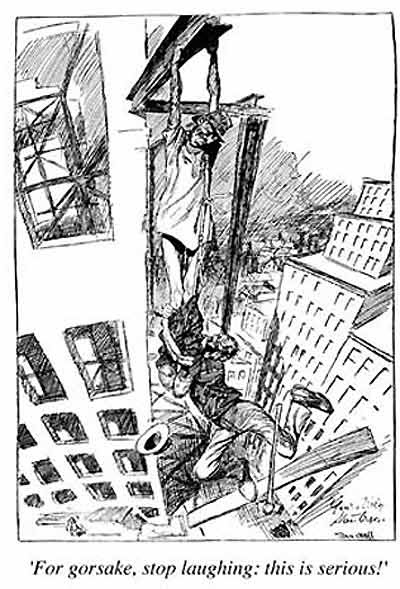
Stan Cross (in Smith’s Weekly, 1933, Australia).
 

This is one of my favorite illustrations of all time!

Saturday, June 23, 2012

Walking briskly for health management (and exercise for avoiding cancer)

You might be interested in a couple of entries that I’ve just added to the Sciences, Medicine & Health page of my website, at notestracker.com and its backup notestracker.net

There’s a lot more of general value on that page, go check it out!

Thursday, June 21, 2012

Simple Signer version 1.2 for IBM Lotus Notes released (freeware)

Simple Signer version 1.2 is now available for download.

It’s your simplest and easiest way to “sign” Lotus Notes database applications, that is, to stamp tall the design elements that make up each application: forms, view, XPages, agents, etc. When signed with your own organization’s Lotus Notes signature the applications are properly prepared/authorized to run in your organization’s IBM Lotus Notes/Domino production environment.

Signing is usually required when you obtain a Notes application from an external source, or before your own in-house-developed applications are moved from the development stage into productions.

Simple Signer was developed to make application signing easy for anybody to carry out.

You can download Simple Signer version 1.2 right now from notestracker.com (Australia) or notestracker.net (USA) web servers.

UPDATE: Please download a refreshed copy of Simple Signer v1.2 that was uploaded on 23rd June, without local encryption (which was causing the error "This database has local access protection"). Apologies for the slip up.

The self-extractor requires a PASSWORD … NotesTracker (what else would you expect from me?)

Apart from a few minor changes, the main enhancement is the ability to keep an audit trail of the various database signing events, for example:

image

As usual with applications provided by Asia/Pacific Computer Services, it is fully documented -- via the built-in Help About This Application and Help Using This Application menu items.

Simple Signer’s design is unhidden (“open source” more or less, you might call it) so you can tweak it to work exactly how you like.

ENJOY!

Wednesday, June 20, 2012

Simple Signer version 1.2 for IBM Lotus Notes released (freeware)

Simple Signer version 1.2 is now available for download.

It’s your simplest and easiest way to “sign” Lotus Notes database applications, that is, to stamp tall the design elements that make up each application (forms, view, XPages, agents, etc. When signed with your own organization’s Lotus Notes signature the applications are properly prepared/authorized to run in your organization’s IBM Lotus Notes/Domino production environment.

Signing is usually required when you obtain a Notes application from an external source, or before your own in-house-developed applications are moved from the development stage into productions.

Simple Signer was developed to make application signing easy for anybody to carry out.

You can download Simple Signer version 1.2 right now from notestracker.com (Australia) or notestracker.net (USA) web servers.

The self-extractor requires a password, which is NotesTracker (what else would you expect from me?)

Apart from a few minor changes, the main enhancement is the ability to keep an audit trail of the various database signing events, for example:

image

As usual with applications provided by Asia/Pacific Computer Services, it is fully documented -- via the built-in Help About This Application and Help Using This Application menu items.

Simple Signer;s design is unhidden (“open source” more or less, you might call it) so you can tweak it to work exactly how you like.

ENJOY!