Saturday, November 26, 2011

NotesConnect (Nping) wherefore art thou?

Does anybody know where to download a copy of that old faithful, Notes Ping (nping.exe), more recently renamed to NotesConnect.

I haven’t managed to find a downloadable copy anywhere.

Since the Lotus Sandbox is no longer extant. Stupid decision, IBM.  Why decommit a very handy tool like this (and all the others in the Lotus Sandbox)?

Surely you could have left the sandbox open as a “no longer supported but we hope you might still get some value from it” archive.

Are there any newer, alternative and/or better free Notes connectivity tester tools?

Monday, August 22, 2011

Wednesday, July 27, 2011

The programmer/developer/coder role is not dead – and long live the project manager!


It’s no problem being a geek, it would seem, according to Jason Hiner in his ZDNet blog posting The future of IT jobs? It's in three types of roles

You may or may not agree, but it makes interesting reading.

Tuesday, July 19, 2011

Will code XPages for food?


There’s a LinkedIn discussion group named Gurus of Lotus – Worldwide with one discussion thread that I’ve been following from a distance: What can we do to promote the technology that we all love?

This is, in turn, an extension of an older thread What do you think? Is Notes fading away? – a more recent variation of the “Is Lotus Notes dead?” theme.

It makes me wonder if we need a version of the following image for Lotus Notes:
[tongue in cheek]

Will_code_html_for_food

Will code HTML for food

Saturday, June 11, 2011

The Cloud Changes What IT Pros Do, but how?


Here’s an interesting view on how “The Cloud” can change what IT professionals have to do, according to Chris Murphy, interviewing Brady Corp's CIO Bentley Curran (in the Global CIO column of InformationWeek, 23 April 2011).

Go read the entire interview, which starts off:

As companies move more of their software to the cloud, there are some indispensible skills IT pros need to hone or acquire, and they’re not technical skills.

and further on:

Now those staffers are doing things like working with the company's R&D to ensure that employees in its Asian and U.S. design centers can do the kind of collaboration they need to, using Google apps. For example, IT employees have helped colleagues use Google Sites to set up their own project pages, so they can post content rather than emailing it around.

Cloud software can bring its compromises--fewer features, less ability to customize. Google Apps doesn't have all the features and functions of Microsoft Exchange, Curran says, and IT leaders need to make that fact clear to their colleagues.

But people are using more features than they were in Lotus because Apps is easy to use, Curran says. And, it's has lowered costs, let IT focus more on strategy than implementation, and met Brady's global collaboration needs. The only real hiccup has been for its employees in China using Google Apps. "One day it'll be working, the next day a certain group of people will just be denied access to certain functionality, and you can't predict it," Curran says.

Lotus Notes and Microsoft Exchange are being kept on their toes, it seems.

Friday, June 10, 2011

The Hungry Beast lurking Down Under goes into retreat


The final episode of Season Three of the Australian Broadcasting Corporation’s excellent HUNGRY BEAST techno show aired this week [on Wednesday 8th June 2011]. Read more about Hungry Beast here.

Hurry if you would like to view this latest episode, because for some strange reason (unlike other series, such as the Catalyst science show) the ABC takes each episode offline after a week or two.

The 2011 final episode’s lead story is Stuxnet: the first computer virus specifically designed to be a weapon (taking offline for a while Iran’s nuclear facilities, for example) …

Saturday, March 05, 2011

Alert - Java applet failure in Firefox 3.6.14, update to 3.6.15 already released

Eternal vigilance and remorseless focus on testing are required for any software development, and unfortunately the Mozilla team let a significant Java applet problem slip into Firefox Browser 3.6.14, but have already released a fix in version 3.6.15.

Reports of the issue appeared the Mozilla Firefox forum such as Latest Mozilla update: 3.6.14 breaks my web graphics.

The Mozilla developers obviously regarded this as a serious enough problem to come out quickly with a  fix, in the form of Firefox version 3.6.15 which you can read about at Pogo.com and other Java pages don't work which (in case you were unsure) explains how you go about installing the update to Firefox 3.6.15.

In an admirably rapid response the Mozilla developers have, within a day or so, already released a new version to address this Java applet support issue, see Pogo.com and other Java pages don't work (which shows how to update Firefox, in case you were unaware).

Let’s hope that version 3.6.15 does fix the problem (and not cause any others, as sometimes happens with bug fixes).

TIP – TESTING WHETHER JAVA IS ENABLED IN YOUR BROWSER
Last weekend I attempted to install Windows 7 Service Pack 1 (SP1), a day or two after it came out. Instead of the smooth ride that I anticipated it turned into an unmitigated disaster. The SP1 update crashed part way through, my Windows system became unbootable, and none of my desperate attempts to recover Windows to a usable state led to success. I’ve described it more thoroughly in my blog, see Windows 7 SP1 upgrade went horribly wrong.

I decided to do a complete “scratch” re-installation of Windows 7, as described in the blog. One of the many things I had to install (after I got Windows with SP1 successfully up and running) was Java.

I don’t know if you agree, but installing Java on a Windows platform still has a few rough edges, in terms of finding out just where to get the JVM from for example.

And particularly, even though I’ve done it many times since Java was released in the mid-1990s, I still find that getting Java applets to run inside a browser can still be rather tricky. Particularly if that browser happens to be Internet Explorer!

Even knowing if Java (the JVM, or JRE as it is now commonly known) happens already to be installed and operational on your system is not always obvious.

So here’s a tip. If you want to determine whether or not Java is installed and enabled inside Internet Explorer or Firefox (or whatever browser turns you on), you could do far worse than opening Michael Horowitz’s Java Tester page:

Michael Horowitz’s Java Tester page

Read Michael's comments and advice, then just follow your nose.

The benefits of ever-decreasing technology size and weight


This video obviously applies to the old-style PC hardware of the 1980s and 1990s, so presumably newer technology (such as LCD monitors) is safer to use, wouldn’t you agree?

View at You Tube: Bad day in the office (or just watch below).

If you are thinking of becoming a freelancer (a.k.a. “consultant”), heed this!


See Freelancing: What People Think Vs. Reality …

image

Visit http://www.makeuseof.com/tech-fun/freelancing-what-people-think-vs-reality/

And see more of Alex Noriega’s wit at http://stuffnoonetoldme.blogspot.com/

Friday, March 04, 2011

Windows 7 SP1 upgrade went horribly wrong … NetBeans IDE 7.0 Beta 2, MailWasher and the Christchurch earthquake


Installing the Windows 7 Service Pack 1 (SP1) on my workhorse desktop system last Saturday turned into a total disaster for me, a really big-time FAIL.

Instead of the smooth ride I had expected, it crashed part way though with one of those inscrutably serious Windows errors, and despite  many hours of trying to recover I finished up with an unbootable system. (I’d rather not think about it any more, so will spare you the horrors of what I went through while trying to get it all working again. I certainly hope that it doesn’t happen to you -- wouldn’t wish it on my worst enemy.)

After a day or so I bit the bullet, reformatted the C: drive, and then carried out a clean “scratch” install of the original Windows (64-bit Ultimate version). After installing a few of my favorite make-life-easier basic utilities, the SP1 upgrade went without a hitch, although I must say that it took around twice as long as I expected.

I suspect that such an incredible amount of cruft had gathered on my workhorse system since August 2009 (when Windows 7 first hit the streets) that the SP1 upgrade crashed because it simply couldn’t work out how to handle some element of the tons of third-party software that it came across. I wouldn’t be surprised if it was a bad driver, which is the common cause of Windows crashes.

Now that I remember it, prior to Windows 7 I had never managed to get Windows XP SP3 to install correctly. It always caused the dreaded Blue Screen Of Death during boot-up, most likely some hardware driver issue or other, so had to keep reverting to SP2 (which fortunately was a relatively painless process. nowhere near as complicated as the whole Windows 7 SP1 rigmarole).

Anyway, Windows 7 with SP1 is running nice and fast, and indeed some software that had been behaving quite bizarrely is now working well again. It looks as if the spring cleaning was worth it, despite the several days of effort involved.

In order to minimize building up all that cruft again, this time around I’m being very particular about which utilities that I find either essential or highly useful.

I might soon write about these while they’re fresh in my mind, but will mention right here and now that for real-time security and anti-malware protection I’m relying on the built-in Windows firewall together with Microsoft Security Essentials (MSE).

I switched over to MSE some five or six months ago (after many years of third-party security tools, some free and some retail). MSE is free, quite unobtrusive, gets its updates daily via the normal Windows Update process, and seems to be pretty darn effective.


SHATTERING NEWS FROM THE LAND OF THE LONG WHITE CLOUD
AND HOW MAILWASHER MIGHT HELP

Another essential product that I rely on day in day out is MailWasher PRO 2011 with its outstanding spam detection which a year or so ago was reworked and released with a beautiful new user interface plus significantly enhanced spam detection capabilities.

image

Based on how well it has worked for me, I consider MailWasher is a fantastic product. It was designed and developed by the team at Firetrust Ltd of Christchurch, New Zealand.


THE EARTHQUAKE

As you are doubtless aware, a magnitude 6.3 earthquake struck the Canterbury region of New Zealand’s south island at lunchtime on 23 February this year (2011), causing widespread and severe property and infrastructure damage in Christchurch city and surrounding areas.

Far worse news is that, at the time of writing this post, the confirmed death toll is at least 160, many injuries were suffered, and several hundred people are still unaccounted for.

Officials are saying that it will take a decade to rebuild Christchurch and that it would be months before the quake-hit city could begin to reopen.

In light of this, I urge you to help out by trying MailWasher.

Following that, I’m pretty confident you’ll be quite happy to purchase a license to help support some of the Christchurch people.


Getting back to the mundane, after installing the above-mentioned essential various utilities, I’ve now also moved on to installing my preferred application design and development tools.

These include IBM Lotus Notes and Domino 8.5.2 (soon I hope to be replaced with version 8.5.3), as well as Microsoft Visual Studio 2010 and other related Microsoft stuff, plus Java IDEs including Eclipse and NetBeans (as well as a favorite of mine, JCreator Pro, which unlike the other two has an extremely light footprint).

I’ve installed the latest Eclipse Helios SR2 version (3.8.2) now available for download (a comprehensive assortment of packages to suit your taste).
image

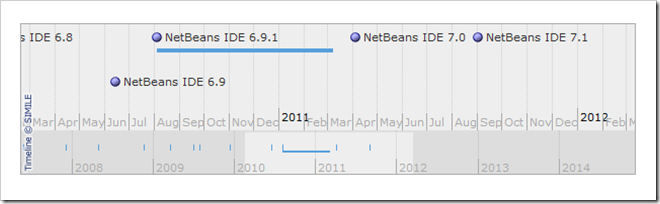
When it came to NetBeans, now of course part of the Oracle stable, instead of the current production version 6.9.1 I’ve decide to try out NetBeans 7.0 Beta 2 which is currently available via http://netbeans.org/community/releases/70/ … I just hope they don’t plan to release the final build on April Fools Day!

NetBeans 7.0 does look and feel very nice indeed, with not only a range of editor enhancements but also leading-edge Java enhancements (JDK7, improved Java EE support, and more) that you could expect due to NetBeans’ close bonding with Oracle (and Sun Microsystems before that).

I’ve always found NetBeans installation to be more user-friendly than the way you have to go about extracting Eclipse from a zip file, creating a Windows shortcut to the eclipse.exe program, adding in plug-ins, and all the rest of it. Though I’ll certainly grant that Eclipse is far more extendable, for the past several versions NetBeans has been no slouch either.

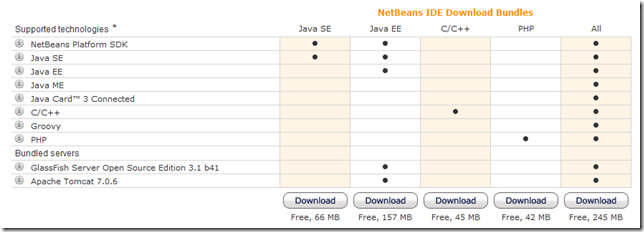
Check the NetBeans IDE 7.0 Beta 2 download page for yourself.

I’ve gone the whole hog and installed the full bundle as shown in the rightmost column:
image


All in all, with Windows 7 SP1 now bedded in, and with such excellent tools to play with I’m a happy bunny.