Sunday, June 16, 2013

NotesTracker Guide Version 5.3 has been added to Scribd

NotesTracker is alive and well, and the guide for Version 5.3 Guide has been added to Scribd.image

View or download the guide at
http://www.scribd.com/doc/148077501/NotesTracker-Version-5-3-Guide

The guide introduces NotesTracker, explaining what it is and how it can be of value to your organization by enhancing your IBM Notes and Domino applications.

Following that is a section that shows how to configure and administer NotesTracker in each application, and finally a section for Notes developers explaining the steps used to add NotesTracker to the design of the applications.

Hyperlinks in the table of contents make it easy to jump to the various sections and subsections.

Thursday, June 13, 2013

Some free widgets for your website

I just stumbled upon a range of free widgets that should add value to your web sites, blogs and other online publications.

Because of the nature of the website (oilprice.com) the widgets are all related to energy, precious metals, and related financial matters.

You’ll find them here:
Energy Widgets | Metal Widgets | Financial Widgets | News Widgets | Clocks Widgets

Here are a few of them in action…


Sunday, June 09, 2013

Do dogs show empathy? It could well be so.

Just back from checking that our pooch was comfortable on a clear. cool early Winter’s night here Down Under in Melbourne. He was okay, and seemed to appreciate the visit!

Back inside, I went to ABC Australia’s Catalyst science show’s website to catch up on their latest episode. You may recall that back in April I pointed out a story about dogs cute appearance probably being due to their facial musculature (see Cute Canines, Eyes That Engage You and watch the video).

Well, in this week’s new episode there’s another intriguing story, this one about dog empathy which the story describes as:

“. . . the naturally occurring subjective experience of similarity between the feelings expressed by self and others without losing sight of whose feelings belong to who. Translated, what that means is to have true empathy, you have to not only feel someone's pain, you have to know that the emotion belongs to them and not to yourself.”

Watch the video. What do you think?

I’m somewhat convinced. I do know that if I’m playing with my dog (and others before him), I only have to howl or yelp in a certain way – making the sort of sound you hear if you accidentally tread on the dog, or if the dog gets bitten in a dogfight – then consistently the dog will immediately stop whatever he’s doing and cuddle up close to to me as if to offer sympathy.

You only have to do a simple search or two and you’ll find much other material about the unique dog-human relationship.

Saturday, June 08, 2013

Fascinating Facts about Flu - What Flu is and isn’t

As southern winter sets in here Down Under, I’m aware that for the previous two years I suffered a number of quite nasty attacks of what I called “the Flu” – But was it really influenza, or something else, and will I succumb again this year despite again getting jabbed with Flu vaccine?

Just-published this first week of June 2013 is a “Facts about Flu” series of articles in The Conversation that sheds light on this topic. There are insights and clarifications, as well as lots of shadowy and dark areas where our knowledge remains deficient.

This excellent series is as follows:

Part one: Of influenza, flu, potions and key opinion leaders

Part two: Influenza vaccine for 2013: who, what, why and when?

Part three: H1N1, H5N1, H7N9? What on earth does it all mean

Part four: The Tamiflu saga shows why all research data should be public

Part five: CSL’s flu vaccine leaves a hole in Australia’s pandemic plan

Part six: Should flu shots be mandatory for health-care workers?

Part seven: The Holy Grail of influenza research: a universal flu vaccine

Part eight: Is it really the flu? The other viruses making you ill in winter

Part nine: The heart of the matter: how effective is the flu jab really?

Monday, June 03, 2013

Enjoy excellent online jigsaw puzzles at Jigsaw Explorer

I just came across a site with outstanding interactive jigsaw puzzles, go to Jigsaw Explorer if such puzzles turn you on.

For example, this tower at Beget, Spain (with the option selected to remind you what the “box top” is for the puzzle):

image

Actually, rather than jigsaws my definite preference is for word puzzles, not only as a consumer but and in the past I’ve created some crosswords that were based around various themes in information technology.

Unfortunately they’re now offline after a redesign of the site where I created them, and the site owner isn’t interested in bringing them back to life.

I really should create some more of these interactive crosswords, this time on my own site so that nobody can take them offline. I used the highly recommended Crossword Forge to build them:

Crosswords take a long time to compile, especially when the choice of words is confined to a theme rather than the general language. Software like Crossword Forge significantly eases the burden.

Sunday, May 26, 2013

Windows 8 will not save Network Discovery settings (yet another unwanted issue)

Late in January 2013 I upgraded my main desktop  work system from Windows 7 Ultimate to Windows 8 Pro (both 64-bit), which went quite smoothly on the whole.

I had problems with an external hard disk docking device’s USB 3.0 driver that took some trouble to sort out. The dock would run in USB 2.0 mode only until I eventually found an updated driver that gave back the USB 3.0 capability I had been enjoying under Windows 7. Usually Windows Update does all this, but in this case it not discover the updated driver, and in the end I had to telephone the manufacturer in the USA to get the required information.

I had to reinstall a few of my (very many) applications, and tweak some of the Windows 8 settings, but eventually – after installing Classic Shell to give back the Start button and equally important the heritage Windows hierarchical menu structure needed to maintain control over all those (very many) applications.

So now I have the desktop system running almost exactly like Windows 7, at full productivity and avoiding the stupid “Modern UI” tiled approach that is not at all appropriate for a non-touchscreen desktop system. (Just last week I purchased a touchscreen slate device running Windows 8 Pro, and the tiled UI works reasonably well in that environment.)

However I am experiencing a major Windows networking problem at the moment, which remains unresolved despite my spending many hours seeking a solution. (I think this problem arose only in the last month or so, but I experiment with a vast amount of software that might be responsible, and am unsure about the timing and about any possible cause.)

I run a simple Windows workgroup (no domain or homegroup), and utilize the username/password method to control all logins across the network.

The symptom is that, while the main system cannot access any of the other Windows systems, including my new Windows 8 tablet, the others can access each other across the network but none can gain access to the main Windows 8 system.

UPDATE:
The following screenshot should help in explaining what I now get -- on the Windows 8 main system -- with Windows Explorer (a.k.a. File Explorer) when I attempt to browse from the main system to other systems:

image

I know from painful experience in past years that this is a network browsing issue, so on the main Windows 8 system I immediately went to the Network and Sharing Center panel with Change advanced sharing settings and clicked on it:

image

From past experience with Windows 7 I know that this networking problem is usually solved by ensuring that network discovery is turned on, which is done by selecting the following  two circled radio buttons:

image

However after doing this (and saving the changes) I found that the networking issue remained. Upon returning to the Advanced sharing settings panel I found that these two settings were still turned off. Repeating the steps always came up with the same result: network discovery always remains off.

I have spent many hours scouring the Web looking for a resolution, to no avail. Others have encountered the same issue, but none of the suggested solutions (such as ensuring that a certain set of Windows services all are started)  had any effect on my system.

What can be causing these two network discovery radio buttons always to switch back to the OFF position (or, more correctly, never to be allowed to switch to the ON position)? A key observation is that whenever I temporarily turn Windows Firewall off, the networking access issue goes away, and when I turn the Firewall back on the issue comes back.

So far, I have not been able to determine what Windows Firewall configuration setting or feature/function could be causing this. Certainly it’s not die to some deliberate action on my part.
I have tried the troubleshooter, to no avail:

image

I've examined Windows Firewall settings, to no avail (not that I’m an expert in this field):
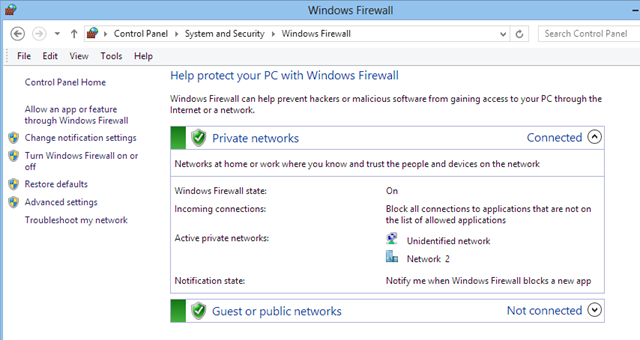
image

I've looked at various group policy settings, to no avail. I’m even less of an expert here, and could easily be looking in the wrong places:

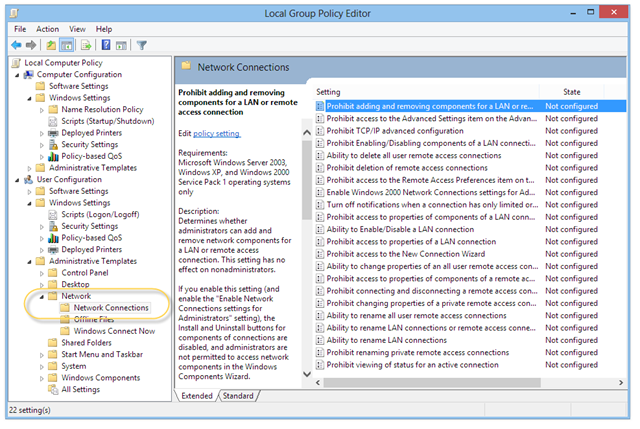
image
image

One possible inkling of what might be awry in my main Windows 8 system comes from digging into the Allow an app or feature through Windows Firewall settings:

image

This yields a list of applications, in alphabetical order, the central part of which is:
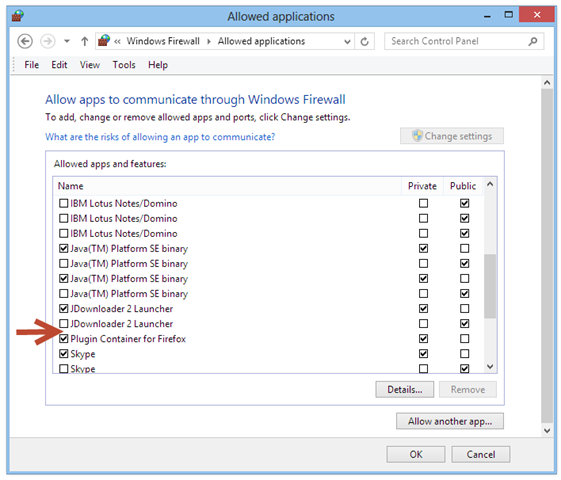
image

My friend Paul in Canberra took time out the other day to have a look inside Windows Firewall on his Windows 8 system, and pointed out that he had an entry for Network Discovery. (Thanks Paul, this gave me a promising new area to explore.)

When I examine this list in a virtual test machine, as expected I get a different list, but the interesting thing is that – unlike on my main Windows 8 system – this virtual system  contains an entry for Network Discovery:

image

So this is where I’m at today.  Why doesn’t my system have this Network Discovery entry in the Windows Firewall list of allowed apps? It’s certainly not due to some explicit action that I took. I have that certain feeling that this is related to why I cannot turn network discovery on unless Windows Firewall is turned off.

Any feedback and suggestions would be most welcome!

A way to repair Windows Firewall, and Windows connectivity problems resuming from Sleep mode
BE SURE TO VISIT THIS LATER POST

Thursday, April 25, 2013

Cute Canines - Eyes That Engage You

My mother adored cats, and I was brought up with felines of all fur colors, temperaments ranging from cuddly to haughty, taking control as they do all over the house. But my wife hates cats, so it’s been dogs during my married life.

I’ve gotten to really like dogs, and I’m in good company. For example, British prime minister Winston Churchill in the movie The Gathering Storm is pictured one day sitting in the farm section of his country property pondering the animals around him. He comments to an approaching visitor:

“You know, a cat looks down upon a man, and a dog looks up to a man, but a pig will look a man in the eye and see his equal.”

I don’t know about pigs, the closest I’ve ever been to one is while eating ham or bacon. Can’t say that I’ve eaten cat or dog (knowingly at least, but then again I have been to parts of Asia).

The dogs that we’ve had have always been cute and devoted. What is it about dogs that makes them into “man’s best friend” as is generally accepted?

Of course, there’s the services they faithfully carry out for us: watchdogs, seeing-eye dogs, wartime duty, lifesaving, farm dogs effortlessly shepherding sheep, and much. much more.

But it was an episode of the outstanding Catalyst science program Australian Broadcasting Corporation (ABC) that put forward another fascinating insight. Catalyst features stories about dogs every now and again.

For example, there’s this story about dogs’ eyes:

It was thought, that like humans, all dogs have the same eye structure and see the world the same way. But Australian researchers have discovered that dogs had a completely different retina. Amazingly, it means different dogs see the world completely differently.

All very interesting, but it doesn’t answer my question of why, of all domestic animals, dogs seem so cute and appealing (compared with cats, especially).Dogeyebrows_small

It seems that there could be a good scientific reason for this. There’s now a plausible theory that it all has to do with dogs’ eyebrows.

Watch the video, and read the transcript.

Are you convinced?

Sometimes I wonder if Microsoft developers really think

I’ve just been  was using the Windows 8 registry editor (regedit.exe) in an attempt to remove the remnants of an application that wouldn’t uninstall cleanly.

Even with my shiny new 8-core processor, twin fast Intel SSDs in RAID configuration plus 32 GB of RAM (rarely is even a quarter of this RAM used), there were periods of up to a minute when the registry editor was scanning for a search string.

During this boring period it simply displayed the following bland, deadly boring [Windows 8 flat, colorless, unappealing] dialog box:

image

I wonder why on earth some of Microsoft’s developers seem so short-sighted and not to think about the user’s experience. . . . Searching the registry for what, fellas?

In this case, if it was me writing the registry editor then the above dialog would for sure have looked something like this quick mock-up:

SNAGHTML4d86db9

It ain’t rocket science!

Wednesday, April 24, 2013

Updating desktop Java sure can be confusing at times!

Ho hum, more security weakness issues have just been discovered in the desktop Java Runtime Environment (JRE).

See for example Yet another Reflection API flaw affecting Oracle's Java SE …

“The new flaw was verified to affect all versions of Java SE 7 (including the recently released 1.7.0_21-b11). It can be used to achieve a complete Java security sandbox bypass on a target system. Successful exploitation in a web browser scenario requires proper user interaction (a user needs to accept the risk of executing a potentially malicious Java application when a security warning window is displayed).

What's interesting is that the new issue is present not only in JRE Plugin / JDK software, but also the recently announced Server JRE as well.”

Wow, a chink in the armor of Java servers. That should raise a few eyebrows!

Back to desktop Java, however. I’ve been assiduously trying to keep my desktop JRE up to date, and it’s annoying that you have to go to the trouble of navigating to the Control Panel of Windows and then and click on Java (when Java for one of several reasons has not automatically presented the Update dialog in a timely manner).

Actually, it’s more than just annoying: I’d call it a significant shortcoming in the Java security maintenance regime, enabling Java updates to fall way behind if you’re not careful. I reckon that Oracle should improve the ‘reliable timeliness” of this entire process.

Well now, a month or two ago I was puzzled by not finding the Update tab to be present in the Java Control Panel, which I expected to look like the following:

 image

A few months I lost some valuable time hunting around to find why this tab does not always appear. Take a look at What is Java Auto Update? How do I change notify settings? Notice that you have to read this page very carefully and about half way down the page you come across the clincher:

Why is the Update tab missing from the Java Control Panel?

Java Auto Update is currently not available for 64-bit versions of Java. 64-bit versions of Java do not include the Update tab in the Java Control Panel.

This is rather slack behavior by Oracle.

It seems that when I got my new desktop system (in late 2012) I slipped up and indeed did have the 64-bit version installed when, like the vast bulk of users, I only needed the 32-bit version. So I dutifully hunted for, downloaded and installed the latest 32-bit JRE version and left it at that.

Last week, after reading about the latest pile of Java exploits, I decided that it was time to update Java again. However I kept getting the following dialog box:

image

Why no Update tab? I pondered this for a while and after checking  Programs and Features realized that, as noted in bold font on the above image, I still had 64-bit JRE installed (as well as the 32-bit JRE).

After uninstalling the 64-bit JRE the Update tab re-appeared, meaning that Oracle needs to update that statement at What is Java Auto Update? How do I change notify settings? to mention that the mere presence of the 64-bit JRE suppresses the Update tab even if you do have the 32-bit JRE installed.

Trivial? . . . Possibly, but I’d say still worth being described so that other people might save some time and frustration.

Sunday, April 21, 2013

My premise: Australia’s NBN shouldn’t mangle the English language

I’m totally enjoying being a pedantic old grump. It’s one of the privileges of getting on in years, one of the joys of dotage.

At out home we’ve been really enjoying having the Optus Cable service for more than a decade now, and for the past year or two their highest offering of 100 Mbps download speeds (as well as a 1 terabyte download quota). I measure the cable speeds every day, and even though HFC is a shared service my tests show that it only drops as low as 30-40 Mbps on weekends and other similar busy times.

So it performs as promised, good work Optus. However I’d prefer it if they offered upload speeds higher than the nominal 2 Mbps (never better than about 1.5 Mbps in practice). The DOCSIS 3.0 standard does support faster speeds, though our National Broadband Network (NBN) being rolled out nation wide I don’t reckon that Optus will ever offer such higher HFC speeds.

So to get even better speeds I’m very much looking forward to the NBN. Unfortunately it’s a huge project expected to take the best part of a decade to roll out, and it was greatly hampered during the first year or two by the “moving target” syndrome (unexpected changes in regulations about the number of Points of Presence, drawn-out negotiations with Telstra, and so on).

I like just about everything that the NBNCo has done so far (and sincerely hope that the 2013 Australian federal election coming in mid-September don’t’ see a change of government and a much inferior NBN result from the new government’s limited vision).

However THERE’’S ONE THING THAT THE NBN DOES ALL THE TIME THAT I DON’T APPRECIATE AT ALL and it’s my pet hate. Their chief spokesperson,  CEO Mike Quigley, uses the term “premise” far too much when he should actually be referring to “premises” – and irritatingly keeps on doing so!

Unfortunately it seems to be spreading throughout NBNCo like an infectious disease (perhaps they’re afraid to correct the boss).

Here’s the latest example, from several days ago, A Report to the Australian Parliamentary Joint Committee on the NBN.

Just one example, a chart showing an estimated price on each “premise” passed. Dollars per “premise” – how slack:

image

The Australian federal opposition party hasn’t yet picked up on this litany of misused terminology, they would surely use it as another way to criticize NBNCo if they did, wouldn’t they?
image