- Sensible Web Navigation - a better way to set up view/navigator for the Web environment.
- Making Domino Behave Relationally, Part 1 and Part 2 - a nice way to have "related links" for a document that don't break if any of the underlying documents is deleted.
- Domino Rich Text In The Browser - a promising alternative to the Java Editor Applet for WYSIWYG editing of Rich Text in the Web browser environment.
Monday, August 15, 2005
Codestore = Cool store!
I've been doing a bit of blog surfing lately, and wanted to compliment Jake Howlett of Codestore on his very perceptive and insightful Notes/Domino design articles. Excellent design ideas such as these:


Monday, August 08, 2005
Wattle - it's the annual goldrush Down Under!
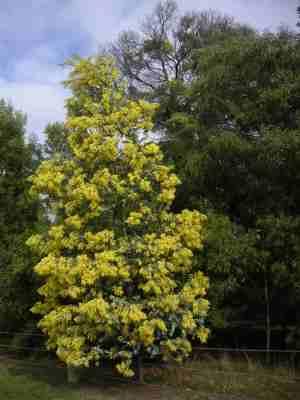
It's the second half of winter down here in Victoria, in the temperate southeastern corner of Australia. We just had a week or more of pleasantly mild weather, due to northwesterly winds crossing the continent and remaining relatively warm.
But a few days ago a southwesterly change hit, bringing with it cold winds from down south in the tempestuous Great Southern Ocean, and perhaps ultimately from further south in the Antarctic. There's a forecast for light snowfalls this week in the hills ringing Melbourne. Thankfully it never snows down here in the suburbs: we get some frost, hail and sleet down here, but never snow. [UPDATE: The predicted snow did indeed arrive on Wednesday. But instead of being confined to the mountains it fell down to sea level on some of our southern ocean beaches. Snow fell in some of Melbourne's suburbs, but didn't manage to reach as far as downtown Melbourne. This was initially described as a "once in fifty year" event, then later as a "never before experienced" occurence. So much for global warming -- maybe it's global cooling instead. (?)]
The winter of 1987/1988 at the IBM Development Laboratory in Rochester, Minnesota (working on the IBM AS/400 before it was announced) gave me a taste of bitter, numbingly cold weather. Since that time I dropped my notion of Melbourne as being really cold, and now consider it to be just uncomfortably cool and a bit miserable in short bursts.
The reference to "goldrush" in the title? Well, despite those cold fronts marching regularly across the southern ocean, there's one thing that I find heartening and uplifting about this time every winter. It's the riot of gold that bursts out in August during the annual blooming of various species of Acacia tree -- see wattle and acacia and sclerophyll in Wikipedia. The gold stands out ever so distinctly against the background green of the leaves. (As an aside, in this southeastern corner of of Australia in the 19th century we had the Victorian gold rush.)
You can see why Australia chose green and gold for the colours of our national sports uniforms, as seen at the Olympic Games, etc.
Finally, here's a collection of royalty-free pictures that I snapped for you today (08/08/2005) just across the road at the nearby Wattle Park reserve: http://notestracker.com/wattlepark/
Wednesday, August 03, 2005
Now You See It, Now You Don't
In an earlier post Note Item Not Found, under the heading Inconsistent Behavior I vented my frustration about the quite bizarre way in Domino Designer that the property box (a.k.a. Infobox) opens automatically for some types of design elements but not for others.
I listed every type of design element for which this happens, up to and including the Domino Designer for ND7 Beta 3 (which was the latest release at that time), as follows:
You just add to your NOTES.INI file the following statement:
DesignNoInitialInfobox=1
And it works well. Relief at last! This should be the default setting, don't you agree?
Of course the question still remains, why do the Domino Designer planners/developers allow the Infobox open inconsistently. Another case of design by committee, I guess, or is it just lack of attention to fine detail?
I listed every type of design element for which this happens, up to and including the Domino Designer for ND7 Beta 3 (which was the latest release at that time), as follows:
- The Infobox remains closed (as it quit eproperly should) when you edit a Frameset, Page, Form, Outline, Subform, Script Library, Navigator, Database Icon, Help About and Help Using documents, Database Script.
- The Infobox inappropriately opens when you edit a View or Folder, Agent, Web Service, Shared Field, Shared Column, Shared Action, Image (maybe), File Resource (maybe), Applet (maybe), Style Sheet (maybe), and Data Connection (maybe). Here, the "maybes" mean that it may be appropriate for the box to open when you click on the item, since there is not underlying form to open for each of these.
You just add to your NOTES.INI file the following statement:
DesignNoInitialInfobox=1
And it works well. Relief at last! This should be the default setting, don't you agree?
Of course the question still remains, why do the Domino Designer planners/developers allow the Infobox open inconsistently. Another case of design by committee, I guess, or is it just lack of attention to fine detail?
Wednesday, July 27, 2005
Karen Kenworthy's Gems
You really owe it to yourself to visit KarenWare.com ... This is savvy Karen Kenworthy's gem of a web site.
Karen develops and offers as freeware for personal use a diverse range of extremely useful Power Tools (designed to run on Windows 95 and later versions).
As well as the tools themselves, you can (and should) enrol for her free newsletter which is not only quite entertaining but also erudite.
If you purchase a copy of her Power Tools on CD Karen also grants you a license to use them at work. I was impressed enough to purchase the CD -- which speaks volumes for the tools because it takes a lot to extract even a dollar or two from me!
For the programmers amongst you, she provides Visual Basic source code for each tool. And you're sure to be switched on by her clear and insightful discussions about a wide range of topics such as hashing algorithms (her Hasher tool) and ultra-high-precision arithmetic (her Calculator which defaults to a mere 10,000 digits precision but she says can be set much higher).
Whether you're a programmer or not, Karen's little beauties are something you shouldn't do without.
Karen develops and offers as freeware for personal use a diverse range of extremely useful Power Tools (designed to run on Windows 95 and later versions).
As well as the tools themselves, you can (and should) enrol for her free newsletter which is not only quite entertaining but also erudite.
If you purchase a copy of her Power Tools on CD Karen also grants you a license to use them at work. I was impressed enough to purchase the CD -- which speaks volumes for the tools because it takes a lot to extract even a dollar or two from me!
For the programmers amongst you, she provides Visual Basic source code for each tool. And you're sure to be switched on by her clear and insightful discussions about a wide range of topics such as hashing algorithms (her Hasher tool) and ultra-high-precision arithmetic (her Calculator which defaults to a mere 10,000 digits precision but she says can be set much higher).
Whether you're a programmer or not, Karen's little beauties are something you shouldn't do without.
Monday, July 25, 2005
Installation Blues, Part 2 revisited - Eclipse setup screencam demonstration
I just revisited the eclipse.org web site, and things seem to have been improved (but I'm not sure when).
There now appears to be a much clearer download pathway for the Eclipse SDK, compared with what I experienced some months ago that prompted me to my earlier posting on this subject.
I have just recorded a brief screencam that shows the entire process and how simple it can be. It demonstrates the downloading and setting up of the latest Eclipse build, which as of today is Eclipse 3.1.
The whole procedure takes only 5 to 10 minutes (the download being the slowest part).
Get the screencam from here: http://notestracker.com/eclipse/Eclipse_animations.htm
There now appears to be a much clearer download pathway for the Eclipse SDK, compared with what I experienced some months ago that prompted me to my earlier posting on this subject.
I have just recorded a brief screencam that shows the entire process and how simple it can be. It demonstrates the downloading and setting up of the latest Eclipse build, which as of today is Eclipse 3.1.
The whole procedure takes only 5 to 10 minutes (the download being the slowest part).
Get the screencam from here: http://notestracker.com/eclipse/Eclipse_animations.htm
Bugs can be extremely expensive to fix
From my IBM days I recall an estimate that to fix an error -- in hardware, software, documentation, or just about anything else -- after it has been delivered and deployed can cost anything from 10 to 100 times as much as it would if the error had been detected and corrected during the original design/development/test phase.
A CHALLENGE:
Are you willing to "stand under the bridge you designed"? ... Read the following article to find out the significance of this challenge:
Software Engineers Aren't Doing Enough To Really Create Error-Free Software
A CHALLENGE:
Are you willing to "stand under the bridge you designed"? ... Read the following article to find out the significance of this challenge:
Software Engineers Aren't Doing Enough To Really Create Error-Free Software
Sunday, July 24, 2005
Installation Blues, Part 2 - Readying Eclipse for use
Today I'd like to pass on the benefits of a lesson that I underwent in the "school of hard knocks" in the fervent hope that it will help some of you, dear readers, to avoid the trap that I fell into in my first brush with Eclipse (getting it ready for working with Java).
Now what's the first thing you look for when you install (Windows) software these days? Surely it's got to be a setup program, and you look for one named setup.exe or install.exe or something similar. And if you're like me you immediately launch this setup program without bothering to read any documentation (since the true test of a good modern installer is that it makes setup a breeze).
Well, in the case of Eclipse you're in for a surprise. Getting Eclipse ready for use is rather different from what you're used to with all the other IDEs out there. (As a preamble, I'm assuming that you already have the suitable prerequisite JRE and JDK installed, as for any other Java IDE.)
The first thing you have to know is that setting up Eclipse V3 is not an "installation" in the usual sense of the term, so let me instead use the term "readying Eclipse". There's no conventional installer that churns around for while setting up directories and doing other mystical things and then finally telling you that Eclipse has been installed.
This difference can confuse both novices and seasoned developers. Nowhere (at least nowhere obvious, to my knowledge) is there a simple set of instructions for getting Eclipse ready for use. I haven't come across a README file in the Eclipse distributions which tells you about this. Nor did I find much about it in any of the Eclipse textbooks and a tutorials. This can be a stumbling block, and sure enough I stumbled!
In the absence of any simple README file, after considerable digging around I worked out that you only have to unzip the Eclipse build package into a folder and then just launch eclipse.exe from that folder. So I got to the point where the Eclipse workbench opened in all its glory, and things were looking good or so I thought.
But more frustration lay ahead. I couldn't discover any Java support (syntax checker, compiler, etc). What was going on here, says I to myself. Was it due to some Eclipse option that I hadn't activiated? I looked everywhere, but try as I might I couldn't even get my World program compiled and running.
As a last resort, I moved into Read The Manual mode! After a bit of research, I came across an intelligible description of the Eclipse plug-in architecture and installation procedures. It indicated that Java support (the "SDK") was just one of the available plug-in options. So I had to install the Java SDK did i? What a nuisance. So after reluctantly reading up on the Eclipse plug-in installation procedure (and stumbling a few more times), I managed to install the Java plug-in. Much to my relief, I could then compile and debug "Hello World".
Nevertheless, I wasn't a happy trooper. Why on earth did I have to go through all the rigmarole of learning the Eclipse plug-in architecture and separately install the Java plug-in? Why did neither the Eclipse online Help nor the eclipse.org web site explain in a friendly, clear and up-front fashion the simple steps needed to get Eclipse ready for use (just unzip the file into a folder and then run eclipse.exe from that folder)? Maybe they do explain it somewhere, but if so I yet to find it!
This initial experience with Eclipse did NOT make a good first impression on me, especially in comparison with the many other smooth IDE installations I have done over the years. What had I done that was so wrong, and what did I have to do to get a simple Java compile working?
After some further research and experimentation I finally discovered where I had gone astray: I had stumbled merely because I had selected the wrong file. I had downloaded the Eclipse Platform build file (for Eclipse 3.0, the one named "eclipse-platform-3.0-win32.zip").
One of the shortcomings of the Eclipse delivery process is the way that the builds are shipped. If you visti one of the Eclipse mirro sites (such as http://mirror.pacific.net.au/eclipse/eclipse/downloads/drops/ here Down Under, in Melbourne) you are presented with an an overwhelming list of builds. And when you open one of the individual builds (such as http://mirror.pacific.net.au/eclipse/eclipse/downloads/drops/R-3.0-200406251208/) there's a long list of build files to choose from. It's pretty obvious that some are for WIndows, others for Linux or Solaris, and so on. But what's not obvious to the novice is that the appealing-looking "platform" variant is NOT the build file that you should be interested in (for Java).
What I didn't immediately realize was that when you unzip this "platform" file you get only a skeletal Eclipse IDE (a basic, language-neutral “platform”) and this base version does not include any language plug-ins at all. When I did come to realize this, the rest was easy.
What I should have downloaded was the Eclipse SDK build file (for Eclipse 3.0, the one named "eclipse-SDK-3.0-win32.zip"). As soon as I used this version everything went smoothly. This is the build file that has the desired Java support built in (there's no need to install the Java SDK plug-in separately). Lesson over, but what along and painful lesson! The pity is that it should have been plain sailing all the way, and I shouldn't have had to endure any storm-tossed seas!
So, brethren, let me put it pithily:
Now it's over to you ... Can any of you provide similar tips for Eclipse (and post them here for the benefit of all)?
Now what's the first thing you look for when you install (Windows) software these days? Surely it's got to be a setup program, and you look for one named setup.exe or install.exe or something similar. And if you're like me you immediately launch this setup program without bothering to read any documentation (since the true test of a good modern installer is that it makes setup a breeze).
Well, in the case of Eclipse you're in for a surprise. Getting Eclipse ready for use is rather different from what you're used to with all the other IDEs out there. (As a preamble, I'm assuming that you already have the suitable prerequisite JRE and JDK installed, as for any other Java IDE.)
The first thing you have to know is that setting up Eclipse V3 is not an "installation" in the usual sense of the term, so let me instead use the term "readying Eclipse". There's no conventional installer that churns around for while setting up directories and doing other mystical things and then finally telling you that Eclipse has been installed.
This difference can confuse both novices and seasoned developers. Nowhere (at least nowhere obvious, to my knowledge) is there a simple set of instructions for getting Eclipse ready for use. I haven't come across a README file in the Eclipse distributions which tells you about this. Nor did I find much about it in any of the Eclipse textbooks and a tutorials. This can be a stumbling block, and sure enough I stumbled!
In the absence of any simple README file, after considerable digging around I worked out that you only have to unzip the Eclipse build package into a folder and then just launch eclipse.exe from that folder. So I got to the point where the Eclipse workbench opened in all its glory, and things were looking good or so I thought.
But more frustration lay ahead. I couldn't discover any Java support (syntax checker, compiler, etc). What was going on here, says I to myself. Was it due to some Eclipse option that I hadn't activiated? I looked everywhere, but try as I might I couldn't even get my World program compiled and running.
As a last resort, I moved into Read The Manual mode! After a bit of research, I came across an intelligible description of the Eclipse plug-in architecture and installation procedures. It indicated that Java support (the "SDK") was just one of the available plug-in options. So I had to install the Java SDK did i? What a nuisance. So after reluctantly reading up on the Eclipse plug-in installation procedure (and stumbling a few more times), I managed to install the Java plug-in. Much to my relief, I could then compile and debug "Hello World".
Nevertheless, I wasn't a happy trooper. Why on earth did I have to go through all the rigmarole of learning the Eclipse plug-in architecture and separately install the Java plug-in? Why did neither the Eclipse online Help nor the eclipse.org web site explain in a friendly, clear and up-front fashion the simple steps needed to get Eclipse ready for use (just unzip the file into a folder and then run eclipse.exe from that folder)? Maybe they do explain it somewhere, but if so I yet to find it!
This initial experience with Eclipse did NOT make a good first impression on me, especially in comparison with the many other smooth IDE installations I have done over the years. What had I done that was so wrong, and what did I have to do to get a simple Java compile working?
After some further research and experimentation I finally discovered where I had gone astray: I had stumbled merely because I had selected the wrong file. I had downloaded the Eclipse Platform build file (for Eclipse 3.0, the one named "eclipse-platform-3.0-win32.zip").
One of the shortcomings of the Eclipse delivery process is the way that the builds are shipped. If you visti one of the Eclipse mirro sites (such as http://mirror.pacific.net.au/eclipse/eclipse/downloads/drops/ here Down Under, in Melbourne) you are presented with an an overwhelming list of builds. And when you open one of the individual builds (such as http://mirror.pacific.net.au/eclipse/eclipse/downloads/drops/R-3.0-200406251208/) there's a long list of build files to choose from. It's pretty obvious that some are for WIndows, others for Linux or Solaris, and so on. But what's not obvious to the novice is that the appealing-looking "platform" variant is NOT the build file that you should be interested in (for Java).
What I didn't immediately realize was that when you unzip this "platform" file you get only a skeletal Eclipse IDE (a basic, language-neutral “platform”) and this base version does not include any language plug-ins at all. When I did come to realize this, the rest was easy.
What I should have downloaded was the Eclipse SDK build file (for Eclipse 3.0, the one named "eclipse-SDK-3.0-win32.zip"). As soon as I used this version everything went smoothly. This is the build file that has the desired Java support built in (there's no need to install the Java SDK plug-in separately). Lesson over, but what along and painful lesson! The pity is that it should have been plain sailing all the way, and I shouldn't have had to endure any storm-tossed seas!
So, brethren, let me put it pithily:
- Eclipse should come with a simple "READ ME FIRST" document that clearly explains the salient points from above so that you don't go astray like I did.
- If it's Java you want to use -- and most Eclipse users probably do, not the JDT or RCP or other specialist aspects of Eclipse -- then be sure to download the SDK file (not the base "platform" file, or the "JDT" file, or the "RCP" file, or any of the others in the drop).
Now it's over to you ... Can any of you provide similar tips for Eclipse (and post them here for the benefit of all)?
Saturday, July 23, 2005
Installation Blues, Part 1 - Installer Work Areas
before you can use a software product you've got to install it, and anything less that a painless installation process doesn't will tarnish your first impressions of the product.
Right after being launched, many installers need to unzip the distributed package into a temporary work area -- a folder on some drive or other -- before they can start on the installation proper. Some installers just forge ahead with a simple "no questions asked" approach, and (provided you have sufficient free disk space available) they usually do their job unobtrusively.
On the other hand, some installers want you to specify the location of the work area, which can be a good thing if the installer needs lots of disk space (some require hundreds of megabytes). Here's a typical dialog (click the image to view an enlargement):
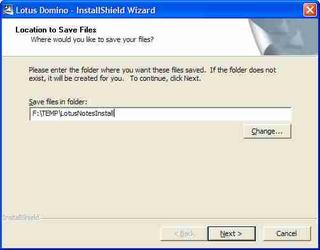
It prompts you for "Location to save files. Where would you like to save your files?". When I first encountered this prompt I thought that it meant the location for the installed product, but it doesn't mean this at all. What it's really asking for is the installer work area location. Only the folder name "TEMP\LotusNotesInstall" gives you an indication of this.
It's a matter of the wording used to get the message across. Technical people often are not good with words! Also, things like this are often overlooked when focus is on the product technical plus sales/marketing documentation and not enough care is taken with installation documentation. Slip-ups like the above really ought to be filtered out during usability testing and quality control stages, shouldn't they? (I know, I know, it's hard work and by most it's not regarded as a glamorous aspect of software delivery -- but it's well worth the effort.)
Here's a superior example (again, click the image to view an enlargement):
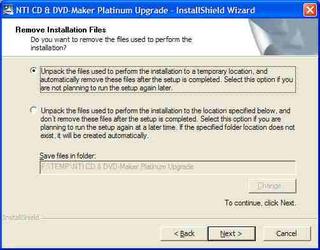
The second example is a model of clarity. No more needs to be said. There's no room for misunderstanding, and compared to the first example you're put in control of the situation.
Do YOU have any similar examples to share, to assist my attempt to influence software vendors? If so, please post them here!
Right after being launched, many installers need to unzip the distributed package into a temporary work area -- a folder on some drive or other -- before they can start on the installation proper. Some installers just forge ahead with a simple "no questions asked" approach, and (provided you have sufficient free disk space available) they usually do their job unobtrusively.
On the other hand, some installers want you to specify the location of the work area, which can be a good thing if the installer needs lots of disk space (some require hundreds of megabytes). Here's a typical dialog (click the image to view an enlargement):
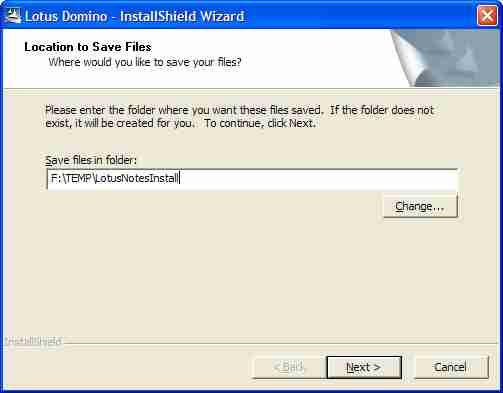
It prompts you for "Location to save files. Where would you like to save your files?". When I first encountered this prompt I thought that it meant the location for the installed product, but it doesn't mean this at all. What it's really asking for is the installer work area location. Only the folder name "TEMP\LotusNotesInstall" gives you an indication of this.
It's a matter of the wording used to get the message across. Technical people often are not good with words! Also, things like this are often overlooked when focus is on the product technical plus sales/marketing documentation and not enough care is taken with installation documentation. Slip-ups like the above really ought to be filtered out during usability testing and quality control stages, shouldn't they? (I know, I know, it's hard work and by most it's not regarded as a glamorous aspect of software delivery -- but it's well worth the effort.)
Here's a superior example (again, click the image to view an enlargement):
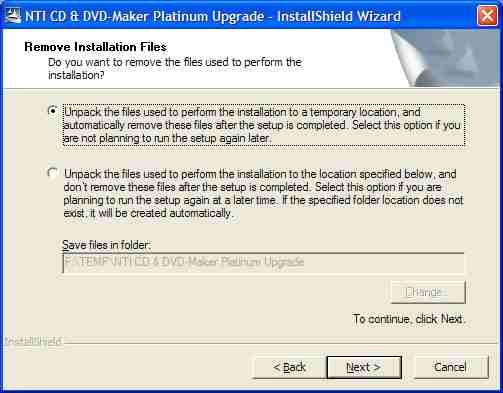
The second example is a model of clarity. No more needs to be said. There's no room for misunderstanding, and compared to the first example you're put in control of the situation.
Do YOU have any similar examples to share, to assist my attempt to influence software vendors? If so, please post them here!
Friday, July 22, 2005
The "Do no harm" principle
In all my IT work over the decades, I have always tried to abide by the maxim "Do no harm". A subtitle of this post could be: "Little things mean a lot."
That is, when a product is enhanced (a new hardware model, a new software version) it must retain ALL of the features and capabilities of the earlier model or version and they should operate the same way as before. No surprises! The new behavior must be identical -- or at least so similar to that of the old model/version -- that the user doesn't notice any significant change in behavior and is not slowed down or inconvenienced.
That is to say, the behavior of the new model/version must be a superset of the earlier behavior.
There's nothing more annoying or disruptive than when the new model/version misses out completely on an old feature or function that you need and depend on, or when some important feature/function no longer can be easily found, or when the feature/function works differently in the new version.
I was brought up (during my years at IBM) on mainframe and midrange operating systems. Generally IBM does an excellent job in ensuring that new products don't cause any grief. Nevertheless IBM makes the occasional slip-up. For example, during the early 1980s a key feature of the IBM System/38 Query Utility that users had come to love and depend on "went missing" in Query Release 3, leading to a whole lot of users being inconvenienced. )To IBM's credit, the feature was reinstated in the next release.)
Jumping forward a couple of decades: a second example is the morphing of Microsoft Windows 2000 (a.k.a. Windows NT 5.0) into Windows XP (a.k.a. Windows NT 5.1). Many useful enhancements came with Win XP, however a number of the old features and functions were invoked differently or worked somewhat differently. Nothing earth shattering, but a fairly significant learning curve was involved in adjusting to the new environment of Win XP. In some cases it seemed that Microsoft had made changes just for the sake of change. Actually, I like Windows XP a lot, and really miss its improvements when occasionally I have had to revert to a client's Windows 2000 system. I won't be at all surprised if a another big dose of transition pain lies ahead of us, when Microsoft delivers its successors: Vista/Longhorn.
(UPDATE as at early February 2006: Microsoft has just released Internet Explorer 7 Beta 2 for public preview. I've been giving IE7 Beta2 quite a workout over the last few days, and while it has some nice new features, its user interface and behaviour are rather different from those of IE6. Some things work differently, some things have just disappeared, and some old features seem to be "broken".)
This leads me to the point of this posting. It's about one product, but similar things could apply to just about any products. As (amongst other things) a software developer myself, I'm just trying to make a point and not be negatively critical: here goes, anyway ...
It relates to Eudora, Qualcomm's very nice e-mail client. It's an example of less-than-satisfactory customer service and support, and you dear reader will surely have had similar experiences or even far worse ones! From my own experiences I know how complex software development can be and how extremely vigilant and consistent you must be at all times. I chose this example not to lambaste Qualcomm in particular but because it's a contemporary example of a company spoiling a product experience by making a new version not work the same way as before.
I started using Eudora in 1993 or thereabouts (Version 3.x), and saw no good reason to change over to Microsoft Outlook when Windows 95 arrived a couple of years later, still to this day seeing no compelling reason to so so. Eudora has some excellent features, fits my work patterns well, and has had numerous functional and usability enhancements over the years.
But for me there has been one major slip-up in Eudora. I was pretty happy with Eudora up to and including Version 6.1.0.6, but my happiness evaporated when in 2004 it was superseded by Version 6.1.2 with one behavioural change that was only a minor one but nevertheless had the effect of causing me continuous pain and anguish, and caused me to be quite discontented with Qualcomm.
Why so? It's because a minor feature that worked unobtrusively up to and including Version 6.1.0.6 was changed and behaves differently in all subsequent versions. There was no way to switch off the new behavior. For my own comfort I decided to revert to (in other words, to stay locked in to) the the old 6.1.0.6 version.
I receive dozens of incoming mail message s daily that are in newsletter format, with each one containing multiple embedded URL links. Up to an including V6.1.0.6 there was a very handy Eudora feature that I came to rely on heavily: you could right-click inside an open mail item and select "Send To Browser" which caused the entire message to be sent directly [without any intervention] to a window in your Web browser, from which it was more convenient to follow those multiple URL links.
But with Eudora Version 6.1.2 (and later), an undocumented and annoying new behavious surfaced: when you right-clicked inside a mail item and selected "Send To Browser" you now got an in-your-face warning:
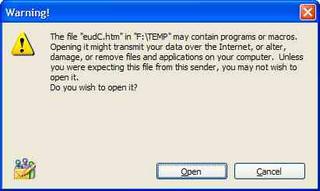
(Click the image to see an enlarged version.)
Stupidly, this dialog could not be switched off. Only by staying back-level (at Version 6.1.0.6 or earlier) could you avoid the major inconvenience of dismissing this alert box by having to click on the "Open" button each and every time.
An exactly parallel situation is properly handled by Firetust's excellent MaiWasher (upon which I depend heavily, to review and get rid if all spam and other unwanted messages before allowing Eudora to read in the remaindert). This is shown by the "Don't show me this warning again" check-box option in the following image:
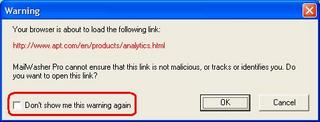
(Click the image to see an enlarged version.)
This could be easily be fixed by Qualcomm. My several attempts over a preiod of months to get them to revoke this unilaterally-changed behavior led nowhere. Like many software vendors unfortunately, Qualcomm has no effective mechanism for issues such as this to get to the attention of the people in their organization who could easily change it. I don't put any blame on their technical support staff, because it's their support structure/mechanism that's at fault (not the support staff, who have not been provided with the the means or opportunity to do any better).
Whenever any of my own customers asks for assistance/support concerning one of my products or services, I sit up and listen! Apart from replying quickly -- same day, if possible -- I strive to relentlessly pursue the matter to resolution, and then to regularly contact them to ensure that no residual issues linger on. Sadly, this does not seem by any measure to be the way that all support is provided. (In too many cases, no suport at all is provided.)
UPDATE (early November, 2005):
I've just tried out the new 7.0.0.10 Beta Version of Eudora, and to my disappointment find that it still has the same problem described above, which means that I'm still oocked into the old version for the moment. HOWEVER, perseverence counts. At last, after a year or so I was put through to the right person at Qualcomm in Eudora technical support. Thank you indeed, Jim Ybarra, for immediately confirming and appreciating my predicament, contacting product development and sending me feedback the very next day! (The issue went away in Eudora version 7.0.0.16 I think it was, and now I'm a happy camper.)
UPDATE (early March, 2006):
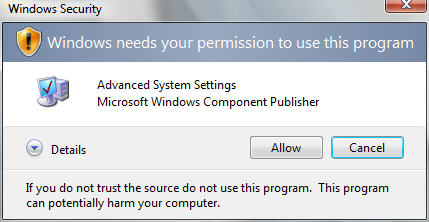
Based on the latest preview (February 2006 CTP, or Beta 2 Release 1) it seems that Microsoft is about to do the same nasty thing to us with WIndows Vista. Reportedly, when you launch a program that it doesn't trust it throws up the security challenge:
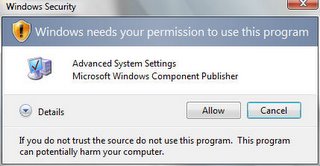
Most unfortunately there's no check box to allow Vista to "learn" that you consider this particular program to be safe and that you're prepared to do away with this challenge when you call up the same item again. If this is how Vista will finally ship, then it's iiintolerable and pathetic!
That is, when a product is enhanced (a new hardware model, a new software version) it must retain ALL of the features and capabilities of the earlier model or version and they should operate the same way as before. No surprises! The new behavior must be identical -- or at least so similar to that of the old model/version -- that the user doesn't notice any significant change in behavior and is not slowed down or inconvenienced.
That is to say, the behavior of the new model/version must be a superset of the earlier behavior.
There's nothing more annoying or disruptive than when the new model/version misses out completely on an old feature or function that you need and depend on, or when some important feature/function no longer can be easily found, or when the feature/function works differently in the new version.
I was brought up (during my years at IBM) on mainframe and midrange operating systems. Generally IBM does an excellent job in ensuring that new products don't cause any grief. Nevertheless IBM makes the occasional slip-up. For example, during the early 1980s a key feature of the IBM System/38 Query Utility that users had come to love and depend on "went missing" in Query Release 3, leading to a whole lot of users being inconvenienced. )To IBM's credit, the feature was reinstated in the next release.)
Jumping forward a couple of decades: a second example is the morphing of Microsoft Windows 2000 (a.k.a. Windows NT 5.0) into Windows XP (a.k.a. Windows NT 5.1). Many useful enhancements came with Win XP, however a number of the old features and functions were invoked differently or worked somewhat differently. Nothing earth shattering, but a fairly significant learning curve was involved in adjusting to the new environment of Win XP. In some cases it seemed that Microsoft had made changes just for the sake of change. Actually, I like Windows XP a lot, and really miss its improvements when occasionally I have had to revert to a client's Windows 2000 system. I won't be at all surprised if a another big dose of transition pain lies ahead of us, when Microsoft delivers its successors: Vista/Longhorn.
(UPDATE as at early February 2006: Microsoft has just released Internet Explorer 7 Beta 2 for public preview. I've been giving IE7 Beta2 quite a workout over the last few days, and while it has some nice new features, its user interface and behaviour are rather different from those of IE6. Some things work differently, some things have just disappeared, and some old features seem to be "broken".)
This leads me to the point of this posting. It's about one product, but similar things could apply to just about any products. As (amongst other things) a software developer myself, I'm just trying to make a point and not be negatively critical: here goes, anyway ...
It relates to Eudora, Qualcomm's very nice e-mail client. It's an example of less-than-satisfactory customer service and support, and you dear reader will surely have had similar experiences or even far worse ones! From my own experiences I know how complex software development can be and how extremely vigilant and consistent you must be at all times. I chose this example not to lambaste Qualcomm in particular but because it's a contemporary example of a company spoiling a product experience by making a new version not work the same way as before.
I started using Eudora in 1993 or thereabouts (Version 3.x), and saw no good reason to change over to Microsoft Outlook when Windows 95 arrived a couple of years later, still to this day seeing no compelling reason to so so. Eudora has some excellent features, fits my work patterns well, and has had numerous functional and usability enhancements over the years.
But for me there has been one major slip-up in Eudora. I was pretty happy with Eudora up to and including Version 6.1.0.6, but my happiness evaporated when in 2004 it was superseded by Version 6.1.2 with one behavioural change that was only a minor one but nevertheless had the effect of causing me continuous pain and anguish, and caused me to be quite discontented with Qualcomm.
Why so? It's because a minor feature that worked unobtrusively up to and including Version 6.1.0.6 was changed and behaves differently in all subsequent versions. There was no way to switch off the new behavior. For my own comfort I decided to revert to (in other words, to stay locked in to) the the old 6.1.0.6 version.
I receive dozens of incoming mail message s daily that are in newsletter format, with each one containing multiple embedded URL links. Up to an including V6.1.0.6 there was a very handy Eudora feature that I came to rely on heavily: you could right-click inside an open mail item and select "Send To Browser" which caused the entire message to be sent directly [without any intervention] to a window in your Web browser, from which it was more convenient to follow those multiple URL links.
But with Eudora Version 6.1.2 (and later), an undocumented and annoying new behavious surfaced: when you right-clicked inside a mail item and selected "Send To Browser" you now got an in-your-face warning:

(Click the image to see an enlarged version.)
Stupidly, this dialog could not be switched off. Only by staying back-level (at Version 6.1.0.6 or earlier) could you avoid the major inconvenience of dismissing this alert box by having to click on the "Open" button each and every time.
An exactly parallel situation is properly handled by Firetust's excellent MaiWasher (upon which I depend heavily, to review and get rid if all spam and other unwanted messages before allowing Eudora to read in the remaindert). This is shown by the "Don't show me this warning again" check-box option in the following image:

(Click the image to see an enlarged version.)
This could be easily be fixed by Qualcomm. My several attempts over a preiod of months to get them to revoke this unilaterally-changed behavior led nowhere. Like many software vendors unfortunately, Qualcomm has no effective mechanism for issues such as this to get to the attention of the people in their organization who could easily change it. I don't put any blame on their technical support staff, because it's their support structure/mechanism that's at fault (not the support staff, who have not been provided with the the means or opportunity to do any better).
Whenever any of my own customers asks for assistance/support concerning one of my products or services, I sit up and listen! Apart from replying quickly -- same day, if possible -- I strive to relentlessly pursue the matter to resolution, and then to regularly contact them to ensure that no residual issues linger on. Sadly, this does not seem by any measure to be the way that all support is provided. (In too many cases, no suport at all is provided.)
UPDATE (early November, 2005):
I've just tried out the new 7.0.0.10 Beta Version of Eudora, and to my disappointment find that it still has the same problem described above, which means that I'm still oocked into the old version for the moment. HOWEVER, perseverence counts. At last, after a year or so I was put through to the right person at Qualcomm in Eudora technical support. Thank you indeed, Jim Ybarra, for immediately confirming and appreciating my predicament, contacting product development and sending me feedback the very next day! (The issue went away in Eudora version 7.0.0.16 I think it was, and now I'm a happy camper.)
UPDATE (early March, 2006):
Based on the latest preview (February 2006 CTP, or Beta 2 Release 1) it seems that Microsoft is about to do the same nasty thing to us with WIndows Vista. Reportedly, when you launch a program that it doesn't trust it throws up the security challenge:
Thursday, July 21, 2005
Distracted by multitasking interrupts
Here are a few home truths >>>
Driven to distraction by technology - "The typical office worker is interrupted every three minutes by a phone call, e-mail, instant message or other distraction. The problem is that it takes about eight uninterrupted minutes for our brains to get into a really creative state. ... humans just aren't that good at doing many things at once. ... there are only certain types of tasks that humans are good at doing simultaneously. Cooking and talking on the phone go together fine, as does walking and chewing gum (for most people). But try and do three math problems at once, and you are sure to have a problem. ... The paradox of modern life is that multitasking is, in most cases, counterproductive."
More or less complemented by body language expert Allan Pease's and his wife Barbara's observations in their popular and entertaining book: Why Men Don't Listen & Women Can't Read Maps
Driven to distraction by technology - "The typical office worker is interrupted every three minutes by a phone call, e-mail, instant message or other distraction. The problem is that it takes about eight uninterrupted minutes for our brains to get into a really creative state. ... humans just aren't that good at doing many things at once. ... there are only certain types of tasks that humans are good at doing simultaneously. Cooking and talking on the phone go together fine, as does walking and chewing gum (for most people). But try and do three math problems at once, and you are sure to have a problem. ... The paradox of modern life is that multitasking is, in most cases, counterproductive."
More or less complemented by body language expert Allan Pease's and his wife Barbara's observations in their popular and entertaining book: Why Men Don't Listen & Women Can't Read Maps
Subscribe to:
Posts (Atom)