Tuesday, January 21, 2014

What you think is right may actually be wrong – Inferring versus rationalising

Over at The Conversation there’s a thought-provoking new article (16 January 2014) about the process of thinking:

What you think is right may actually be wrong – here’s why

We like to think that we reach conclusions by reviewing facts, weighing evidence and analysing arguments. But this is not how humans usually operate, particularly when decisions are important or need to be made quickly.

And:

We tend to prefer conclusions that fit our existing world-view, and that don’t require us to change a pleasant and familiar narrative. We are also more inclined to accept these conclusions, intuitively leaping to them when they are presented, and to offer resistance to conclusions that require us to change or seriously examine existing beliefs.

Go read the full article.

Wednesday, January 01, 2014

A ship-shipping ship, shipping ships


Here’s one for New Year’s Day:

The title of the page at MajorGeeks was “Oh ship! A ship-shipping ship, shipping shipping ships.”

But -- compared with my blog title above (q.v.) -- I can’t quite follow why they wrote (after the comma) “shipping shipping ships” … Is the ship-shipping ship at bottom shipping some shipping-ships which in turn are themselves shipping ships?

Oh ship! It’s all too much  for me, after  last night’s celebrations. Perhaps somebody would explain the subtleties to me.

Tuesday, December 31, 2013

99 Facts on The Future of Business - a MUST read for 2014 and beyond

Well, it’s the final day of the 2013 calendar year and a good time to consider what you should do for 2014 (and beyond).

I’d recommend that you mosey on over to SlideShare and look at 99 Facts on The Future of Business assembled from a wide range of sources by SAP:

Business Innovation is the key ingredient for growth in the future of business. Changes in technology, new customer expectations, a re-defined contract between employees and employers, strained resources, and business and social networks are requiring businesses to become insight-driven businesses.

In this presentation, we have gathered 99 facts that represent the changes taking place in the world today. Each facts represents a key insight and suggests where we need to focus and change to become viable, sustainable and growing future businesses.

Some of the slides present mind-boggling facts and statistics that should be relevant to planning for any organization, big or small (and not just businesses either), and even for us as individuals.

A few of the 99 factoids, taken at random:

  • 90% of all internet traffic in 2017 will be video (petabyte upon petabyte)
  • Data being stored is doubling every 18 months
  • Asian students account for 53% of all students studying abroad worldwide
  • 70% of buying experiences are based on how the customer feels he or she is being treated
  • Tablet growth is more rapid than smartphone growth (3 time iPhone growth)
  • Small and Midsized Businesses (SMB) account for over 99% of all businesses in developed economies and 40-70% of value added in the economy (but are the least likely to sell online)

image

Friday, December 27, 2013

What could free software mean to a programmer?


From geek-and-poke.com … See other geeky cartoons there!

For more holiday season reading for programmers, take a look at this lengthy article at stackoverflow

What is the best comment in source code you have ever encountered?

Wednesday, December 18, 2013

How to stop Windows task bar (system tray) icon tooltips being obscured

When parts of Microsoft Windows start behaving oddly or even completely stop operating it can be painful in the extreme trying to find a fix or a workaround.

Why not get support from Microsoft, you ask? Well, yes and no. Microsoft’s support website site is vast, and it’s a hit-and-miss affair to find any solution for your problem.

Success often lies with the vast user base of Windows -- in the hundreds of millions if not billions. If you’re persistent enough, sometimes more by chance more than anything else you’ll sooner or later find a forum or blog or a team of Windows specialists out there to help define and solve problem. In the early days of Windows this rarely happened, but these days it’s a lot more likely that you’ll hit the jackpot somewhere in the large community of Windows users..

The problem I’m discussing in this post occurred on some but not all of my Windows 7 systems, and happens on my Windows 8.0 desktop system yet not on Asus Slate touchscreen system (which also runs Windows 8.0).

Here’s the symptom: when I hover the mouse over an icon in the “system tray” -- more properly called the “notification area” -- the tooltips do not pop up on top, they are  partially (in some cases completely) obscured by the task bar. This equally applies to the pop-up panel that displays the so-called inactive icons.

I probably have quite a few more inactive icons than most people because I have tons of applications installed. Screenshot 1 shows the inactive icons panel being invoked on my desktop PC:

system_tray_tooltips_obscured_by_the_Windows_task_bar_01

Once the above panel has opened, I found when I moved the mouse pointer to any one of the hidden (inactive) icons that each tooltip (pop-up help text) was always either partially or totally obscured by the panel (screenshot 2):
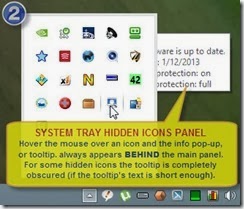
system_tray_tooltips_obscured_by_the_Windows_task_bar_02

This has usually led me to move the mouse around the panel and hover it over different inactive icons, sometimes with the icon’s tooltip completely obscured, until by trial and error I came to the icon that I wanted to invoke at that time.

As I mentioned earlier in this post on some of my Windows systems this does not occur, so it’s pertinent to ask what causes this to happen and what can be done to get rid of the annoyance.

To cut a long story short, after several hours of research spread over some days (because it took me a while to determine some potential solutions and test them all).

The only success I had was in using one of the freeware utilities from Nir Sofer’s  bountiful website.

The tool of choice to download for fixing this problem is NirCmd which is a command-line utility having virtually a million-and-one divergent uses. The 32-bit and 64-bit NirCmd downloads are near the bottom of that page, as is the following link to the NirCmd Full Help File.

In my case, after extracting the command from its zip container I moved it into the C:\UTILS folder (adjust the example below to match your own choice of folder).

There’s a big pile of text in the NirCmd help file. The command variant that we’ll be using is settopmost to set the topmost state of a Windows form such as the task bar or the inactive task bar icons panel. (See here and here and here for some background about  the topmost state for a form.)

Since it is inconvenient to repetitively run NirCmd from a command-line [via a DOS command prompt window[, I decided to create a BAT file (in the UTILS folder, which is in my system PATH environment variable) called TooltipsFixer.bat which contained the following:

@echo Tooltips should no longer be obscured by the Task Bar ...
C:\UTILS\nircmd.exe win settopmost class "tooltips_class32" 1

Then I created a shortcut to the TooltipsFixer.bat file and placed it in a convenient place for repetitive use.

That’s because the problem keeps cropping up, therefore I need to run this BAT file most times that I access the inactive icons panel. One of the other solutions launches a Windows service that runs in the background and does away with the need to repeatedly correct the problem, which would be nice, but it didn’t work for me.

Now I merely double-click on this shortcut to rectify the problem and force the tooltips to display in front of the task bar, and in front of the inactive icons panel.

Problem solved. I’m still rather peeved that this issue cropped up in the first place, and wonder why it affects some systems yet not others (anybody know why?).

Google’s Blogger/BlogSpot commenting can “go cactus” on you

Today I kept failing to add a comment to one of my very own blog posts at Google’s BlogSpot (blogger.com). It had “gone cactus” on me, to use an Aussie term.

It was for the first time in a while, and hadn’t ever had this problem before. I was properly logged in with my Google account, typed a response, but whenever I clicked on the Submit button nothing appeared to happen, repeatedly.

RESOLUTION:
After messing around for some time managed to get it working again by editing my Blogger profile and changing one of the commenting options:

Blogger__change_comments_from_Embedded_to_Full_page

The comments had been set to be “Embedded” which shouldn’t have been problematic but apparently was. I tried the up window” setting, but to no avail.

However when I altered the Comment Location setting to “Full page” the issue was resolved (I was again able to add comments to posts),

I’m using Firefox 25.0.1 browser running on 64-bit Windows 8.0 if that’s relevant (probably isn’t).

What caused all this is beyond me, but it worked and that’s all that I’m interested in. And perhaps the same Comment Location setting change will work for other BlogSpot users too.

Tuesday, November 19, 2013

I was going to delay writing this, but here it is anyway …


What’s the difference between ignorance and apathy?
   ANSWER: I don’t know, and I don’t care!

It’s been one of those days for me, when random thoughts come flooding in for no apparent reason.

Well, perhaps it’s all been triggered by my reading the following article:
  Putting it off: some ideas about why we procrastinate

Go read it yourself – if you can be bothered. Else put it off until mañana.

And as we know from the famous Peggy Lee song of 1948, mañana is soon enough

Thursday, October 24, 2013

Trigger fingers kill people (guns don’t)

Of course, that’s just as absurd a statement as many others that are spouted out in the gun control debate.

Do guns become animate and start firing by themselves? Perhaps sensor-controlled ones would, but fortunately there aren’t many of those around, certainly not in movie theatres and schools, thank goodness. It’s what’s on the other end of the trigger finger that’s responsible, surely?

The above was prompted by reading Data suggest guns do in fact kill people in the online version of The Economist. This article concludes:

“It's really not terribly shocking that making it harder to get your hands on machines designed to kill people results in fewer people being killed. But we've worked very hard over the past few decades to convince ourselves otherwise.”

Go read the article and ponder the arguments for and against gun control.

Friday, October 11, 2013

A way to repair Windows Firewall, and Windows connectivity problems resuming from Sleep mode

During the last few days a Windows connectivity problem reared its ugly head. I used to get this from time to time with Windows 7, and now am suffering from it under Windows 8.

Every time that I resume from Sleep mode (which is several times per day) the wired Ethernet adapter would not reconnect and remained permanently offline in “Unidentified network” state, lasting for some minutes at least (I didn’t wait any longer, it should come online in 10 to 20 seconds at most).

While researching the above problem, thanks to trusty old Google search I stumbled  upon what seems to be a solution for a related painful problem that I described some months ago at Windows 8 will not save Network Discovery settings.

In summary, Windows Firewall went awry earlier this year, stopping LAN connections between this system and other Windows systems in my local area network. Since then, I’ve had to keep Windows Firewall turned off, and have experimented with several other firewalls which themselves caused a few problems: firstly being very intrusive (or “noisy”), plus making some other software quite difficult to keep running properly.

Consequently for the last few weeks I’ve been running without a software firewall and being alert for intrusions (as well as some benefit from the Cable modem’s built-in hardware firewall).

My discovery today -- while doing a Google search for Windows 8 repair “Windows Firewall” (this time with searchword “repair” that I hadn’t used on previous occasions) – was an interesting-looking repair tool called reimage that claims to give excellent results. I installed and ran it, and after a couple of minutes of scanning it presented the following results (the final part of the scan results only):

image

When I clicked on the “START REPAIR” button it opened a browser window inviting me to subscribe:

image

Being tight for funds at the moment (undergoing some treatment for melanoma, too many decades in the strong Australian sunshine I suppose), I declined payment.

So I went looking for a similar but hopefully FREE repair tool and luckily found one, which I used with good results and so would recommend to you. It’s available from Tweaking.com who describe themselves as “a group of tech heads with system performance on their brains.”

See the overview of their software and specifically (for this discussion) go to Repair Windows Firewall . . .
This will repair the Windows Firewall. The firewall is built into the system rather deep. And when the firewall becomes corrupt it can still block out side connections from coming in. Even when turned off. Also when corrupt you are unable to add any exceptions to the firewall.
Built into Windows “rather deep” is an understatement! As you will see from my earlier post the underpinnings of Windows Firewall are totally obscure. Microsoft themselves don’t provide any readily-accessible documentation for understanding how it’s all supposed to work, and how to systematically go about fixing things when it all goes wrong.

Anyway, even though it’s only described as being “for Windows XP, 2003, Vista, 2008 & 7” I installed and ran Repair Windows Firewall under windows 8. A little over a minute later I got the final screen:
image

But did it really fix my Network Discovery problem, could I browse other Windows systems on the LAN and could they browse this Windows 8 system?

Some quick testing proved that the answer was Yes, Yes, Yes.

Look again at the second-last last screenshot at Windows 8 will not save Network Discovery settings . . .

[image%255B60%255D.png]
Thankfully now, after running Repair Windows Firewall, I see:
image

Many, many, many, many, many thanks to Tweaking.com for this Network Discovery firewall-related problem resolution, and I’ll certainly be trying out some of your other repair tools.

If you decide to try this Repair Windows Firewall tool, of course  it goes without saying (does it not) that you should take an appropriate backup first so that you can recover if Windows somehow gets messed up.

And life goes on for me . . . Now I only have to worry about the recent issue of Ethernet connectivity failure after resuming from Sleep mode.