I have no attribution for this, but I surprised myself by tearing through it like greased lightning. At warp speed, in fact, which you would expect from a warped mind like mine!

Mens sana in corpore sano, indeed.
I have no attribution for this, but I surprised myself by tearing through it like greased lightning. At warp speed, in fact, which you would expect from a warped mind like mine!
Mens sana in corpore sano, indeed.
I have today installed the recently-released Windows 8 Release Preview.
As I did with the earlier Consumer Preview version, I installed it as a virtual machine running under Oracle VM VirtualBox Manager (which as you may know came to Oracle as part of the Sun Microsystems acquisition, but started off before that a German product).
Here’s the Windows 8 Release Preview, running in desktop mode, as I would only want it to be on my main work and development system:
I might look pretty, but so far I’ve found it VERY, VERY awkward to use via mouse and keyboard, compared with Windows 7 (and all previous Windows releases that I’ve used, back to Windows 3.0).
Keep in mind that I’ve been using all sorts of computer systems since joining IBM in 1970 (and even for a few years before that), so I cannot in any way be considered a mere beginner.
I certainly do understand that Microsoft is trying its very darnedest to move its cash cow user base along into the touchscreen/tablet world. That makes a lot of sense for a sizeable proportion of the emerging market. If I had a tablet PC, I assuredly would like the “metro” mode that Windows 8 embraces.
But, frankly, as a “power user” (intense technical user) I find the “metro” mode to be extremely annoying and timewasting.
The icons occupy far too much screen real estate, the constant swiping is highly frustrating (especially when using mouse to mimic finger movement), and what was a single click under Windows 7 (and its predecessors) now usually will take several clumsy actions under Windows 8. Multiply all those extra swipe/click actions by the hundreds of times per day that I carry them out, and it results in a major loss in productivity for me – and, I’m pretty confident to postulate, for a big slab of potential Windows 8 users.
As shown in earlier Blogger posts of mine, such as this one and this one, I happen to use four 1600x1200 monitors arranged in an inverted T fashion (enabling me to open windows as wide as 4800 pixels or as tall as 2400 pixels), often with numerous windows open on the various monitors:
![ND851_with_ND703_under_Win7_XP_Mode_at_top_thumb%5B1%5D[1]](https://blogger.googleusercontent.com/img/b/R29vZ2xl/AVvXsEjT6Jj4sfULpPQQDS9tAVHpU3L2u6XzKz6X4fL46ooRMVV0znatFNVIT5xQfXa3T-rovgw6_ZpoENbxpelg-bJ4x9eMZuEiNUHoAImcaSq7jM-yIGoHgQ7VahPx4FyAjyfHXyal/?imgmax=800 "ND851_with_ND703_under_Win7_XP_Mode_at_top_thumb%5B1%5D[1]") | 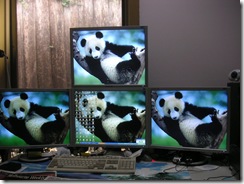 |
Now, I understand that (compared with the earlier Consumer Preview version) the Windows 8 Release Preview apparently supports multiple monitors, but since VirtualBox only emulates a single monitor [as far as I know] couldn’t test this.
The support of multiple monitors has been outstanding since at least Windows XP, so I wouldn’t expect any less for Windows 8. I wonder whether the experience would work for multiple touchscreens running in “metro” mode (has anyone tried it?).
What I wanted near the very start of Windows 8 installation was a single radio button or checkbox option to have installed Windows 8 in a pure desktop mode, identical (or as closely as possible) to the way that Windows 7 and earlier version get installed, with all the old Windows 7 style features supported in as close as possible to the same way.
Why impose a far from trivial re-learning effort on users of previous Windows versions by foisting the “metro” way of doing things upon them when they’re still using non-touchscreen PCs? … Let them enjoy the new mode when they get their first touchscreen device.
So far, I’ve spent 3 or 4 hours fiddling with Windows 8 options that have only got me a small way along the path of making Windows 8 desktop look, feel and act like Windows 7 desktop. It’s been an extremely frustrating experience, and I suspect that it’s bound to fail not much further along the path. This is NOT good news for all of those confirmed Windows desktop mode users out there!
Microsoft made the move from Windows 200 to Windows XP not too difficult, with only a few things rearranged and/or hidden away in different spots. The move to Windows Vista was a bit more dramatic, but not unmanageable, Windows 7 was IMHO easier than Vista.
Based on my limited trials, but a good “gut feel” after decades in the industry, I reckon that moving to Windows 8 is going to be a real nightmare for users upgrading from earlier Windows versions.
However I surmise that the Windows 8 experience will be quite pleasant and rewarding for all those users – possibly a very large proportion – who get Windows 8 preinstalled on a tablet device. And this is where Microsoft is making a big gamble, I suppose. Time will tell.
What would a reactionary old codger like me know, anyway? … Then again, perhaps I’m not so technologically unaware as this other old-timer (it starts with a few sentences in German, no need for a translation, you will guess the meaning):
There’s great debate, fear and trepidation in the Australian population about the economic and lifestyle impacts of the Carbon Tax due to come into effect down here in July 2012. See this search or this other search for some articles about it.
But all things are relative, and it won’t be too long before the tax will need to be repealed, perhaps in 250 million years or so!
To quote from the fascinating article The end of Earth, the end of us, and the end of the universe
It is a rare person indeed who thinks of 50 or 100 years in the future — but what about 1,000 years? Or a million years? Or a billion years? …
… Between 250 million and 800 million years from now, Earth will slowly become inhabitable [sic, surely meant to be uninhabitable], due to the Sun’s increasing luminosity (the old girl hasn’t reached her peak yet!) As temperatures rise, weathering increases, and the amount of carbon dioxide drops to a point where plants can no longer photosynthesize. 1 billion years from now, the Sun’s luminosity will have increased by 10%, resulting in an average Earth surface temperature of 47 degrees Celsius (117F). At this point, the oceans will evaporate into space, and shortly after, almost all remaining lifeforms will die.
So there you are, in a blind panic Down Under we’ve introduced yet one more piece of ultimately useless legislation that will need to be repealed a bit later on, a microscopically tiny way further along than today on the scale of our Sun’s life cycle:
Oh, aren’t politicians everywhere so impetuous and short-sighted. (wink)
You just can’t get reliable staff these days, apparently, or at least good spellers.
Apparently a Russian-born assistant at a florist in Springvale (a suburb of Melbourne, Australia, not too far from where I live) earlier this month made some “grave” spelling mistakes when writing out a floral wreath card:
If the card had been inscribed “Rust in peas” perhaps I would give it a pass mark, since what happens to us after burial is a process somewhat akin to rusting!

Following a query in another post, I’ve received an official answer from Nuance Communications about using Dragon NaturallySpeaking with IBM Lotus Notes.
See Working with Dragon NaturallySpeaking in IBM Lotus Notes either here or here
The article Ghosts in the machine at the Australian website Fairfax Digital contains much food for thought.
“What happens when you die? In cyberspace not much” it starts off with, “unless you make the appropriate arrangements.”
Many people don’t make out a will and so die intestate, with lots of negative ramifications. But even if you have a will, it’s fairly likely that it doesn’t take account of your digital assets.
When you depart from this earthly vale of tears, what can and should be done with all your passwords, files, web domains, and other things that exist on your computers and other electronic devices as well as all over the place in the World WIDE Web.
I encourage you to read the article and think hard about what you should do about these assets of yours, if they have any significant meaning and value to you and your dear ones.
Professor David Suzuki has some wise words for us all, watch and listen to his Test Tube story as he shares a common scientific observation.
TIP: enter just a single word when prompted in the opening screen.
By pure coincidence, the other day two websites came to my attention. Both are concerned with music but in markedly different and, to me -- by their very juxtaposition in my stream of awareness – rather amusing ways.

In stark contrast, there’s Love God’s Way Ministries who say they “specialize in Christian topics other so-called Churches do not want to deal with. Recently, we’ve started work on the Homosexual problem. We believe they can be fixed and we have created a means of fixing them.”
Being an old square I happen to listen almost exclusively to orchestral (“classical”) music, jazz, the Big Bands, and other mainly instrumental music.
So I have only the slightest experience of most of today's “popular” music, the supposedly-dangerous Gay Bands that they list:
“One of the most dangerous ways Homosexuality invades family life is through popular music. Parents, please keep careful watch over your children’s listening habits. … We Strongly recommend that you burn the CDs” they say.
Nor do I have more than the slightest experience listening to the Safe Bands that they have cataloged.
Perhaps you’d be interested in reviewing their two lists, the devilish versus heavenly bands, giving your opinions and explaining it all to an out-of-touch old timer?


