Saturday, November 04, 2006

A slash with some "dash"

Another tip for improving Web performance. It might only have a marginal or imperceptible effect, but as they say Every little counts.

I've been doing this for years and couldn't for the life of me remember why until I recently came across the explanation in this Internet Explorer blog article.

When entering hyperlinks -- in a browser's address bar, or when editing hyperlinks in a web page -- you should always put a trailing backslash if possible (where it is allowable).

The example given in the article is:

For instance, navigating to http://msdn.microsoft.com/ie takes one more roundtrip than http://msdn.microsoft.com/ie/ When the browser navigates to the /ie url, the server merely sends down a 301 to the /ie/ url. Both links work, but the second version is faster.
So when you omit the trailing slash the server has a bit more work to do, there's a bit more network traffic, and you have to wait a bit longer (perhaps only a tiny bit, but it all counts). All in all, this means some amount of increased overhead.

Didja know that?

Increasing your Internet Explorer concurrent connections - and optimizing Page Load time

Here's a time-saving tip that will work to some peoples' advantage ...

Once upon a time, Internet connections used to be ever so slow, via slow dial-up or leased telephone lines: in the 1970s and 1980s 8 Kbps (kilobits per second) to 14.4 Kbps, later 28.8 Kbps or 34 Kbps. And in the late 1980s to mid-to-late 1970s -- with modem compression -- even up to a "blazingly fast" 64 Kbps (this was a nominal rate, but in practice it usually averaged around 40 to 50 Kbps).

In those days, when Internet Explorer came out [with Windows 95] it seems that Microsoft decided to strictly follow the standard for HTTP V1.1 (as laid out in RFC2616) and restricted an IE session to a maximum of two connections with any one server.

The effect of this wasn't too noticeable with those old, slow line speeds. Web browsing and file transfers were generally held back by the line speed rather than the connection limit.

But these days, with far faster broadband speeds, the effects of this connection limit are much more noticeable: once you have two downloads running, the next (third) one is suspended until one of the two active downloads finishes.

There's a tip at Microsoft for increasing the connection limit (to, say, 10 concurrent connections), but only use it if you're comfortable with editing the Windows registry. Refer to Microsoft support article 183110 ... WinInet limits connections per server

The article warns:

By changing these settings, you cause WinInet to go against the HTTP protocol specification recommendation. You should only do this if absolutely necessary and then you should avoid doing standard Web browsing while these settings are in effect.

However since I made the change several months ago I haven't noticed any detrimental effects -- but your mileage might vary! I can now run quite a few more than two downloads at once, which interleave nicely with each other thus reducing the overall elapsed file transfer time.

You will find other articles discussing this topic by doing a Web search such as: http://www.google.com.au/search?hl=en&q=Internet+Explorer+concurrent+connections&btnG=Google+Search&meta=


UPDATE, 14 November 2006:
I just came across the following article by Aaron Hopkins: Optimizing Page Load Time which mentions the above (about the number of connections) but covers a much broader field, aimed at web developers. It starts off:

"It is widely accepted that fast-loading pages improve the user experience. In recent years, many sites have started using AJAX techniques to reduce latency. Rather than round-trip through the server retrieving a completely new page with every click, often the browser can either alter the layout of the page instantly or fetch a small amount of HTML, XML, or javascript from the server and alter the existing page. In either case, this significantly decreases the amount of time between a user click and the browser finishing rendering the new content.

While working on optimizing page load times for a high-profile AJAX application, I had a chance to investigate how much I could reduce latency due to external objects. Specifically, I looked into how the HTTP client implementation in common browsers and characteristics of common Internet connections affect page load time for pages with many small objects."
Aaron then gives quite a few tips, and finishes off with:
While the tips above are intended to improve your page load times, a side benefit of many of them is a reduction in server bandwidth and CPU needed for the average page view. Reducing your costs while improving your user experience seems it should be worth spending some time on.

Tuesday, October 31, 2006

Recommending ... Paint.NET

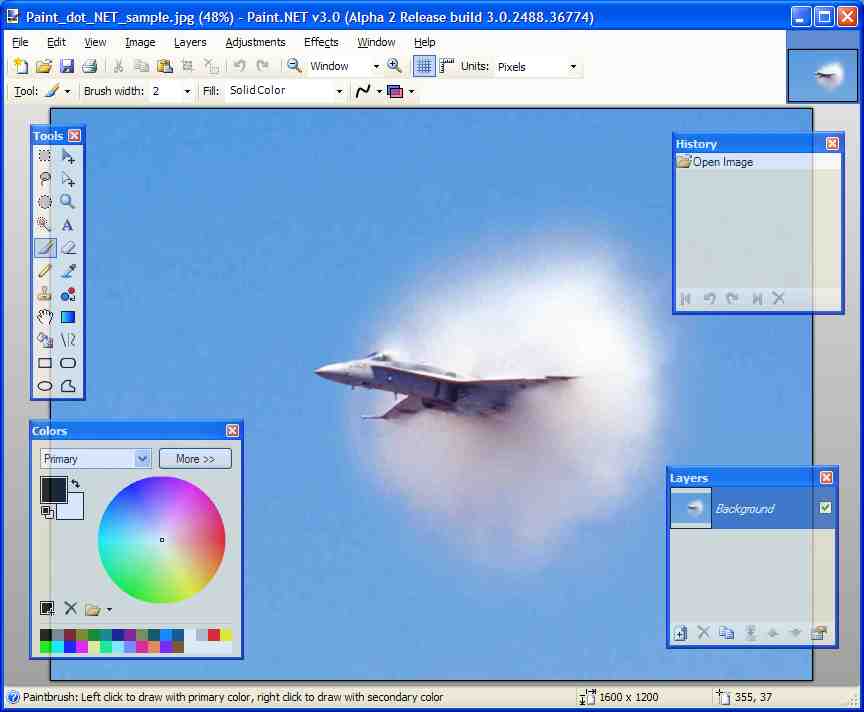
Just in case you haven't come across it before, and are in need of a very competent graphics package for the Windows environment, I thought that I'd mention Paint.NET which is a free download (a donation of US 5.00 or more is welcomed). Considering the wide range of features, Paint.NET is a bargain to say the least!

Click to view an enlarged image, in a new window.

You could easily use Paint.NET instead of the likes of Corel Paint Shop Pro (which I have purchased) and Adobe Paintshop (which I haven't).

All the same, basic as it is I still find myself regularly using Windows Paint for those "quick and dirty" little jobs, and hope that there's an equivalent lightweight graphics program in Windows Vista -- can anybody tell me about this?

Monday, October 23, 2006

Tips for installing multiple Lotus Notes Client releases on a single system

Bill Buchan has a handy tip on configuring multiple Lotus Notes clients to run on a single workstation, which prompted me to add my own tips on this topic.

This is goodness for those of us (developers, consultants, ISVs, administrators, Help Desk staff, testers, etc) who need to support multiple customers/users running IBM Lotus Notes/Domino at different release levels.

I've been using a similar set-up for many years too. It seems to work quite well, without the considerable overheads and slowdowns that ensue if you choose to install them using a virtualization approach (say, using VMware or Microsoft Virtual PC).

In the following, I'm assuming that "Notes" -- by which I meant the Lotus Notes client, the Lotus Domino Designer, and the Domino Administrator client, rather than the Domino Server -- are being used in a Microsoft Windows environment. This will be the majority (and will probably remain so for quite a few years).

There's a caveat that Bill didn't mention: if you're working on an application that relies upon Windows OLE/COM (say, to interact with and update fields in a Microsoft Word or Excel document) then you can only expect the most-recently-installed version of Notes to behave properly. This is because each successive Notes installation will make changes to the dreaded Windows Registry, such that the only reliable access to the OLE/COM classes will be via the most recent Notes installation.

The versions of Notes that I currently have installed on my main development machine are R5.0.11 and R6.5.4 and (as of a few weeks ago) R7.0.2. (I've only recently decided that it's fairly safe not to bother with actively supporting Notes R4, otherwise I'd have installed R4.6.4 as the very first one. I know of a few places still on R5. Surely there aren't any still on R4?)

I was careful to install them in increasing release number sequence: 5.0.11 followed by 6.5.4 with 7.0.2 being the final install. Naturally, they're all installed in their respective separate Notes and Domino directories.

TIP:
My main reason for writing this article is that there's a check done early in the R6 installation process -- related, I think, to the "multi-user install" option that first appeared with R6.0 -- which can prevent you from installing such consecutive releases on a single system. (Note that, as per Bill's tip, they're all going into separate directories.)

For related background info, including the multi-user support (against a single Notes release) and "roaming user" capabilities, see the following IBM support articles: Unable to Upgrade 4.x or 5.x Single-user Install to a 6 and Is a Multi-user Installation of Notes/Domino 6.x Needed as well as Where is the option for a Multi-user Install of the Notes Client? and also Error: 'You are attempting to upgrade a multi-user installation' when upgrading to a single-user install. There's also the IBM Redbook Upgrading to Lotus Notes and Domino 6 -- download the PDF (or the online HTML edition) and examine Chapter 16.1.2 Multi-user workstations in particular.

Now, you might have arrived at this particular blog posting after doing a search for "Notes and multiple" or something like that. So just to make it crystal clear, I'm not here intending to discuss the ability for multiple users to share the same Notes release on a single workstation, but for a single user (such as a developer, administrator or tester) to run different releases of Notes on the same workstation.


This check didn't happen in the days before R6 came out. And because of the addition of this check, it seems that to accomplish your objective (running multiple releases of Notes on the same workstation) you have to now fiddle with settings in the Windows registry -- some people would call it the Windows "resistry" -- to allow R7 to be installed on top of R6.

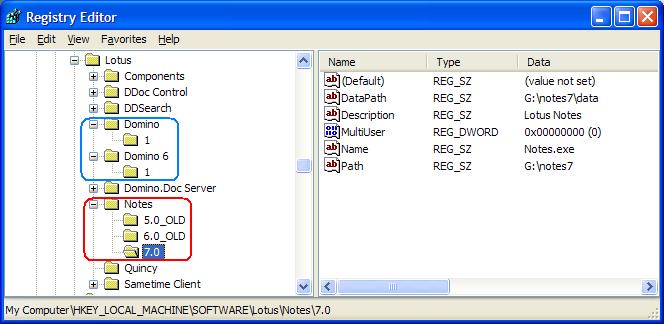
The way that I did it after a little trial and error is shown inside the red-colored rectangle in the accompanying illustration. (The blue colored rectangle happens to indicate that multiple versions of the Domino Server are also installed on the same machine.)


(Click to view a larger image in a new page)
In order to enable R7 to install after R6, I had to experiment for a while, eventually going to the \HKEY_LOCAL_MACHINE\SOFTWARE\Lotus\Notes section of the registry and renaming the folder labelled "6.0" to anything different (I chose the name "6.0_OLD"), after which R7 installed without any further complaints.

After all that, Notes Client and Domino Designer R6.5.4 seems still to work okay. Any comments/suggestions?

UPDATE - 08 January 2007:
I have installed multiple releases once again, on a new desktop system, and this time took the opportunity to document the above procedure more carefully, so you should refer to the following more recent post:
Steps for installing multiple Notes/Domino releases on a single system


AN ASIDE:
If like me you're the only user of Notes on your system, you can try editing the MultiUser doubleword entry, setting it to zero in order to eliminate some minor issues/complications related to this feature.

UPDATE 1:
There's another article on this topic, over at the Lotus Notes FAQ website: Can you keep multiple versions of Notes on the same system? (Note: this older article describes work done with Notes R4 and R5, and the author mentions at the end "I have not had the opportunity yet to try out this procedure involving ND6.")

UPDATE 2:
Here's a tip for installing multiple Notes releases using Citrix AIE (Application Isolation Environment) ... Lotus notes installation in Application Isolation mode

UPDATE 3:
Wolcott Group's Configuration Manager for Lotus Notes may help in this too. "Easily manage the contents of multiple Lotus Notes configuration files on a single system" they say. "Developers typically install multiple versions of the Lotus Notes client on their computer systems so they can develop and test applications on multiple clients. There are often times where a developer will want to review the configuration of the different versions or even compare individual parameters between versions. For developers, CM is most useful when you need to verify (view or set) parameters that were modified by an application or process being tested. Administrators and help desk personnel need to be able to view the differences between a configuration that works properly vs. one that does not." (I've never seen their CM in action, so can't vouch for it one way or the other.)

Wednesday, October 18, 2006

Web 2.0 approaches

In a few earlier posts about Web 2.0 I've shown some skepticism, or you might even call it even cynicism.

You might recall my very own hyperbolic concept of Web Pi -- where Pi represents the ratio of a circle's circumference to its diameter, which (being transcendental) is a number which you can never quite reach!

In a well-balanced article, Web 2.0 and New Approaches to Software, Peter Varhols comments:
"Web 2.0 is about more than the technology and coding. ... You have to integrate technology with community and business innovations in order to have a valid Web 2.0 application concept. Without the community and business innovation, you might have a useful application, but you almost certainly lack an application that dramatically changes your business. ... That is the key to Web 2.0. Not the technology, which is by itself not particularly innovative. The innovation is how that technology is applied to problems in business and society. In other words, it is not enough to write a Web application that uses Ajax, REST design, and scripting languages; it is about using these technologies in pursuit of innovation."

By my reckoning, Peter's article nicely positions Web 2.0 and then finishes off with:
"To paraphrase former Supreme Court Justice Potter Stewart, who wrote that he couldn't describe pornography but knew it when he saw it, it may not be possible to fully describe Web 2.0, but you will know it when you see it."

Tuesday, October 17, 2006

Programmer -- or Developer?

Ever been puzzled about the difference between a "programmer" and a "developer" and/or been accused of being one or the other? Is there any justification in distinguishing between these two handles?

Not too sure?

Then scoot across to Hacknot for a clarifying article (published 09 October 2006) called Developers are from Mars, Programmers are from Venus

Sunday, October 15, 2006

asiapac.com.au Browser Share - as at October 2006

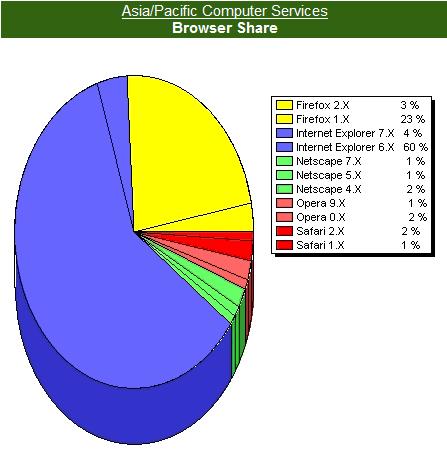
Every few months I've been reporting on the browser share for visits to asiapac.com.au (also including its mirror/backup site notestracker.com).

Here's the report for 13 October 2006. Keep in mind that the various browser shares fluctuate a bit from day to day, but this snapshot is quite representative ...

(Click to view an enlarged image, on a new page)

With the official release of Microsoft's "Windows Internet Explorer 7" (a.k.a. IE7) due within the next week or two, it will be quite interesting to see if this changes the continuing loss of share -- mostly to Firefox -- that IE has been showing for the last year or so.

Wednesday, October 04, 2006

A perspective on Lotus Notes views

IBM's inimitable Alan Lepofsky has recently posted two articles that will help users of IBM Lotus Notes better understand the behavior of views and folders:

Both of these have a tendency to trip up new Notes users.

Alan's expostions are a model of clarity, as is everything else in his highly-recommmended weblog.

Thursday, September 21, 2006

Puttin' Putin in Perspective

INSEAD -- who unselfconsciously dub themselves "The Business School for the World" -- release some very interesting publications across a diverse range of topics that I find quite fascinating.

Quite a few of their publications are available for for free viewing and download, including one of the latest:

Vladimir Putin - Evaluating the 'CEO of Russia Inc.' ... Is it sensible to evaluate the leader of a former superpower using many of the same the same criteria one might use for a leading CEO? Manfred Kets de Vries, the Raoul de Vitry d'Avaucourt Clinical Professor in Leadership Development, and Affiliate Professor of Entrepreneurship Stanislav Shekshnia certainly think so. Vladmir Putin, "CEO of Russia Inc.," is in the last of the three-phase "life cycle" described by the authors. But what might all that mean for his country and the world?

It's rather a good read, even for a geek like me. From now on, I'll be looking at leaders in all sorts of organizations and pondering how far they've progressed in their "three phases" and how long they've got left!

I encourage you to read this report. To further whet your appetite, here's the first paragraph of the Introduction:
In studying leaders in the business world—our particular area of expertise—we have foundthat many CEOs, on attaining the position of top leadership, go through a three-stage “lifecycle”: a distinct period of entry, a period of consolidation, and a period of decline. The period of entry is typically characterized by a high degree of uncertainty as the fledgling leaders struggle to understand what their new position entails, deal with the legacy of their predecessors, and search for business themes that will take the organization forward. Once their power is consolidated, the environment in which they operate is understood, and the key themes are identified, the new CEOs concentrate on pursuing these themes to make their mark on the organization. In most instances, it is during this period of consolidation that they reach their highest performance and build a solid foundation for the organization’s future. In the final stage, the period of decline, CEOs begin to lose their interest in doing new things (though they typically retain their interest in preserving their power base!), often becoming myopic, complacent, and stuck in their ways. They may even engage in paranoid thinking, fearful (frequently with good reason) that others are trying to get rid of them. Leaders in this end stage can become real threats to companies they have led successfully for many years. A dramatic example is the first Henry Ford, who rejected all proposed changes to the famous Ford Model T for 20 years, in spite of changing consumer tastes and a shrinking market share. Ken Olsen, the former CEO of Digital Equipment Company (a firm that no longer exists), was likewise out of touch with market reality, a failing that contributed to the decline and fall of his organization.
And then a bit later on:
Putin does not seem to be functioning well in his leadership role—but why? Given his many positive qualities and the favorable timing of his ascendancy, why has he failed to fully fulfill the relatively simple expectations of his shareholders? The answer is simple: he has not done what effective CEOs do.
So, do go read the article: Vladimir Putin - Evaluating the 'CEO of Russia Inc.' ...

The mysterious and pervasive "Rule Number 10"

Jason Mawdsley has written nicely about Coding Conventions: Make Them Agile ... These are simple rules to let your team deliver high-quality code as efficiently as possible.

Jason's agile coding convention is as follows:
  1. Make your code look like other people's code.
  2. Use the simplest design possible.
  3. Don't re-invent the wheel.
  4. Document your code.
  5. Keep security in mind.
  6. Work in increments.
  7. Work in iterations.
  8. Have your code reviewed.
  9. Don't stay blocked.
  10. (You'll have to read the article to find out)